
Windows Insiders who are testing Microsoft’s Windows 11 — which has been announced but not yet available for consumers — are getting an update that brings a new experience to Microsoft Teams. With the update, Microsoft is focused on transforming Teams from an enterprise tool into an accessible experience where all PC owners can stay connected with loved ones through chat and video calls. Part of this transformation includes a new fly-out Chat experience from the taskbar and an overall redesign of the Teams desktop experience that makes it feel more like a natural extension of the Windows 11 operating system, the company said.
With the new chat experience on Teams, Microsoft announced that you can now start a chat from the Chat icon in the taskbar, which can also be accessed via keyboard shortcuts. If you’d rather not hover over the icon, you can alternatively use the Win + C shortcut, Microsoft said. From the fly-out window, you can view recent chats or group conversations, and you can also reply or start a new chat.
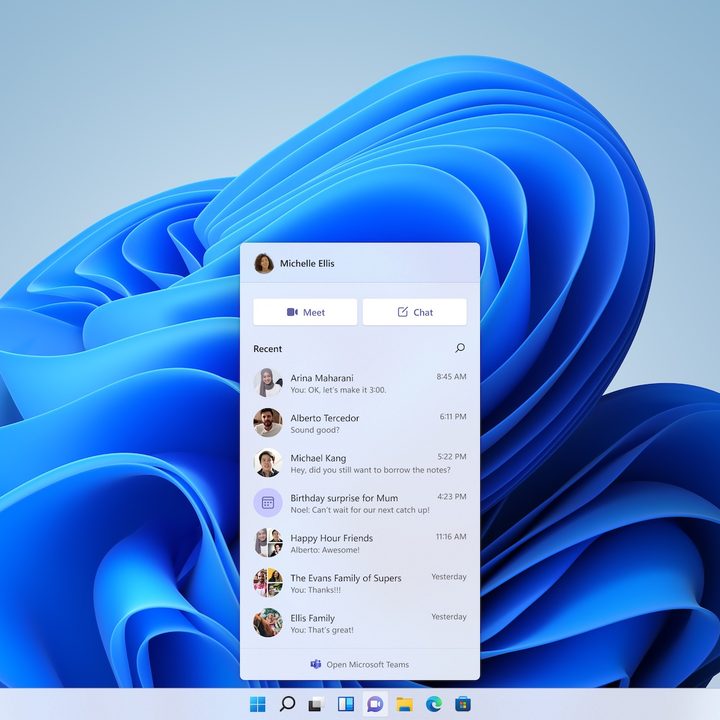
Microsoft had initially showcased the new chat experience for Teams when it publicly announced the new changes to Windows 11. However, the new feature wasn’t immediately ready when the Insider program rolled out. Microsoft said that it will use a staged rollout for the new Teams experience, so it will take some time before all the features are available to you.
“In this first stage, you’ll be able to sign in, add contacts, and connect via individual and group chats,” Microsoft said of its strategy. “Over the coming weeks, we will enable audio and video calling, meetings, screen sharing, and other capabilities.”
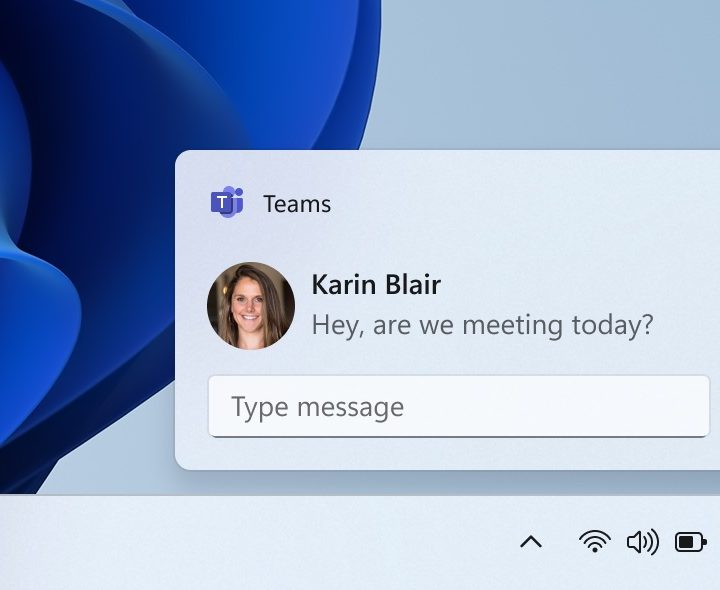
And to make multitasking easier, the new Teams preview also allows Insiders to reply to chat notifications directly in-line. Teams notification will also respect Windows 11’s focus assist settings, Microsoft said.
For general PC users who may not have used Teams as part of their workflow in the past, Microsoft is making it easy to connect with family and friends, especially if you’ve used Skype or Outlook in the past.
“If you’ve used Skype or Outlook for personal communications with your Microsoft Account in the past, you’ll have the option to sync those contacts to start using them from day one,” the company said in a detailed blog post outlining all the changes to Teams on Windows 11. “You can also sync contacts from your mobile device by installing the Teams mobile app and turning on contact sync, further saving you time.”
And if you’ve never used a Microsoft account to message or communicate in the past, you can simply enter your contact’s email or phone number into the Teams app, and they’ll receive a message with an invitation to join Teams.
The new Teams experience is available now to Windows 11 Insiders to test. The operating system should be available to consumers later this year. Microsoft previously gave a rough timeline of a launch by the holiday season. If you’re interested in the new Teams experience and don’t mind testing out a non-stable release of Windows 11 right now, be sure to check out our guide on how to sign up for the Windows Insiders program.
Microsoft isn’t the only one working on revamping its communication tools. Rival Apple recently announced big updates to FaceTime and iMessage on the Monterey MacOS. One big change is that non-Apple users will finally be able to join FaceTime video chat calls. Formally known as MacOS 12, Apple’s next operating system is due this fall. Google is also working on replacing its legacy Hangouts platform for enterprise Workspace users with Google Chat.


