
New World is Amazon’s first foray into the world of video game publishing — and it made a splash when its beta began melting graphics cards. That’s not a problem anymore, thankfully, but that also doesn’t mean it’ll run smoothly across every PC hardware setup.
After testing the game at launch, we have put together a New World PC performance guide to help you get the best out of your system while playing the game. We’re going to cover the optimal settings to increase your frame rate, how the game runs across graphics cards and resolutions, and some of the unique options buried in the settings menu.
As is the case with other MMOs, your performance in New World is subject to your internet speed. Your connection won’t change anything about your frame rate, but it could make the game feel like it’s performing worse than it is.
The best settings for New World
Unfortunately, there isn’t a lot of room for optimization in New World. There are four presets available, and we’d recommend sticking with them. The individual settings don’t offer a lot of extra performance on their own, so you can’t optimize New World like you can Control or Cyberpunk 2077.
After testing each setting individually, we found three that make most difference: Effects Details, Terrain Details, and Texture Details. Most of the other settings offered about a 3% increase in frame rate, while some offered no performance benefit at all.
We built out a list of optimized settings based off the Medium preset, balancing visual fidelity with performance:
- Effects Details — Medium
- Lighting Details — High
- Object Details — Medium
- Post-Processing — High
- Shadows Details — High
- Terrain Details — High
- Texture Details — Medium
- Water Details — Medium
There was virtually no difference between the settings above and the Medium preset. At most, we found a difference of only 3%, and that was only with the RTX 2060 Super at 1440p. Otherwise, our optimized settings were either within a frame of the Medium preset or identical.
In a game like New World, you shouldn’t take our settings list as law. Consider it a starting or reference point. As mentioned, Effects Detail, Terrain Details, and Texture Details impact performance the most. We decided to keep Terrain Details set to High, though. You’re going to look at the ground a lot in New World, and there’s a noticeable difference in visual quality between Medium and High.
Outside of settings, there are three main things that affect performance in New World: Resolution, the number of players on screen, and dense foliage. If you’re running into frame rate issues, we recommend bumping down to a lower resolution before adjusting settings manually. New World has a lot of resolution options, too, so that shouldn’t be a problem.
Otherwise, stick with the presets and adjust your settings from there. New World’s frame rate really changes when you bump down all of the settings at once, but you can gain a little extra performance by tweaking individual settings.
New World performance
We took New World out for a spin with a few of the best graphics cards to give you an idea about how it performs. We chose the RTX 3090 for 4K, the RTX 2060 Super for 1440p, and the RX 580 for 1080p, and all three cards hit the mark like they should. All of the cards were paired with an Intel Core i9-10900K and 32GB of RAM.
Before diving into our results, let’s look at the minimum and recommend system requirements:
Minimum
- CPU: Intel Core i5-2400 / AMD quad-core GPU at 3GHz
- RAM: 8GB
- Graphics: Nvidia GTX 670 2GB / AMD R9 280
- Storage: 50GB
Recommended
- CPU: Intel Core i7-2600K / AMD Ryzen 5 1400
- RAM: 16GB
- Graphics: Nvidia GTX 970 / AMD R9 390X
- Storage: 50GB
New World doesn’t call for powerful hardware. As we’ll see, though, the game can absolutely take advantage of it. If you’re diving into the game based on the minimum requirements, you’ll need to bump down your settings a lot and likely move to a resolution lower than 1080p.
| 1080p Very High | 1080p Optimized | 1440p Very High | 1440p Optimized | 4K Very High | 4K Optimized | |
| RTX 3090 | 168 fps | 174 fps | 135 fps | 149 fps | 85 fps | 111 fps |
| RTX 2060 Super | 98 fps | 136 fps | 65 fps | 90 fps | 32 fps | 45 fps |
| RX 580 | 57 fps | 75 fps | 38 fps | 51 fps | 19 fps | 26 fps |
As you can see from our results, the largest performance difference comes in resolution. It’s hard to get consistent results from an MMO like New World since the number of players on screen plays a significant role in frame rate. Still, we can see a consistent trend with the lower-end cards. Both the RX 580 and RTX 2060 Super improved by around 50% moving from 4K to 1440p.
If you were hoping to play New World at 4K, you’ll need a hefty rig. The RTX 3090 can do it, but not by as much as its price would suggest. For 4K above 60 frames per second (fps), you’ll need an RTX 3070 or RTX 3070 Ti.
Fortunately, 1440p is a lot more forgiving. Last-gen’s RTX 2060 Super still performed above 60 fps with all of the sliders turned up, and even higher with our optimized settings. On the AMD side, you can expect similar performance out of the RX 5700 XT or RX 6600 XT.
Although the RX 580 got close to 60 fps at 1080p Very High, it still fell short. The GTX 1060 — which is the most popular graphics card according to Steam’s most recent hardware survey — is slightly better, so you can expect 60 fps at 1080p on Very High with that card. Optimizing the settings a bit can gain you back some performance, too.
The system requirements don’t tell the full story. If you based your rig on the minimum requirements, you’ll need to use the Low preset and likely bump down the resolution below 1080p. It seems the recommended system requirements are targeting 1080p with the Very High preset, though you might need to lower some settings to hit 60 fps.
Nameplates and dynamic resolution scaling
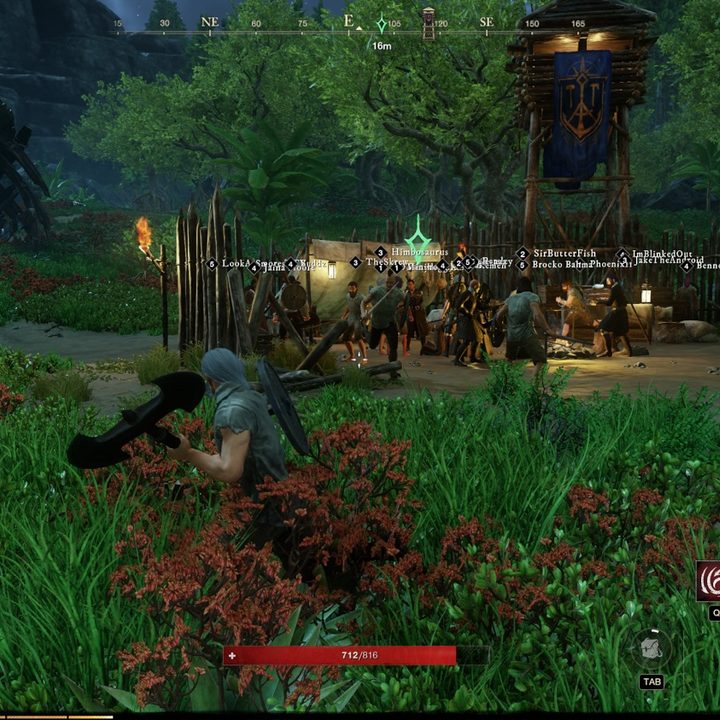
Outside of the main settings, there are two unique options in New World. You can change the number of nameplates — the names above characters — that show up on screen at once, and the game includes dynamic resolution scaling. Despite a warning that nameplates can severely affect frame rates, we didn’t note much of a difference with either setting.
We ran around the first hub you visit — which was crowded with a bunch of players — to test the nameplate setting. The results were identical between minimum (two) and maximum (100) number of nameplates. The bigger impact on performance was the number of players. Running this test, we found lower overall frame rates compared to our tests above.
That’s not to say that the nameplate setting is all hot air. It’s hard to find 100 people to stay on screen at once. We recommend sticking with the default setting of 15 nameplates on screen. Going down doesn’t change anything, and there isn’t a big reason to go up.
Dynamic resolution scaling was interesting. We tested each card at 4K on Very High to see how it would handle the upscaling. It seems the algorithm isn’t that aggressive, as the RTX 2060 Super and RX 580 showed almost no difference with the setting on. The RTX 3090, on the other hand, showed nearly an 18% improvement.
Basically, you should turn on dynamic resolution scaling after you have your settings and resolution dialed in. It can help, but the dynamic resolution won’t save your frame rate in the way something like Nvidia Deep Learning Super Sampling (DLSS) will. Unfortunately, DLSS isn’t in New World, at least not at launch.


