
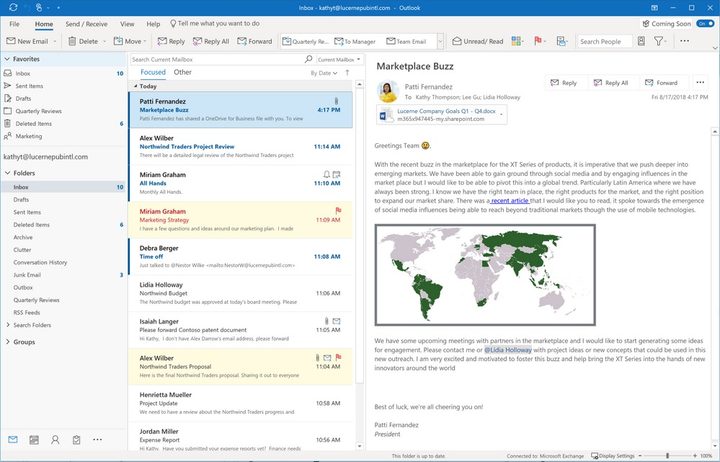
Outlook for Windows will soon be getting a makeover with a Simplified Ribbon interface that will help with emails and scheduling, and users who are registered testers of the Office Insider program will be among the first to see the user interface, or UI, changes this month with the Coming Soon feature pane. Based on user feedback, Microsoft will incorporate these changes to Monthly Channel customers in the future, but unfortunately, the updated UI won’t be available for Office 2019 for Windows.
“Over the last two years we’ve been talking, concepting, and co-creating with customers and are now ready to introduce an exciting number of updates that simplify the user experience, while keeping with the familiarity of Outlook,” Microsoft said in a blog post detailing the new changes. “These updates are aimed at making it easier for you to get things done and focus on what matters with a customizable experience that keeps you in control.”
At the center of this update is a Simplified Ribbon, which Microsoft describes as both customizable and adaptable. Instead of the three-row ribbon that we see today, the new ribbon occupies just a single row of buttons that can be personalized to fit your needs and workflow, and the interface is based on a similar Fluent Design overhaul that Microsoft announced for other Office products earlier this summer. Users can pin and customize the buttons that show up on the Simplified Ribbon. The new ribbon will also scale to fit different window sizes, and you’ll also be able to switch back to the old UI or expand the buttons if you need to.
For corporate users who rely on Outlook to manage their work email, Microsoft also made changes to both the message list and reading pane to help you get to the important stuff. “For example, names are bolded and flagged messages stand out with a yellow background,” Microsoft said. “And with a little more padding and text treatment to create a clearer visual hierarchy, scanning your inbox is easier, and focusing on important messages is easier than ever.”
Email subjects are now more prominently displayed in the reading pane, and response actions are now context sensitive. If you’re dealing with an email, for example, you’ll see the Reply button, but if Outlook for Windows detects a calendar invitation, it will display the Accept button instead. Group folders will also be more accessible with this update.
If you’re composing a more detailed email response, you can reply in a pop-out window, which comes with a simplified ribbon with tools for formatting your message.
Outlook also gains contextual awareness when scheduling meetings, making it easier and smarter to add required and optional attendees, and to find available meeting rooms. By choosing the meeting time first, Outlook will then search for available conference rooms based on the meeting’s time parameters.
To make these new changes more accessible, Microsoft is also introducing a Coming Soon panel, which details all the changes coming on the horizon and allows users to experience new features prior to a broader release. Depending on your IT policy, Coming Soon may be disabled.


