

This was a turbulent year in the world of Windows laptops. The introduction of Qualcomm’s Snapdragon X chips completely changed the game — and I don’t say that lightly.
They entered the market in such a forceful way that both AMD and Intel were forced to respond quickly with their own more power-efficient chips that could compete. Intel’s Core Ultra Series 2, otherwise known as Lunar Lake, attempted to beat Qualcomm at its own game, boasting a dramatic improvement in battery life.
But now that the dust has settled a bit, which chip results in the best laptops you can buy right now? I’ve tested a number of systems using both chips, and I finally feel like I can see where the chips are falling.
Performance
The Qualcomm Snapdragon X comes in two variations, the Snapdragon X Elite and the Snapdragon X Plus. As you can see in the chart below, they vary widely in terms of their core counts, speeds, and integrated Adreno graphics performance. Qualcomm doesn’t advertise their TDP (thermal design power), but evidence points to their running at between 15 watts and 80 watts.
The primary concern with the Qualcomm chipsets is that Windows on Arm requires applications to be written natively for the platform to see the best performance. While the current version of Windows on Arm has a very good emulation engine compared to past versions, and it’s much more compatible with a variety of applications, there can still be a penalty if an important app won’t run at all or at full speed.

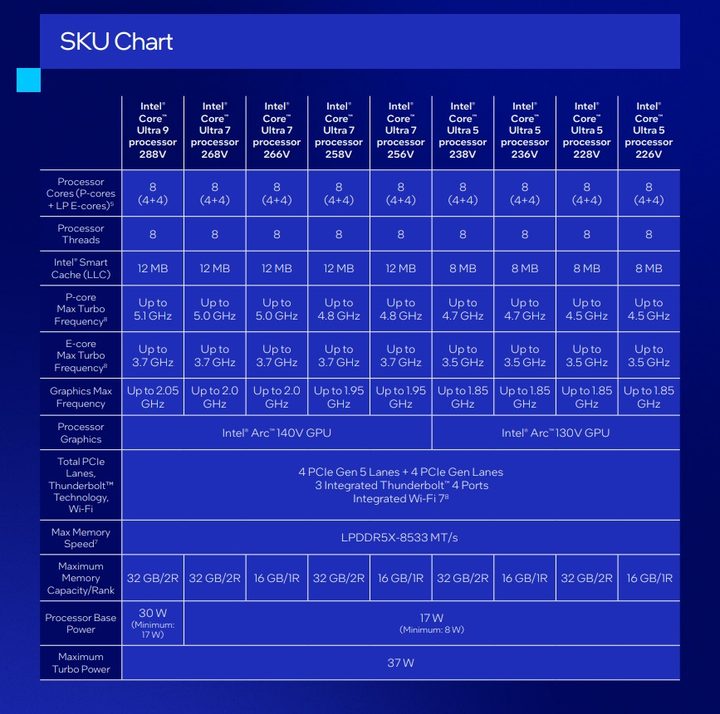
Intel’s Core Ultra Series 2, or Lunar Lake, also has various iterations that are more consistent in their overall design. They all have eight cores with the same number of performance and efficiency versions. Most are 17-watt parts, while the Core Ultra 9 288V is a 30-watt part.
We haven’t yet reviewed a laptop with the Core Ultra 9, so we can’t directly attest to its performance. Lunar Lake is an x86 chipset and so uses the same version of Windows as past Intel and AMD chips. There’s no concern about compatibility and no performance concerns around emulation.
Looking at our benchmark results, we see that Snapdragon X is a lot faster than Core Ultra Series 2 in CPU-intensive tasks. There’s some variability, but that’s generally true. It’s not as fast, though, in GPU-intensive tasks. Intel’s Core Ultra Series 2 chips have the best integrated graphics we’ve ever seen in a Windows laptop, so we have to give credit where credit is due. Meanwhile, Qualcomm’s Adreno graphics are in last place among the options, behind AMD and Apple as well.
None of the laptops with these chips provide a viable gaming platform for AAA gaming, nor does either chip provide a truly significant performance benefit for creative applications. For that, you’ll want a discrete GPU, and as of now, that category of laptops don’t exist for either platform. You’ll have to jump to AMD’s latest chips or go back to Intel’s previous generstion if you want something more powerful.
it’s also important to note that Apple’s M3 chipset that runs in similar thin-and-light laptops splits the difference in CPU tasks while enjoying faster graphics.
But looking at my testing results so far, it’s clear that Qualcomm has an upper hand against Intel, both in single-core and multi-core performance — and for these types of laptops, that’s what matters most.
| Cinebench R24 (single/multi) |
Geekbench 6 (single/multi) |
3DMark Wild Life Extreme |
|
| Acer Swift Go 14 AI (Snapdragon X Plus / Adreno) |
107 / 716 | 2413 / 11388 | 3231 |
| HP OmniBook X (Snapdragon X Elite / Adreno) |
101 / 749 | 2377 / 13490 | 6165 |
| Dell Inspiron 14 Plus 7441 (Snapdragon X Plus / Adreno) |
108 / 419 | 2451 / 8744 | 6457 |
| Dell XPS 13 9345 (Snapdragon X Elite / Adreno) |
121 / 921 | 2805 / 14511 | 6397 |
| Acer Swift 14 AI (Core Ultra 7 258V / Intel Arc 140V) |
121 / 525 | 2755 / 11138 | 5294 |
| HP OmniBook Ultra Flip 14 (Core Ultra 7 258V / Intel Arc 140V) |
116 / 598 | 2483 / 10725 | 7573 |
| Lenovo Yoga Slim 7i Aura Edition (Core Ultra 7 258V / Intel Arc 140V) |
109 / 630 | 2485 / 10569 | 5217 |
| Asus Zenbook S 14 (Core Ultra 7 258V / Intel Arc 140V) |
112 / 452 | 2738 / 10734 | 7514 |
| MacBook Air (M3) |
141 / 601 | 3102 / 12078 | 8098 |
Battery life
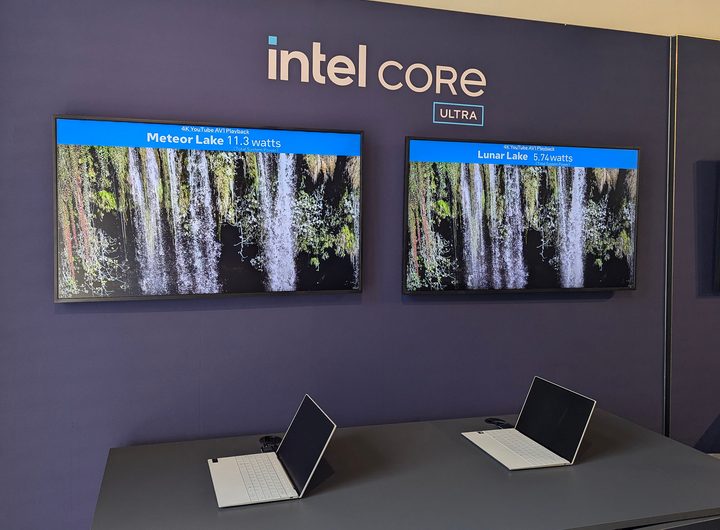
So, how do they perform in terms of battery life? After all, both chipsets are intended to make more Windows laptops better equipped to compete with Apple MacBooks, which have been significantly longer-lasting.
It’s a challenge to compare battery life across each platform because we’ve reviewed laptops with different display technologies and resolutions. The longest-lasting machines have been those with FHD+ (1920 x 1200) IPS displays, while those with 2.8K (2880 x 1800) OLED displays have done the worst. The Acer Swift 14 AI, for example, used Intel Lunar Lake combined with a 14.0-inch FHD+ IPS display and is one of the best performers, while the Acer Swift Go 14 used a Snapdragon X Plus along with a 14.5-inch QHD+ (2560 x 1600) IPS display and it also did very well. The HP OmniBook Ultra Flip 14 combined Lunar Lake with a 2.8K OLED display and wasn’t as impressive.
Generally speaking, it’s safest to say that Intel’s new chipset is likeliest to give the best performance the more the CPU is being pushed. That shows up best in our Cinebench R24 test that runs the chipsets at maximum performance. Here, Intel does better than Qualcomm. When looking at all three scores, the Apple MacBook Air M3 remains a strong option, and it’s likely that the M4 version arriving early in 2025 will provide even stronger scores.
The bottom line is that both the Snapdragon X and Core Ultra Series 2 represent important advances for the Windows platform. Unlike in the past, you can easily select a Windows laptop that will give you all-day and maybe even multiday battery life. That’s huge.
| Web browsing | Video | Cinebench R24 | |
| Acer Swift Go 14 AI (Snapdragon X Plus) |
15 hours, 29 minutes | 21 hours, 38 minutes | 1 hour, 42 minutes |
| HP Omnibook X (Snapdragon X Elite) |
13 hours, 37 minutes | 22 hours, 4 minutes | 1 hour, 52 minutes |
| Dell Inspiron 14 Plus 7441 (Snapdragon Plus) |
10 hours, 9 minutes | 19 hours, 28 minutes | 2 hours, 25 minutes |
| Dell XPS 13 9345 (Snapdragon X Elite) |
12 hours, 29 minutes | 22 hours, 9 minutes | 1 hour, 37 minutes |
| Acer Swift 14 AI (Core Ultra 7 258V) |
17 hours, 22 minutes | 24 hours, 10 minutes | 2 hours, 7 minutes |
| HP OmniBook Ultra Flip 14 (Core Ultra 7 258V) |
11 hours, 5 minutes | 15 hours, 46 minutes | 2 hours, 14 minutes |
| Lenovo Yoga Slim 7i Aura Edition (Core Ultra 7 258V) |
14 hours, 16 minutes | 17 hours, 31 minutes | 2 hours, 15 minutes |
| Asus Zenbook S 14 (Core Ultra 7 258V) |
16 hours, 47 minutes | 18 hours, 35 minutes | 3 hours, 33 minutes |
| Apple MacBook Air (Apple M3) |
19 hours, 38 minutes | 19 hours, 39 minutes | 3 hours, 27 minutes |
Both last a long time, but Qualcomm maintains performance
If you go exclusively by efficiency, then both platforms are easy enough to recommend. Intel’s Core Ultra Series 2 is more efficient overall because it maintains efficiency when working harder. But both equip Windows laptops that are so much longe- lasting.
However, Qualcomm’s Snapdragon X is considerably faster. If you’re a demanding productivity user, it’s a stronger choice. You’ll still want a discrete GPU if gaming or video editing is your primary usage, and we haven’t yet reviewed either platform with a discrete GPU. That’s going to take longer with Qualcomm. But for thin-and-light laptops for productivity, the Snapdragon X provides the better combination of speed and battery life right now.
Perhaps the strongest point in favor of Qualcomm, though, is pricing. Yes, it’s been out a bit longer, but as of now, you can pick up Snapdragon X laptops for significantly less than any options for Intel’s latest chipset.


