

Variable Rate Shading, or VRS, is a major piece of graphics tech that PC games have largely ignored for the past three years. It works on all modern AMD and Nvidia graphics cards, and it has a simple goal: Improve performance by as much as 20% without any perceivable drop in image quality.
Sounds amazing, right? Well, there’s a reason you probably haven’t heard much about it. The last couple of years have focused on Nvidia’s Deep Learning Super Sampling (DLSS) and AMD’s FidelityFX Super Resolution (FSR) as the performance-saving champions of the modern graphics era. And although they offer the best bang for the game developer’s buck, VRS is an equally impressive tool that’s been woefully underused.
Variable Rate Shading: Not new
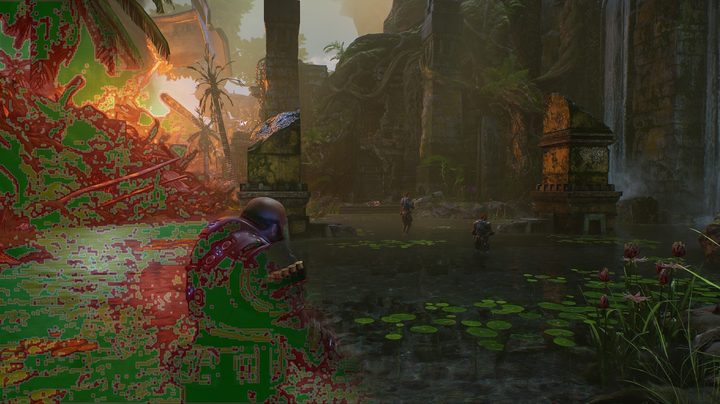
VRS isn’t new — Microsoft’s blog post announcing the feature in DirectX 12 is over three years old. If you’re not familiar, VRS changes the resolution at which shaders are applied within a scene. It’s not changing the resolution of the game; VRS simply allows neighboring pixels to share a shader rather than having the GPU do redundant work.
If there’s a corner of a scene wrapped in shadow without a lot of detail, for example, your graphics card doesn’t need to calculate the light, color, and texture values for each pixel. It can save some hassle by grouping them together — four pixels in a 2×2 grid may have extremely similar shading values, so VRS kicks in to optimize performance by only calculating one shader and applying it to the rest of the grid. The size of the grid is the shading rate, and more pixels in a grid means a lower shading rate.
That small change can make a big difference in performance. In Gears Tactics at 4K, for example, VRS offered a 22.9% increase in my average frame rate. That’s the best example, but Resident Evil Village also showed a 9.8% increase in my average frame rate, while Hitman 3 offered a solid 8% boost. And the idea behind VRS is that it should be indistinguishable when it’s turned on, essentially offering free performance.

There are only a small number of games that support VRS on PC, despite it being more than three years old. I’ll address that issue later in the column, but the more pressing issue is how VRS is used among the few games that support it.
There are two buckets for VRS: One that makes it look like a revolutionary piece of kit that offers free performance, and another that makes it look like a feature that hurts more than it helps.
Two worlds of VRS
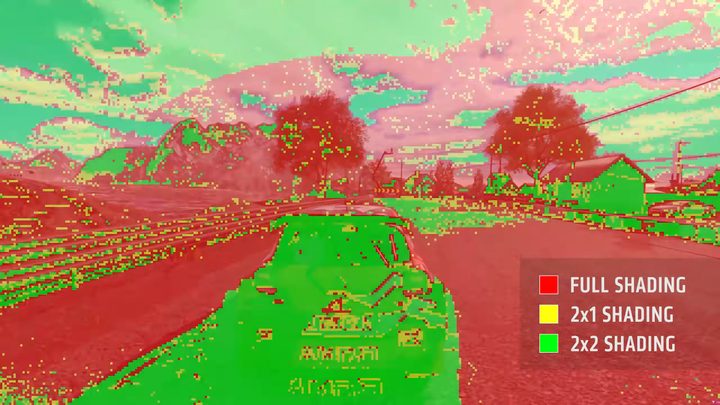
Microsoft has two tiers of VRS in DirectX 12 Ultimate: The aptly-named Tier 1 and Tier 2. Tier 1 VRS is the most common technique you’ll find in games, which is the heart of the problem. This level doesn’t concern itself with individual pixels, and it instead applies different shading rates to each draw call. When there’s a call to draw background assets, for example, they may have a 2×2 shading rate, while assets drawn in the foreground have a shading rate of 1×1.
Tier 2 VRS is what you want. This is far more granular, allowing the developer to shade within a draw call. That means one part of a model can have a shading rate of 2×2, for example, while a more detailed area on that same model could use 1×1. Tier 2 VRS is ideal, allowing the developer to focus on the details that matter to squeeze every ounce of performance out.

The problem: Even among the small pool of games that support VRS, most of them only use Tier 1. Resident Evil Village, the most recent game I looked at, uses Tier 1 VRS. You can see how that impacts the image quality above, where you can make out pixels in the snow as Tier 1 VRS lumps together everything a few feet away from the camera.
Contrast that with Gears Tactics, which supports Tier 2 VRS. There’s a minor difference in quality when zoomed in to nearly 200%, but it looks much nicer than Tier 1. You can spot a difference when the two are side-by-side and zoomed in, but put these two frames back to back in a blind test, and you wouldn’t be able to tell a difference. I certainly couldn’t.

Free performance for virtually no loss in image quality is a huge deal, but on PC at least, VRS isn’t in the conversation as much as it should be (let alone the discussion between Tier 1 and Tier 2). Even after moving Gears Tactics and Gears 5 to Tier 2 VRS, developers haven’t jumped on the performance-saving train. Instead, VRS has mostly focused on the limited power budgets of consoles, and there’s one particular console holding the feature back.
A console blockade

The reason VRS comes in two flavors is that Tier 2 requires specific hardware to work. Nvidia’s RTX graphics cards and AMD’s RX 6000 GPUs have hardware support, as does the Xbox Series X. Older graphics cards and the PlayStation 5 do not. Instead, they use a software-based version of Tier 1 VRS, if it’s even available in the game at all.
Developers working on multi-platform titles are usually going to focus on the lowest common denominator, which means Tier 1 VRS. There are only a few developers who have gone out of their way to support Tier 2 VRS on supported hardware (id Software uses Tier 2 VRS on Doom Eternal for the Xbox Series X, for example), but the vast majority of modern AAA games either don’t support VRS or use this Tier 1 approach.
As Gears Tactics shows, a proper Tier 2 implementation from the developer offers the best image quality and performance. It’s true that DLSS and FSR provide an easy solution for developers to improve performance in PC games. But proper Tier 2 VRS can represent around a 20% boost for barely any difference in image quality, and that’s too good to ignore.
This article is part of ReSpec – an ongoing biweekly column that includes discussions, advice, and in-depth reporting on the tech behind PC gaming.


