
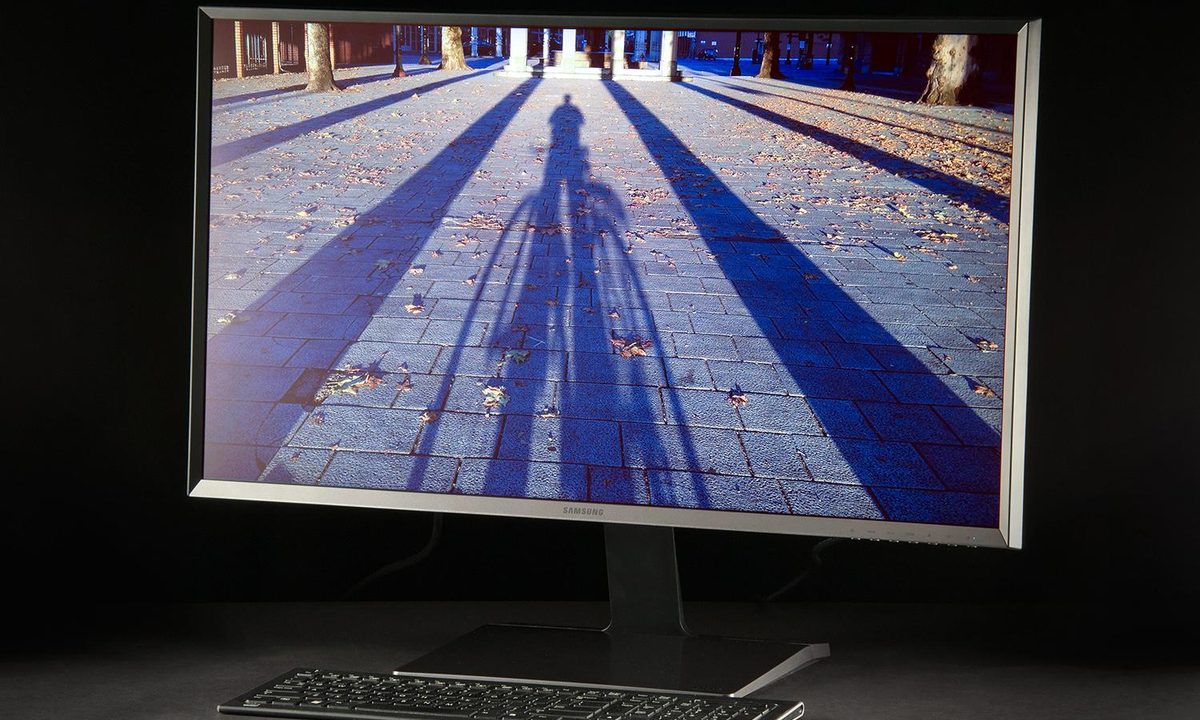

“The Samsung U32D970Q is the best monitor we've ever reviewed.”
- Sturdy and attractive
- Lots of input options
- Precise calibration controls
- Huge screen
- Excellent image quality
- 4K on a 32-inch monitor isn't that sharp
- Mediocre contrast
- Expensive
“Why you can trust Digital Trends – We have a 20-year history of testing, reviewing, and rating products, services and apps to help you make a sound buying decision. Find out more about how we test and score products.“
Buying a better monitor is one of the most worthwhile upgrades a PC owner can make. Unlike a new processor or video card, which will only help under certain heavy-load situations, an upgrade in the monitor department always improves your computing experience.
For some people, though, image quality is not just about enjoyment. It’s a crucial aspect of a professional tool as well. Photographers, digital artists, movie editors, and other creative types who work with digital media need a monitor that can reliably show how their work will look to others. 4K helps, but since the selection of accurate Ultra HD monitors is slim, many pros run into problems.
Now, there’s a new option in the 4K space from Samsung, and it’s quite a doozy. The company’s U32D970Q is a 32-inch beast that serves up 3,840 x 2,160 resolution, precise factory calibration, and a wide-view PLS panel. These traits are the features every professional desires. We hope you’re in a line of work that pays well, however, as this mammoth monitor retails for $2,000.
Hands on video
Admirable quality
Yep, $2,000. That’s not unheard of for a monitor, but screens that cost thousands are usually marketed towards enterprise buyers instead of consumers. The U32D970Q seems to be courting both markets, and that means it needs to perform well, and look luxurious. And boy, does it do both.
Samsung has engineered a unique stand that operates more smoothly, and with less resistance than those found on most competitors.
While the monitor’s matte black (or is it dark silver?) paint job isn’t flashy, anyone who examines it can easily see the high quality with which it was crafted. The large, angled bezels resist flex despite their size, and the panel sits atop an exquisitely engineered stand with height, tilt, and pivot functions. A broad, heavy stand with metallic accents keeps the panel planted, and adds an extra touch of class.
Samsung has engineered a unique stand that operates more smoothly, and with less resistance than those found on most competitors. There’s also a removable plastic cover that hides the unsightly square metal VESA bracket which attaches the mount to the stand. The cover can be removed, and the stand can be detached, allowing you to use the monitor with a different mount. A wall mount conversion bracket is included in the box as well.
Along the left rear panel, there are inputs for dual-link DVI, HDMI 1.4, two DisplayPort jacks, and four USB ports. In this regard, though, the U32D970Q slightly stumbles. All of the ports are on the rear panel, which makes them difficult to access.
Remarkable controls
Samsung’s U32D970Q, like most monitors, is controlled through a simple set of buttons located on the lower right hand flank. Thankfully, these are real buttons, instead of finicky touch-based controls. However, the navigation problems associated with many monitors aren’t quite resolved here. This display proved to be particularly confusing, only because of the sheer volume of options that are available for you to adjust.
The calibration options include brightness, sharpness, contrast, color mode (custom, sRGB, Adobe RGB, SMPTE-C, BT.709, EBU, DCI and DICOM are available), gamma (adjustable between 1.6 and 2.6), color temperature (adjustable up to 10,000K), black level in HDMI mode, and precision adjustment of red, blue, and green.


That’s just the basics. Samsung also bundles a variety of extras that are only of use to professionals. There’s a dual-color mode, for example, that lets you set one half of the screen to a particular color calibration, and the other half to another entirely. You can also use the picture-in-picture modes and picture-by-picture modes to view multiple input sources simultaneously. Simpler monitors like the CTL X2800 offer this as well, but the U32D970Q offers numerous size and scaling options that make PIP/PBP far easier to use.
Another interesting feature is Natural Color Expert, a calibration utility that uses software to achieve optimal results. You need to bring your own calibration tool (supported brands include i1DisplayPro, ColorMunki Photo, and Spyder4), but once obtained, you can use Samsung’s provided software. Most calibration tools supported by the U32D970Q work in Windows, and Mac OS X.
Pre-calibration image quality
Turning on the Samsung U32D970Q makes the monitor’s immense size impossible to ignore. The additional four inches this has compared to a 28-inch 4K monitor doesn’t sound like much, but the difference is obvious when you’re face to face with it. Samsung’s giant display is so monstrous, in fact, that it may require you to rearrange some stuff on your desk to accommodate it. We had to move aside a printer to make room for this monitor.
The Samsung U32D970Q’s scores in AdobeRGB gamut, gamma, and color difference are the best we’ve ever seen in a stand-alone monitor.
The screen is so large that we didn’t need to maximize Windows’ scaling to make its extreme resolution usable. We turned it down from 150 percent, which is the setting we use with most 28-inch 4K displays, to the “normal” 100 percent scale. At this size, we found text to be a little small, but still readable without squinting. Samsung has smartly used an anti-glare panel, as well, which further reduces eyestrain.
Spreading 4K across a 32-inch panel translates to just 138 pixels per inch, however, and the result is an image that’s not as stunningly crisp as the 4K label suggests it should be. A 28-inch 4K monitor, by comparison, nearly reaches 160 PPI. The U32D970Q looks sharper than a 27-inch 1440p display, or a 24-inch 1080p monitor, but it doesn’t reside on the cutting edge of clarity.
The monitor’s merely good pixel density is balanced by the U32D970Q’s amazing out-of-the-box image quality. Samsung doesn’t just ship calibration tools, you see. They use them to achieve the best results possible before shipping the display.
Our test equipment found that the monitor can render 99 percent of sRGB, and 96 percent of AdobeRGB. Gamma came in at the ideal value of 2.2, and the average color difference was a stunningly low .68. A difference of one or less is generally unnoticeable to the human eye, so the U32D970Q looks absolutely perfect in practice. The Samsung U32D970Q’s scores in AdobeRGB gamut, gamma, and color difference are the best we’ve ever seen in a stand-alone monitor.

The result is an absolutely gorgeous picture. When fed a 4K source, the U32D970Q can spit out life-like images with colors that are vibrant, but not over-saturated. We found only one thing to complain about, and that’s the contrast ratio of 460:1. This is only an average result, and it means that the monitor sometimes lacks the inky blacks needed to provide a sense of depth. This is more of a concern to gamers and movie fanatics than the monitor’s target audience of photo and video editors.
Post-calibration image quality
A display that performs as well as the U32D970Q does by default makes calibration less important, but we still made an effort to refine the monitor’s quality. To do this, we changed the monitor’s brightness from its factory setting of 252 lux (which is its maximum) down to 120 lux, which is better for use in a light-controlled room. We then used the monitor’s controls, and the Datacolor Spyder4Elite calibration utility, to obtain the best results possible.
The monitor’s merely good pixel density is balanced by the U32D970Q’s amazing out-of-the-box image quality.
We tinkered with brightness and contrast to slightly improve the ratio to as high as 480:1. We dove into color settings in an effort to drive color difference results even lower. We also fiddled with the sRGB, and AdobeRGB modes just to see what would happen. In the end, nothing we did created a result that was unquestionably better than the factory default settings. In fact, most of the changes we made only reduced color accuracy.
This might be disappointing if the U32D970Q wasn’t amazing by default, but it is, and that means the lack of improvement through calibration is a positive. You can purchase this display, plug it in, and never touch a setting again. You’ll see an incredible picture.
Don’t misinterpret our inability to improve the default calibration as a lack of calibration options. This monitor’s strength is not just the fact that it can be calibrated to offer a great picture. It can also be calibrated to show a picture that’s similar to another, less capable monitor. Spending $2,000 for the option to intentionally reduce quality may seem batty, but it’s important to professionals who must ensure that their creations look great on a $200 monitor, a cheap tablet, or an HDTV.
Conclusion
Samsung’s U32D970Q is easily the best display we’ve ever reviewed. Its out-of-the-box performance is practically perfect in every area besides contrast, which was mediocre. True professionals will love the controls, as well, as they allow precise calibration of gamma, color, and color space.
Yet, this isn’t the best monitor for everyone. We recorded mediocre contrast, and found that 4K resolution doesn’t look ridiculously sharp when it’s spread across a 32 inch screen. The U32D970Q’s precise colors make it an ideal choice for photo editors and digital artists, but gamers and video enthusiasts will be disappointed by the lack of depth. Price is a problem, as well. $2,000 is a lot to pay, regardless of quality.
The U32D970Q is a serious display built for professionals who demand highly accurate colors not just out of a pursuit of perfection, but also because it’s what their work requires of them. For these buyers, Samsung’s latest is a must-buy because of its superb factory calibration. It’s ready to go the moment the box is opened.
Highs
- Sturdy and attractive
- Lots of input options
- Precise calibration controls
- Huge screen
- Excellent image quality
Lows
- 4K on a 32-inch monitor isn’t that sharp
- Mediocre contrast
- Expensive



