Of all the MacOS updates announced at Apple’s 2022 Worldwide Developers Conference (WWDC), one of the most intriguing was Stage Manager. I’ve been playing around with it since the show, and it feels like it could change the way I work on my Mac for good.
First, a quick explainer. Stage Manager is basically a window management tool. With it activated, your open windows appear on the left of your Mac’s display, and you can click to quickly switch between them.

But its real strength lies in its ability to group windows together. When you do that, you can alternate between entire app setups on the fly. You can split an app’s open windows between two groups, too, meaning you could have one Safari window in one group and a second in a different group.
There’s a huge amount of potential in this. You can set up a group of work-related apps — Pages, Numbers, a time-tracking app, for example — then switch out to a set of leisure or gaming apps with a single click when the clock strikes 5 p.m.
Instead of sifting through tons of app windows cluttering your desktop and trying to sort the relevant from the irrelevant, Stage Manager makes it a breeze, and could help you be more productive at the same time.
Can’t you just use virtual desktops?
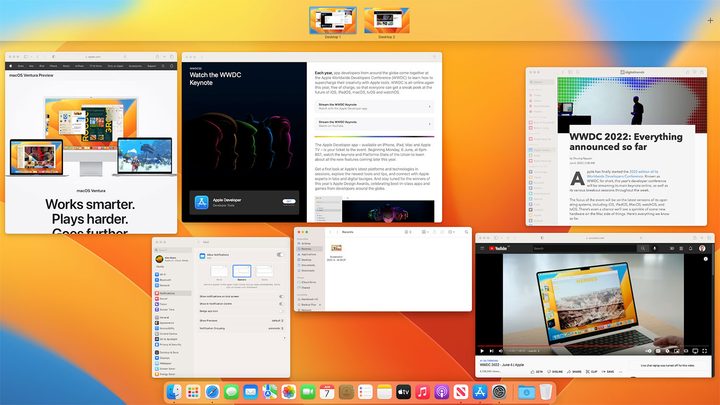
But is Stage Manager even necessary? After all, MacOS already has a virtual desktop system called Spaces. This lets you place some open apps on one version of your desktop, then with a quick swipe or keyboard shortcut you can switch to another version of the same desktop with different apps open. A lot of people already use it for the same tasks Stage Manager seems to be pitched at, so why bother with Stage Manager at all?
At this stage, it seems like Apple sees Stage Manager and Spaces as working together, not competing. If you’re running multiple Spaces and also have Stage Manager enabled, each Space will have its own list of Stage Manager apps and groups. In other words, it seems to be Apple’s intention for you to use both at the same time.
Stage Manager also has its own advantages. While it lets you flip between entire groups of apps at once, it’s also more granular than that, as you can use it to cycle between individual apps and windows in a visual way. Spaces, on the other hand, are a higher-level thing, allowing you to move between entire workspaces at once. With Stage Manager, you can move between workspaces or just between apps. It’s more flexible and adaptable.
But right now, there is a lot of overlap between the two. If you currently use Spaces to organize your workspaces and switch from one set of apps to another, Stage Manager might not seem all that exciting to you.
It’s still early days

Of course, given that MacOS Ventura is still very much an early beta, Stage Manager is not without its problems. It’s still very buggy, and frequently does strange and unexpected things, but that’s probably to be expected at this point.
For one thing, it’s clunky to enable and disable Stage Manager. Right now, you need to open Control Center and click the Stage Manager button to get started. Closing Stage Manager is even slower: Click Control Center, click Stage Manager, then click the toggle to disable it. There’s no Stage Manager keyboard shortcut or trackpad gesture, and as this is something that could become central to how you use MacOS, that needs to change.
Still, none of these problems really bothers me because Stage Manager feels so promising, potentially one of the best new MacOS Ventura features. Yes, it’s raw and unpolished. But it feels surprisingly natural and fluid to use, even in its current rough state. It makes me feel like I’ve seen the future of how I’m going to use my Mac.