
Stray, the recently released cyberpunk cat adventure from developer BlueTwelve Studio, has a stuttering problem on PC. The game is a console launch exclusive for PlayStation, and as you can read in our Stray review, it runs like a treat on consoles. PC is a different story, as shader complication causes stuttering throughout the experience.
I downloaded and played through the first couple of hours of the game, testing various fixes along the way. Although none of them get rid of stuttering completely, they can limit how frequent and severe it is, at least until we wait on a post-launch patch to fix the issue.
What causes stuttering in Stray?

Shader compilation causes stuttering in Stray, and it’s a common problem with games built on Unreal Engine 4 (though, as you can read in our writeup on Elden Ring stuttering, it can cause issues in other engines, too). Sam Machkovech, who wrote a review of Stray for Ars Technica, confirmed with the developers that shader compilation is the source of the problem.
https://twitter.com/samred/status/1549089768549466113
Shader compilation is when the game takes all of the human code that goes into shaders and compiles it into code that can be read by your graphics card. Some games, like Tiny Tina’s Wonderlands and Call of Duty: Vanguard, handle this process when you first launch the game to avoid stutters. Others, like Stray, attempt to compile the shaders in real-time.
In a game like Stray where you’re seeing unique environments constantly, the engine has to compile shaders at a breakneck pace, which causes a brief moment where your GPU is busy: a stutter. These stutters are frequent, but you can make them a little less severe with a few fixes, at least until a patch is available.
How to fix stuttering in Stray on PC

I played through the first couple of hours of Stray on a machine equipped with an RTX 30-series GPU, and I had quite a few stutters in the open sequence of the game. They became less severe as the world opened up, but transitioning into buildings or new areas still resulted in a sudden jolt. The back hour of my playtime was after I implemented fixes, which didn’t completely solve the stuttering issues but made them much less severe.
Update your graphics driver

Before doing anything else, update your graphics driver. We have a guide on how to update your GPU drivers, but the process is simple. For Nvidia GPUs, go to GeForce Experience, click Drivers, and then Check for updates. Download the latest version available. If you don’t have GeForce Experience, you can download the latest driver from Nvidia directly.
For AMD, open Radeon Software and click Check for updates in the box on the right. You can also download drivers from AMD if you want to make sure you have the latest version. The latest AMD driver is 22.6.1 and the latest Nvidia driver is 516.59. Neither of them comes with official support for Stray.
Although Stray doesn’t call for a big driver update like F1 2022, you should still update. Drivers change how shaders are compiled, and the latest driver usually has the best performance for recent generations of graphics cards.
Set a frame rate limit
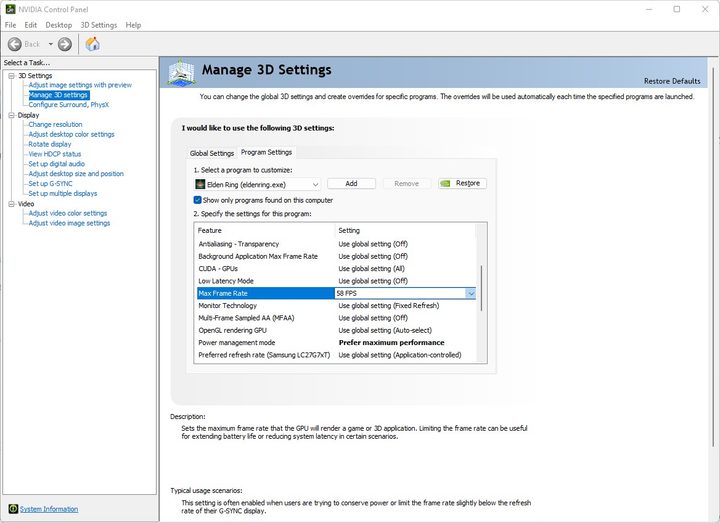
Setting a frame rate limit won’t get rid of stuttering, but it can make is less noticeable. Stray has a frame rate limiter built-in that tops out at 60 fps, and switching it on massively cut down on perceivable stuttering. If you have a high refresh rate monitor and want a few more frames, you can set a frame rate limit outside the game.
If you have an Nvidia GPU, open the Nvidia Control Panel, click Manage 3D settings, and scroll down to Max frame rate under the Global settings tab. AMD is just as easy. Open up Radeon Software, click Settings and then Graphics, open up the settings with the Advanced button, and look for Frame rate target control. You can also set a frame rate with the Radeon chill setting in the same menu.
Based on my time in the game, Stray is far from stable in the frame rate department. I suggest being conservative with your limiter, as new areas and outdoor scenes can cause big drops.
Flush your shader cache

Finally, you can open up your shader cache to make stuttering less severe in Stray. Nvidia GPUs have an option to give the shader cache as much room as it needs, which you can do in the Nvidia Control Panel. Open it up, click Manage 3D settings, and under Global settings, set Shader cache size to Unlimited.
AMD users don’t have the same option, but you can still flush your shader cache to give more room to Stray. Open Radeon Software and navigate to Settings > Graphics > Advanced and look for the Reset shader cache option. Select it and hit Apply.


