

Copilot Pro is Microsoft’s AI subscription service that costs $20 per month for individuals and is integrated into the brand’s Microsoft 365 suite. The paid service offers unique features to Microsoft users, provides faster and more consistent AI performance with priority access to the GPT-4 and GPT-4 Turbo large language models (LLM) during peak times, and also brings the AI technology to the brand’s most popular PC applications — and that’s where things get really interesting.
Here are some of the best features on Copilot Pro and how they work.
Create custom GPTs
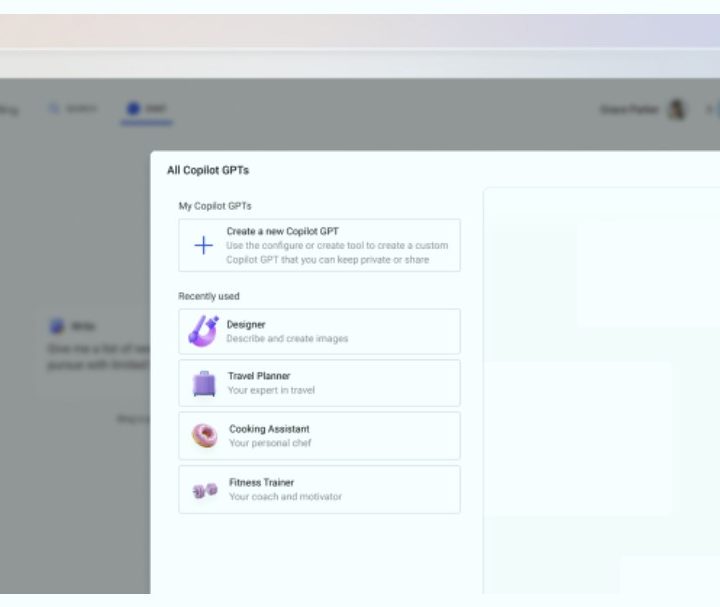
One of the most interesting features of Copilot Pro is that you can build your own custom GPT within the AI service, meaning you can create and edit a unique chatbot to do your bidding. You can create your chatbot as a personal trainer, a chef, a language tutor, a language adviser, or a career coach, among many other personalized ideas. You can do so by accessing the Microsoft Copilot GPT Builder at copilot.microsoft.com and signing in using your Microsoft account (such as outlook.com).
Follow the setup steps included there to get started building your custom GPT. Because it is a GPT environment, you essentially need only to input the text parameters of your chatbot to begin training it. There are also instructions on how to edit the GPT, if needed. For the best results, complete the steps in the Microsoft Edge browser.
Dalle-3 access in Microsoft Designer

Because Copilot Pro is a paid service, it benefits from OpenAI’s latest DALL-E 3 image model, which can generate images from more elaborate text descriptions or generate from other images. It also has upgraded editing abilities. Much of the image generation for the brand’s AI subscription service takes place within the Microsoft Designer tool.
Within Copilot Pro, you can generate up to 100 images per day and have the option to create images in either landscape or square. This is a massive upgrade in comparison to the free version, which allows 15 generations per day and square images only.
Make PowerPoint presentations from text prompts

A very fascinating part of Microsoft’s Copilot Pro is you can use the brand’s AI service in conjunction with other popular programs, such as the Microsoft 365 suite. The Copilot Pro chatbot and icon are integrated into all of these apps, including Word, Excel, PowerPoint, OneNote, and Outlook. Typically, you must have a separate Microsoft 365 subscription to access Microsoft Copilot Pro features in tandem with the apps of that service on PCs. However, to access the features without having to invest in a Microsoft 365 subscription, you can use Microsoft 365 apps through the web apps at no extra cost.
Creating presentations in Microsoft PowerPoint is a popular productivity option in the Microsoft 365 suite. Adding Copilot Pro makes the function as simple as typing a sentence. Once you’re in PowerPoint, you go to the Home tab to open the drop-down menu. This reveals the Copilot button in the upper-right corner. Click it to open the Copilot menu on the right side of the PowerPoint window.
Click Create a Presentation, type your prompt, and it will begin to generate the slides of your presentation. You can add a slide, ask questions prompts, and edit the text of your prompt to improve your presentation. You also have access to the Microsoft Designer tab in the drop-down menu, which gives you creative options for your slide within PowerPoint, since you can’t use prompts to make creative edits within Copilot. There is also the Copilot Labs section for generating ideas.
Create graphs and visuals through text prompts
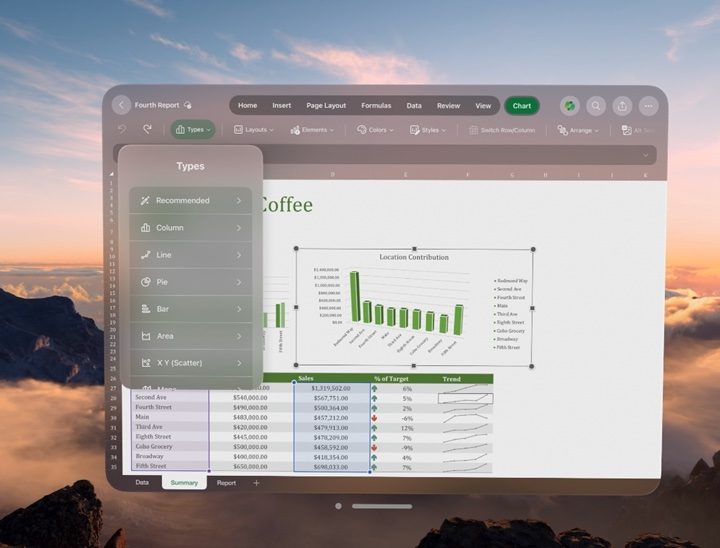
Excel is an extremely useful app for professionals who need to crunch numbers and simplify statistics. Copilot Pro can calculate, analyze, and present your figures and graphs in a manner that is easy to decipher. Once in Excel, you can access the Copilot button in the upper-right corner of the drop-down menu. If you are using Excel online, you may see a notice that says it only works with Excel table, but all of the AI functionalities are actually still intact.
If you have a file with some figures, you can highlight some text and Copilot Pro will give you some prompt ideas (such as show formula suggestions, highlight filter, sort data, and bold the first column) that you can select and will make up the entirety of your prompt once you’re done. These details will not only be the information but the look and feel of your results.
Select Ask for Insights and Excel will generate the tables and graphs with all of your data laid out. Select another insight or All insights for a more complete look at your information. Alternatively, you can enter a prompt in Copilot Pro with the parameters you desire.
Have Copilot write for you directly in Word
Word is one of the most used apps in the Microsoft 365 suite and Copilot Pro introduces several automated features into the word processors. Before even launching Copilot Pro within Microsoft Pro, you can highlight blocks of text within Word and a Copilot icon will appear on the left of the text, indicating that it can be edited by the chatbot. Right-click the highlighted text with your mouse and you can select the options, rewrite with Copilot, or visualize as a table. It will do those functions in the text area without having to execute a prompt.
You can also access the Copilot button in the upper-right corner of the drop-down menu and use it whether you have a blank document or you’re working with an existing document.
You can type your prompt directly into Copilot Pro to generate whatever result you need, or you can get assistance via a host of assistant tabs and quick options, including write about, ask a question, and summarize this document. Summarize this document, for example, will roll out text in a bullet point format and pull credits from the source document that you can refer back to later. For further assistance in prompt generation, you can select more prompts and access Copilot Labs.


