
Progress on Redstone, the next major update to Windows 10, continues apace. In search of ensuring a smooth release, Microsoft has been rolling out previews to Insiders, testing out new features and checking for stability and compatibility issues. Those who have opted into the fast lane have the privilege of installing the newest preview, build 14267, as detailed on the Microsoft blog.
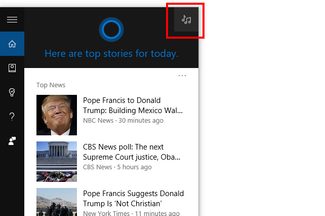 Unlike the previous build, which was largely under-the-hood changes, build 14267 includes some new features that actually affect the user experience. There’s now a dedicated music button in Cortana’s top-right corner. Pressing it allows Cortana to listen to the song that’s playing and identify it. There are also improvements to Skype and messaging that enable photo attachments, either from existing pictures or directly from your webcam.
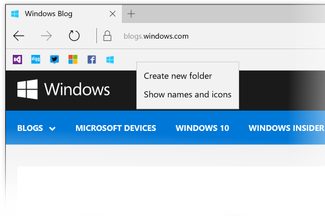
There are some new features in the Edge browser as well. The favorites bar has been redesigned to allow for just favicons, instead of full bookmark titles, along with the addition of folders for keeping track of favorites. In addition to Incognito mode, Edge now allows users to automatically clear browser data when closing the browser. Microsoft has also improved the download tooltip, allowing users to choose a specific location when downloading a file.
In addition to the new features, Microsoft has rolled out fixes for some bugs that popped up in the last few builds. The “reset this PC” function was having issues, but is now working correctly, and a missing .dll dialog that pops up on boot is now silenced. Front-facing RealSense cameras should once again be working properly, and system volume should display the correct capacity.
It’s not all sunshine and roses, but there’s only one new bug haunting this Insider build, and it only applies to users running Microsoft’s server virtualization software, Hyper-V. Upgrading with more than one vswitch, or with multiple network adapters, may result in a loss of network connectivity. Luckily, Microsoft provides a pair of workarounds to resolve the issue.
- Remove all the virtual network adapters connected to the vswitch, delete the vswitch and recreate it, then reconnect their virtual NIC to the new vswitch.
- Admin command prompt, do “netcfg -d” will wipe-out all the vswitch settings so that you can start from scratch.
Insider build pacing has picked up considerably over the last few weeks, with the official release of Redstone nearing ever closer. The bugs are still few and far between, but if new things scare you, you can always roll back to the slow ring, or the release-ready version only.


