
Microsoft released its latest feature update for Windows 10, shipping with a host of new features. Microsoft only launches two of these each year, so there’s plenty of new changes to play around with.
In addition to the standard security patches that roll out with every update, the May 2019 update (version 1903) includes a number of added features, many of them designed to provide users with simpler ways of managing their device privacy and security.
What’s new?

The biggest security boost is Windows Sandbox, which lest you open ephemeral application sandboxes that are siloed off from your main Windows filesystem. This allows you to launch untrusted files or executables in a separate environment, virtualized using your device’s hardware acceleration. The May 2019 update also adds a microphone notification icon that alerts users when an app or website attempts to tap into their microphone or webcam hardware, empowering users to take action to prevent unauthorized hardware use. This is bundled with a dashboard menu where users can view all the apps that are currently using their microphone or camera.
Along with these, Windows 10 now lets users log in to their Microsoft accounts using the Windows Hello biometric authentication suite. Windows Hello’s recent FIDO2 certification means you can now access your Microsoft account online (as well as on their devices) using either facial recognition or fingerprint-based authentication, adding an extra layer of protection by eliminating the use of a password.
Finally, for users of the Windows Subsystem for Linux (WSL), Windows Defender Firewall can now enable firewall rules pertaining to the WSL, filtering network traffic to and from Linux subsystem applications. Other minor changes include removing Cortana from the search bar and a new light mode that changes up the visuals a bit.
How to install the update
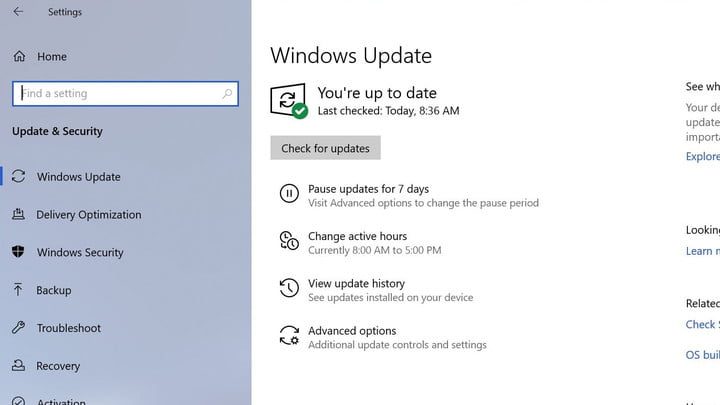
You can install the May 2019 update right from the standard Windows 10 update menu. Start by navigating to Settings > Update & Security > Windows Update. Once you are at the update menu, check to see if the update is already offered and, if so, launch it, If you don’t see it upon landing on the menu, you can select “Check for updates” to see if yours is read. Assuming it is, you can then hit “Download and install now” and the update process will start.
After the update is completed, you will be able to choose when to reboot and apply it. You can either schedule an exact date and time, or you can have Windows 10 automatically restart the device outside of your standard usage timeframe (what Windows 10 calls “active hours”), which it determines by analyzing a historical profile of your device activity patterns.
It should be noted that you might not get the update right away, as Microsoft is metering the number of devices updated at a time to scan for issues and address them. If this is the case, just check the update menu periodically. To ensure they avoid another fiasco like the October 2018 update, Microsoft has posted a device health dashboard cataloging all detected and resolved update issues. Once you download and apply your update, you should have plenty to play around with.


