  1. Home
  2. Computing
  3. News

Microsoft’s updated Windows 10 design to bring curvy corners next year

Add as a preferred source on Google

Source: Zac Bowden, Twitter Image used with permission by copyright holder

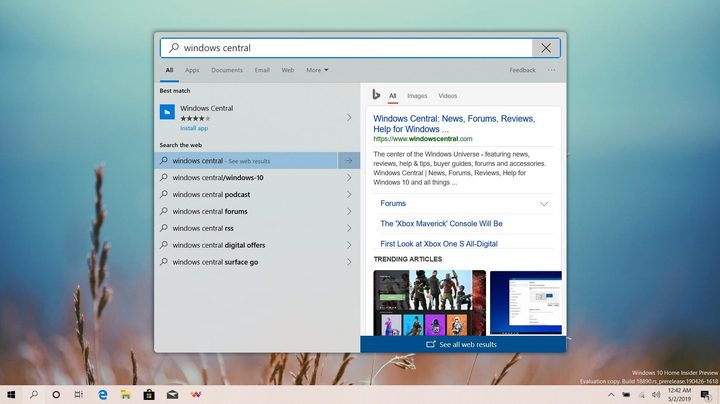
In an effort to shed its square image, Microsoft will be cutting corners next year with the next major release of its Windows 10 operating system. Rather than sharp, angular corners on windows within Windows 10, Microsoft is looking at an updated design that will have curved corners.

Recommended Videos

An image of a search window with rounded corners was posted by Windows Central Senior Editor Zac Bowden on Twitter. He claimed that the updated look is now in testing with build 20H1. The operating system update is expected in 2020.

Though this is just a minor aesthetic change, it does bring a more modern feel to Windows. Microsoft began experimenting with rounded corners inside the latest version of its Edge browser powered by Chromium. Now, it looks like Microsoft will soon be ready to bring this design to the entire operating system.

For comparison, Apple has used rounded corners on windows in MacOS for years, and more recently, Google adopted a similar design aesthetic for Chrome OS. With Microsoft adopting this new look for Windows 10, the rounded corner design will also hit other Microsoft products, including Xbox.

“The rounded corners are coming to Fluent Design. You’ll see it all over Windows, Xbox, Office, and other products in the coming months [and] years,” Bowden said.

Microsoft has larger changes planned for Windows 10 in 2020 as well. File Explorer will reportedly get a big visual overhaul and some new functionality as part of the Fluent Design update. Though the final look of File Explorer is unknown at this time, early reports suggest that Microsoft will add some sort of app integration, leading to speculation that users will be able to search across services like Outlook and OneDrive from within the File Explorer app without having to fire up the dedicated apps.

Windows 10 faithfuls who want to experience Microsoft’s new design and get an early taste of build 20H1 can sign up for Microsoft’s Insider Preview program. Insider members will be able to test early builds and releases of Windows prior to the consumer release. For most users, running an Insider build isn’t advisable, as these early releases often contain bugs.

Chuong Nguyen
Silicon Valley-based technology reporter and Giants baseball fan who splits his time between Northern California and Southern…
Discord calls finally get end-to-end encryption, but your DMs didn’t make the cut 
Discord spent three years building one of the most cross-platform encryption systems ever shipped, and it doesn’t cover the part of the app that forms the basis of day-to-day communication.
Computer, Electronics, Laptop

Discord just completed something it started back in 2023, and while the result is genuinely impressive, there’s a big asterisk in place. 

As of early March 2026, every standard voice and video call on Discord is end-to-end encrypted (E2EE), and you don’t have to toggle any switches, as the feature is enabled by default. The encryption is based on DAVE, which, for the uninitiated, is Discord’s own open-source protocol. 

Read more
OpenAI has a new website where you can check if an image is real or AI slop
OpenAI and Google are teaming up to put a stamp on every AI image.
OpenAI verification tool in action on iPad

Spotting an AI-generated image is getting harder by the day. OpenAI wants to change that, and it is using Google as a partner to accomplish this behemoth task.

OpenAI has announced a significant update to how it handles content provenance, which is just a fancy way of saying how you can tell where an image came from and whether it was AI-generated.

Read more
Google just gave Workspace a 24/7 AI agent that sends emails and books meetings while you sleep
Google announcing five Workspace features at once is either confidence or chaos, but Gemini Spark acting on your behalf while you sleep is the one that actually changes what a productivity suite is supposed to do.
Google AI Inbox for Gmail users.

At the I/O 2026, Google announced several AI-powered updates for its Workspace apps. The main highlight of the announcement is Gemini Spark, a 24/7 personal AI agent that doesn’t just answer questions but takes actions on your behalf. 

It can send emails, add calendar events, and complete tasks across Workspace apps. And before you even ask, it asks before doing a high-stakes task, and you can choose whether you want to enable it or not. It's coming soon in preview for Workspace business customers in the Gemini app.

Read more