  1. Home
  2. Computing
  3. News

Digital Trends may earn a commission when you buy through links on our site. Why trust us?

Windows 11 multitasking to get better in an important way

Add as a preferred source on Google

There are already many ways to multitask in Windows 11, with Snap Layouts and Snap Groups being the biggest ones, but one more important multitasking ability could be on the way. That is all according to Rafael Rivera, an advanced Windows Insider, who has managed to enable a new hidden “tabs” feature in the Windows 11 File Explorer.

In 2017, beta versions of Windows 10 had a”Sets” feature that would let you create tabs in core system apps for faster access to your other programs and documents. It was eventually canceled by Microsoft, and this new Windows 11 feature is similar but is only built into File Explorer at the moment. It adds space above the File Explorer title window, and a new “plus” button to open new tabs for different folders like Pictures, Music, Downloads, and network or This PC. Each of these tabbed areas then works independently of each other.
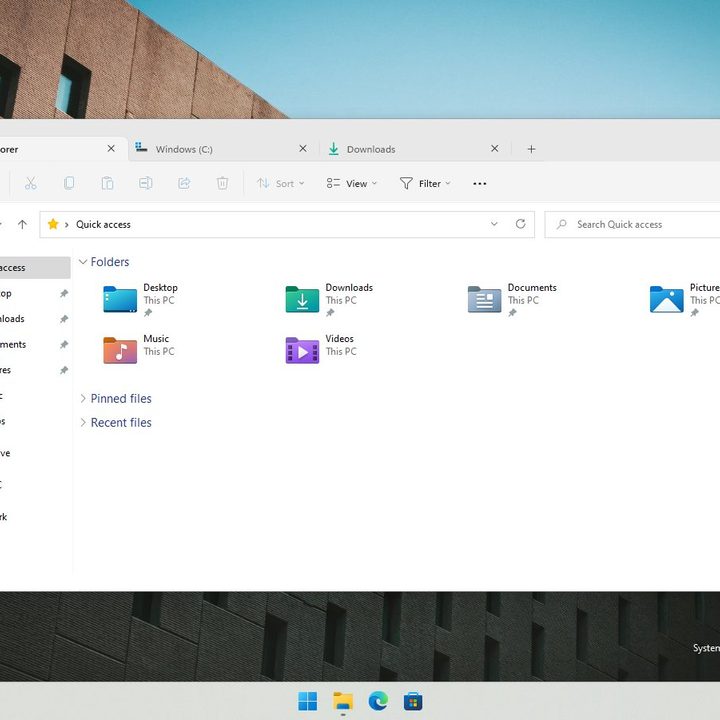
Windows 11's tabs in the File Explorer
Rafael Rivera/ Twitter

The feature is yet to be officially detailed by Microsoft, but several Windows Insider beta testers with PCs enabled in the Dev Channel branch of Windows 11 have already managed to enable it. Based on what we’ve seen, you can use this to save some time and improve your multitasking. You can expect to open more of your files and folders in one instance without having to jump between different windows. There’s even an “overflow” menu that lets you cycle between all the open tabs if things were to get too busy.

Recommended Videos

If this sounds familiar if you’re a MacOS user, then you’re not mistaken. Apple’s operating system also lets you do something similar to open multiple items within an app or in the Finder in a tab, though it’s not usually turned on by default.

Since tabs in the File Explorer is being tested and is hidden in the Dev Channel of Windows 11, this feature isn’t linked to a specific release. That means there’s once again the chance that it might not ever make it to the regular version of Windows 11, and Microsoft could remove the feature from the Dev Channel at any time once it becomes official. Yet third-party programs like the Files app and Stardock’s Groupy are a great solution to get this tabbed experience today in Windows.

Arif Bacchus
Arif Bacchus is a native New Yorker and a fan of all things technology. Arif works as a freelance writer at Digital Trends…
OpenAI has a new website where you can check if an image is real or AI slop
OpenAI and Google are teaming up to put a stamp on every AI image.
OpenAI verification tool in action on iPad

Spotting an AI-generated image is getting harder by the day. OpenAI wants to change that, and it is using Google as a partner to accomplish this behemoth task.

OpenAI has announced a significant update to how it handles content provenance, which is just a fancy way of saying how you can tell where an image came from and whether it was AI-generated.

Read more
Google just gave Workspace a 24/7 AI agent that sends emails and books meetings while you sleep
Google announcing five Workspace features at once is either confidence or chaos, but Gemini Spark acting on your behalf while you sleep is the one that actually changes what a productivity suite is supposed to do.
Google AI Inbox for Gmail users.

At the I/O 2026, Google announced several AI-powered updates for its Workspace apps. The main highlight of the announcement is Gemini Spark, a 24/7 personal AI agent that doesn’t just answer questions but takes actions on your behalf. 

It can send emails, add calendar events, and complete tasks across Workspace apps. And before you even ask, it asks before doing a high-stakes task, and you can choose whether you want to enable it or not. It's coming soon in preview for Workspace business customers in the Gemini app.

Read more
Gemini can now make videos, brief your morning, and do digital chores while you sleep
Gemini is now an AI intern that never logs off
Google Gemini App gets a major update

Google is giving the Gemini app a massive update, bringing a bunch of nifty changes. The chatbot phase is fading, and the company now wants Gemini to become something closer to a full-time digital assistant.

During Google I/O 2026, the company announced a redesigned Gemini app along with a new model, proactive daily summaries, video tools, and a 24/7 agent called Gemini Spark. Google claims that Gemini has now reached more than 900 million monthly users across 230 countries and more than 70 languages, up from 400 million last year.

Read more