  1. Home
  2. Computing
  3. Legacy Archives

Windows 8.1 updates store, improves app promotion

Add as a preferred source on Google
windows8store
Image used with permission by copyright holder

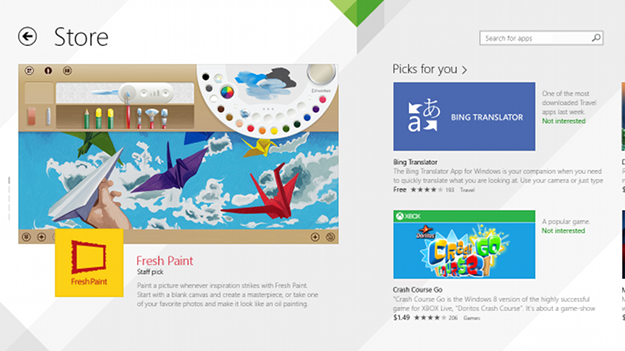
The Windows 8 Store didn’t receive a great reception at release, and for good reason; its messy, confusing interface was cluttered by poor-quality apps and didn’t promote a wide variety of choice. Now Microsoft is tackling the Store’s problems with a revision that will appear first in Windows 8.1, most of which focuses on helping developers promote and monetize their apps.

Chief among the additions are in-app purchases and app gifting, a pair of important functions noticeably absent from the original Windows 8 Store. Adding these will  give developers new ways to make money and promote themselves and also provide users a new way to share favorite apps with friends and family.

Recommended Videos

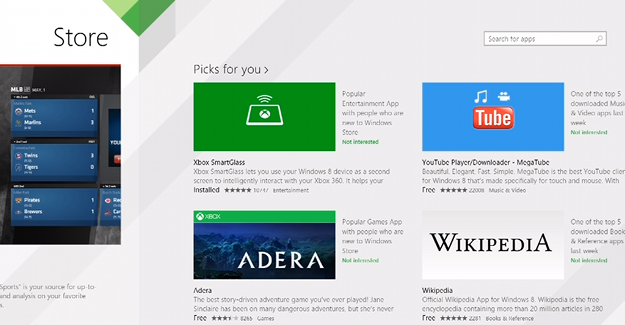
Microsoft also hopes to increase visibility by improving promotion. The store’s new front page, along with categories, has been re-designed to allow for more prominent and personalized app suggestions. There will be app recommendations attached to individual app pages, too, which should improve cross-merchandising and discoverability of apps not ranked at the top of each category.
dtwindow8image
Image used with permission by copyright holder

While most of the announcements focused on development, there was one users specifically will appreciate: No more manual app updates! Microsoft is following in the footsteps of Android and iOS 7 and making Windows 8 apps eligible for automatic, behind-the-scenes improvements. This will help developers ensure users always have the latest version and give users one less update to worry about.

Improving app promotion is an important step, as it will attract more developers and improve overall app quality, a serious issue facing early versions of the Windows 8 store. The store’s new look is promising, but we’ll need some hands-on time before making a final judgment.

Matthew S. Smith
Matthew S. Smith is the former Lead Editor, Reviews at Digital Trends. He previously guided the Products Team, which dives…
Microsoft Edge is about to get more frequent updates, but don’t expect more features
Starting with Edge 152 on August 27, Microsoft is cutting its release cycle in half, with smaller but more frequent updates for Stable channel users.
Microsoft Edge illustration official

Microsoft is accelerating updates to its Edge browser, switching from a monthly release schedule to a biweekly one. The change takes effect with Edge 152, due on August 27, and puts the browser on the same cadence as Google Chrome.

More updates, not more features

Read more
What makes a laptop good for both work and entertainment?
Computer, Electronics, Laptop

This post is brought to you in paid partnership with HP.

The HP OmniBook X Flip is designed as an all‑day AI PC that adapts seamlessly from productivity to entertainment without switching devices.

Read more
Your Windows 11 PC can now natively run AI workloads, even if it lacks the Copilot+ badge
Windows 11 laptop on a table

For the better part of a year, Microsoft has been telling us that the future of AI on Windows belongs to Copilot+ PCs. If you wanted Microsoft’s most advanced local AI features, you needed a machine with a dedicated Neural Processing Unit (NPU). That was the deal. Now, Microsoft appears to be rewriting the rules.

According to updated documentation, Windows 11’s local Language Model APIs can now run on non-Copilot+ PCs, provided they have an Nvidia GeForce RTX 30-series GPU (or newer) with at least 6GB of VRAM. On the surface, this sounds like a developer-focused update. In reality, it could be one of the most significant shifts in Microsoft’s AI PC strategy since Copilot+ PCs launched last year. More importantly, it raises a question that has been lingering ever since the AI PC era began: Did we really need NPUs for all of this in the first place?

Read more