Sony uses 12-digit codes to distribute prepaid access to everything from games to DLC, movies, memberships, and even PlayStation Network store credit. If you’ve just opened up a new PlayStation 4, there is a pretty good chance you will have a few codes to redeem — digital games bundled with the console, a PlayStation Plus trial membership, a PS Now trial, or maybe a PSN gift card with funds to load onto your account. Luckily, redeeming codes on PSN is painless, and there are a few ways to do it. Here’s how to redeem a code on your PS4.
Recommended reading:
- Escape reality online with the best cheap PS Plus deals for July 2020
- The best PS4 controllers for 2020
- The most common PS4 problems, and how to fix them
Redeem your codes on your PS4
Step 1: Open the PlayStation Store.

Step 2: Scroll to the bottom of the page and choose Redeem Codes.

Step 3: Press X to open an on-screen keyboard.

Step 4: Enter the 12-digit code. Just the numbers and letters; don’t add the hyphens (and don’t worry about case sensitivity).

Step 5: Press R2 or click Done when finished.
Step 6: Press Continue.

Step 7: Click Confirm to finish redeeming the content shown on the left side of the screen.

Step 8: On the next screen, you can download your new content (if applicable).

Redeem your codes on the web
Step 1: Go to the PlayStation homepage.
Step 2: Click Sign In in the upper right-hand corner. Enter your email/password associated with your PlayStation account.
Step 3: Then, click on your profile image to reveal a drop-down menu.
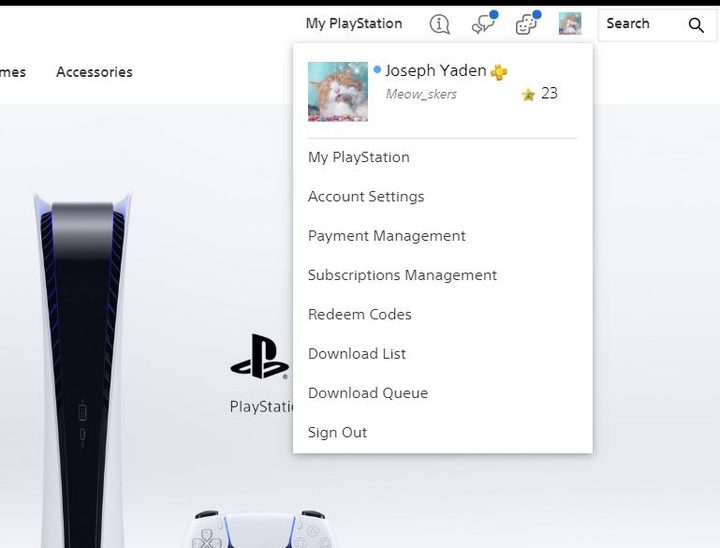
Step 4: From here, click on Redeem Codes and you’ll be taken to a new page that looks similar to the section on the PS Store from the PS4 itself.

Step 5: Enter the 12-digit code. If your PlayStation 4 is powered on, you can initiate the download straight from your PC. If not, you can access the new content the next time you turn on your console.
Redeem your codes with the PlayStation app
The PlayStation smartphone app on iOS and Android also lets you redeem codes for your PlayStation 4. The app is free on both Google Play and the App Store. Once downloaded and launched, touch the PlayStation logo at the bottom-center of the screen. Three rows of icon options will appear. Redeem Codes is located four from the left on the top row.
There is one major perk of redeeming codes on the app: You don’t actually have to type the code in. Using your smartphone’s camera, simply position the code inside the window in the center of your camera frame, and the app will detect and enter the code. If you don’t want to use your camera, though (or if it’s having trouble picking up the code due to lighting), you can still type in your code manually.
Either way, press Enter once you’ve input the code. It’s that easy.