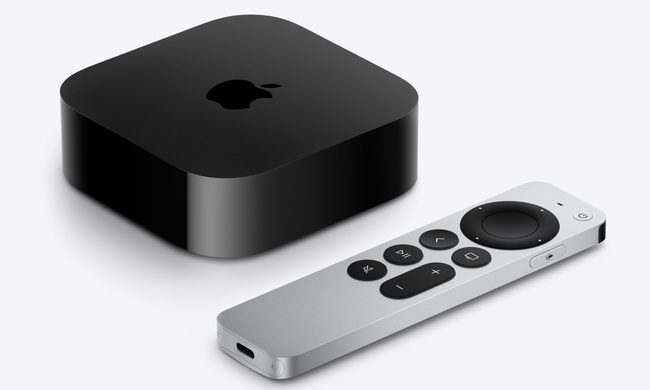
Expert Note: Before diving into the more comprehensive guide below, I’d recommend doing a “System Restart” (Settings > System > Restart) or by unplugging the power ford for at least 30 seconds. If that doesn’t work, find the specific issue and resolution below. In my experience, a system restart has solved 90% of the issues I ran into with my Apple TV. I tested these solutions on my personal Apple TV using tvOS 17.4.
Quick Troubleshooting Menu
- Remote Unresponsive or Laggy
- Wi-Fi Connectivity & Buffering
- Video Flickering or Black Screen
- Audio Out of Sync
- App Crashing or Freezing

1. Siri Remote is Unresponsive or Jumping
Whether you have the silver USB-C remote or the older black touchpad version, connectivity issues are pretty common, especially if your Apple TV is located behind a cabinet or wall.
The Fixes:
- The “secret” Reboot: Hold down the TV/Control Center button and the Volume Down button simultaneously for 5 seconds until the Apple TV status light flashes. The remote will restart and re-pair automatically.
- Charge check: Unlike the old remotes, the Siri Remote doesn’t give a “Low Battery” warning until it’s nearly dead. Charge it for 30 minutes via USB-C/Lightning
- Distance & Obstructions: Ensure that there is a clear line of site. While it uses Bluetooth, 2.4GHz interface from soundbars can cause “ghost touches.” I have not had this problem personally, but my brother has experienced this in his family room where he uses a soundbar, too.

Frequent Buffering or u0022Network Unavailableu0022
Even with high-speed internet, the Apple TV’s internal Wi-Fi antenna can struggle when it’s near other electronics.
The Fixes:
- The 5GHz Rule: If your router supports dual bands, ensure the Apple TV is on the 5GHz band – if the Apple TV is close enough to the access point or router to receive a strong signal. 2.4GHz is too crowded some times and can cause the Apple Spinning Wheel of Death.”
- Forget and Rejoin: Go to Settings > Network > Wi-Fi, forget the network, and re-add it. The clears the stale IP assignment and gives you a new IP address.
- Check Signal Strength: Go to Settings > General > About. If your signal strength is 2 bars or fewer, you potentially need a mesh extender or an Ethernet connection.

Video Flickering, Tinted Screen, or No image
This is usually an “HDMI Handshake” error where the TV and the Apple TV fail to communicate.
The Fixes:
- Check the Cable: Use a “Certified Premium High Speed” HDMI cable
- Match Content Settings: Go to Settings > Video and Audio > Match Content. Turn on Match Dynamic Range and Match Frame Rate. This prevents the “black flash” when an app switches from HDR to SDR, and most receivers or video switches should be able to handle the handshake.
- The HDMI Reset: Unplug both ends of the HDMI cable and plug them back in firmly. Or try reversing the ends. Here is a list of our favorite HDMI cables to use.

Audio is Out of Sync (Lip-Sync Issue)
Wireless audio (like AirPods or HomePods) often lags behind the video. Especially if you are trying to screencast from your iPhone.
The Fix:
– Wireless Audio Sync: This is a hidden gem in Apple’s settings. Open Settings > Video and Audio > Wireless Audio Sync. Your iPhone will use its microphone to listen to your TV and calibrate the audio timing perfectly.

Specific Apps like Netflix, YouTube Keep Crashing
If one app fails while others work, the app’s cache is likely corrupted.
The Fixes:
- Force Close: Double-click the TV/Control Center button to see the App Switcher. Swipe up on the offending app to close it completely.
- Reinstall: Highlight the app on the Home Screen, hold the center clickpad until it jiggles, press Play/Pause and select Delete. Re-download the app from the App Store.
When to Contact Apple Support
If you see a flashing status light that won’t stop after a restart, or the “Restore” screen (a picture of an iPhone next to an Apple TV), the firmware is likely toast.
- The Apple TV 4K: You must contact Apple Support as there is no USB port for Manual restoration.
- For Older HD Models: You can plug it into a Mac via USB-C and restore it via Finder.
Frequently Asked Questions (FAQ):
Q: Why is my Apple TV status light blinking rapidly?
A: This usually indicates a hardware failure or a firmware update gone wrong. Try a hard power cycle; if it persists, it requires a professional restore.
Q: How do I update my Apple TV?
A: Go to Settings > System > Software Updates. I would recommend turning on “Update Automatically” to ensure you have the latest security patches installed.
Q: Can I use my iPhone as a remote if mine is lost?
A: Yes. Open the Control Center on your iPhone and tap the Remote icon. If you don’t see it, add it via Settings > Control Center on your iPhone