
The Echo Hub and Echo Show 8 (3rd Gen) are two of the newest products to join the Amazon catalog. Both are designed with large touchscreens and make it easy to access the Alexa voice assistant, connected smart gadgets, and your favorite apps. But while the two share a few similarities, there are big differences between the Echo Hub and Echo Show 8.
Here’s a closer look at the Echo Hub and Echo Show 8 to help you decide which is best for your smart home.
Pricing and design

The Echo Hub costs $180 and is intended to be used as a wall-mounted touchscreen. If you want to place it on a countertop, you’ll need to pick up an optional stand. This can be purchased as a bundle with the Echo Hub for $210. Its overall design is simple, and it essentially looks like a tablet with a few control buttons on its edges.
The Echo Show 8 (3rd Gen) costs $150 and is often on sale for around $100. It’s intended to be used as a tabletop device, with a built-in stand that lets you place it on any surface throughout your home. Like the Echo Hub, the Echo Show 8 looks relatively simple, with a large touchscreen supported by an elongated back that allows it to sit upright without any external stands.
Winner: Echo Show 8
Display and quality
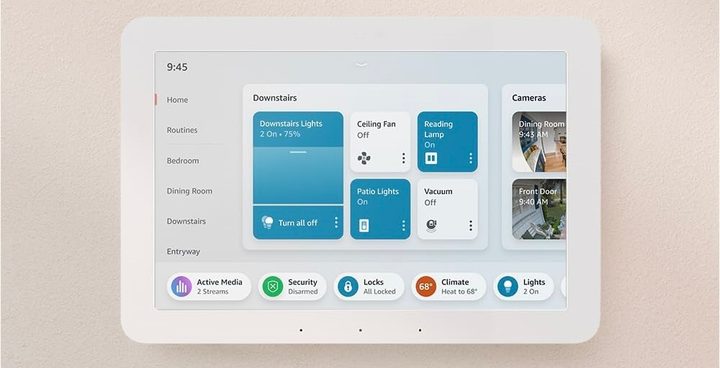
The Echo Hub uses an 8-inch touchscreen with a 1280 x 800 resolution. The display looks great and is easy to use, though our Echo Hub review noted that it’s sometimes slow to respond. It is, however, easy to set up and features a high-quality, intuitive interface.
The Echo Show 8 also uses an 8-inch touchscreen and 1280 x 800 resolution. Its interface is just as easy to use as the Echo Hub’s, and the device feels durable and premium. Since the Echo Show 8 is typically placed on a surface below eye level, its screen is angled upwards to improve your viewing experience.
Winner: Tie
Features and smart home connectivity

Amazon designed the Echo Hub and Echo Show 8 to fulfill different roles in your home. The Echo Hub is an Alexa-enabled control panel for your smart home. That means you’ll be using it as a way to quickly control all your smart gadgets. And since the Echo Hub supports thousands of devices (thanks to support for Matter, Wi-Fi, Bluetooth, and other connectivity options), there’s a good chance it’ll work with your existing products. The Echo Hub also lets you access camera feeds or arm/disarm your security system, making it a great all-around control hub. You can access certain apps like Prime Video and Hulu, but its underwhelming speakers make it less than ideal as a dedicated entertainment hub.
In other words, the Echo Hub is all about giving you easy access to your smart home.
The Echo Show 8, meanwhile, is a jack-of-all-trades. It’s not as easy to control all your smart home devices on the Echo Show, but it offers easy access to dozens of apps, the Alexa voice assistant, and supports video calls thanks to a built-in webcam. Inside the Echo Show 8, you’ll find two 2-inch neodymium speakers that are much better than the speakers in the Echo Hub, making it a better option for playing music or streaming TV shows.
Winner: Tie
Is the new Echo Hub a better smart home gadget?
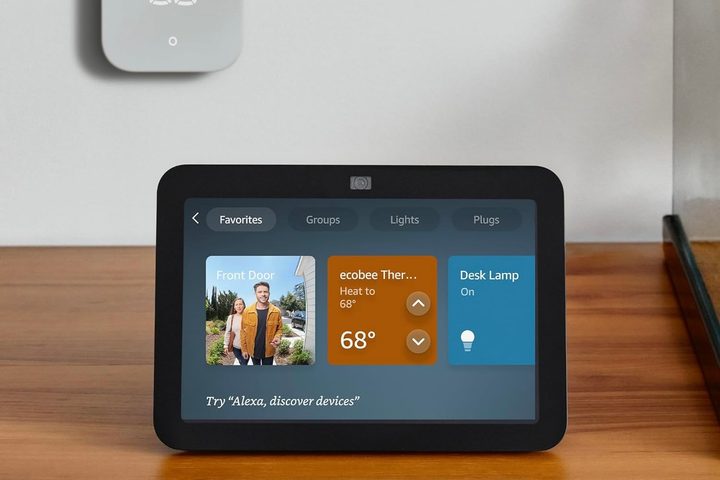
Since the Echo Hub and Echo Show 8 were built with different purposes in mind, one isn’t necessarily better than the other. If you plan to watch TV shows in the kitchen while you cook or take a quick video call, the Echo Show 8 is an easy recommendation. The current version of the Echo Show 8 is the third iteration of the device, making it a bit more polished than the Echo Hub. Most homes will likely be better served by the Echo Show 8 than the Echo Hub.
If you need a smart home hub that lets you quickly control all your devices, the Echo Hub deserves a closer look. It’s not perfect, and there are still plenty of kinks to work out, but it’s a great first attempt for Amazon. Consider adding it to your shopping list if you have a bunch of Ring doorbells and cameras installed around your property and want a central hub to control the action.


