Robot vacuums are designed to stay quiet and out of sight as much as possible. They don’t work as well if they’re constantly getting underfoot — or if they start making loud, unexpected noises, which can be disruptive and time-consuming.
If your Roomba or other robot vacs starts throwing a fit, these are the fixes we’ve found that can make them quiet again, depending on where the problem’s origin. A few minutes with your Roomba and you should be able to put things right. Let’s start with some of the most effective solutions.
Clean the brushes

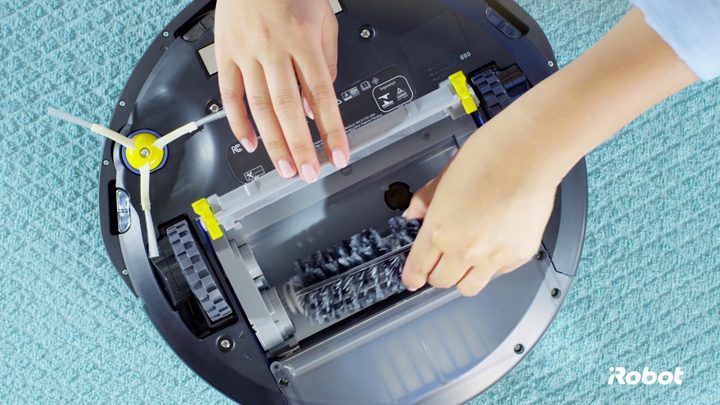
Roomba brushes (and extractors in other models) can be taken off and cleaned if necessary. Sometimes this can be a crucial step when fixing problems, like loud noises. If your Roomba has started making grinding noises every time it works, flip it over and inspect the brushes or extractors. Detach and clean them if you can, and thoroughly clean the cleaning head and brush housing.
Grinding noises are often caused by bits of debris getting lodged behind the brushes or into the cleaning head, especially large bits like dry pet food. This will clatter around or jam the brushes to create the noise you’re hearing. A thorough cleaning should put everything right.
Make sure the brushes/extractors are properly connected

Sometimes, after cleaning a Roomba brush or rubber extractor and putting it back, the component isn’t quite connected and positioned properly. Or maybe your Roomba got jostled or dropped, and one of them became a little loose. When this happens, your Roomba starts making loud clicking or tapping sounds when it tries to move.
You can usually fix this clicking by removing the brush or extractor, ensuring it’s not damaged, and installing it again — check the position is correct. Give it a few turns to confirm the edges aren’t bumping up against anything. Roomba side brushes are usually installed with a screwdriver, so verify that the screws are tight and properly connected, too. Learn how to check and resolve other Roomba brushing issues.
Check your floors

Roomba volume can change a lot based on the type of floor it’s cleaning. If your Roomba switches from a carpet to a hardwood floor, it’s likely to get a lot louder — especially with the latest Roomba models that have the strongest suction motors. If you’re watching TV, for example, it may seem like your Roomba suddenly started making noise and it’s hard to hear your show, but it could be the Roomba just moved to a different surface. Stone and tile floors often provide the noisiest results.
There’s no easy solution for this, as the Roomba is just doing its job. Our best recommendation is to schedule full-house Roomba cleanings when no one is home, so it can address the noisiest floor surfaces at that time and not bother anyone.
Check the beep code
Does your Roomba keep beeping? This isn’t just a general error message — Roomba codes usually depend on the number of beeps. If you are frequently hearing many beeps in a row, it’s definitely annoying, but it’s also the Roomba giving you an important warning. One or two beeps can usually be fixed by adjusting the Roomba or going through our fixes above. Here are a few multi-beep codes worth knowing:
- Five beeps in a row: One of the side wheels has been jammed, and your Roomba may be turning in circles, too.
- Five beeps in a row: The Roomba has a serious navigation error and may be close to falling down stairs. It could also have a sensor malfunction, like a dirty cliff sensor or buggy readings on a black surface.
- Nine beeps in a row: This indicates a bumper error, so inspect and clean the bumpers to get your Roomba working.
Clean and adjust the charging station

Sometimes Roomba starts clicking when they head back to their charging stations to refill their batteries. This can have several causes, but it’s usually caused by the Roomba’s positioning while it’s charging.
First, try cleaning the charging station, especially the contact points that the Roomba uses for charging. It may be slipping on and off the contacts when trying to charge. If everything is clean, don’t be afraid to quickly tap your Roomba into place, as this can often silence the clicking.
If this doesn’t work, try adjusting the cleaning bin on the Roomba itself — especially if you have a model that dumps into a larger bin in the charging station. A loose or stuck cleaning bin on a Roomba may be creating these ticking sounds.
Review your warranty information

There’s not always an easy solution for a noisy Roomba. In the worst case, the motor that powers the Roomba’s suction may be wearing down, or the suction propellers may start getting jammed. These issues usually emit loud grinding noises and are accompanied by serious performance issues.
If it looks like a motor-related issue, it’s time to pull out your warranty and check the details. If your robovac has malfunctioned within a year, then the limited warranty may cover it. Contact iRobot (or other manufacturers, keeping in mind warranties can vary), and ask about shipping your unit back and getting a replacement.