  1. Home
  2. Smart Home
  3. News

The ‘Look and Talk’ feature means you don’t have to say ‘Hey Google’

Add as a preferred source on Google

How many times do you have to say, “Hey, Google” on a day-to-day basis? During the Google I/O event, the company announced two new features: “Look and Talk” and expanded “Quick Phrases.”

Look and Talk lets you look directly at your Nest device and ask it a question without using the hotword. You can opt in to this feature, and once you do, all processing is done on-device. This means that Google — or anyone else, for that matter — won’t see your face or hear your commands.

Recommended Videos

So how does it work, exactly? Google uses six different machine learning models to distinguish a passing glance from sustained eye contact. If you’re asking multiple questions, this is a great solution. The example that Google gave was, “Show me beaches near Santa Cruz,” with follow-up questions about specific answers.
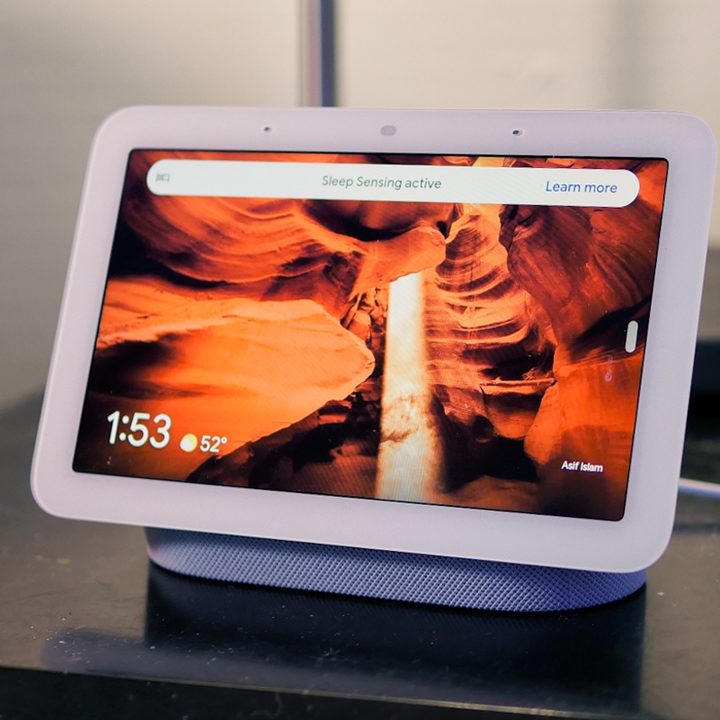
Google Nest Hub 2nd Gen on table.
John Velasco / Digital Trends

The next is Quick Phrases, a list of questions that Google can respond to immediately without the hotword. These include common commands like setting a timer, pausing the music, and more.

Powering all of these upgrades are new speech models that run on the device itself to make it faster. More comprehensive neural networks can better understand human speech, even if it’s broken and choppy. In the example, Google Assistant gave the speaker a gentle nudge to finish their question but was able to distinguish what the speaker wanted even with incomplete information. Google says the Tensor Chip is the driving force behind this update, providing the necessary computing power to make on-device speech processing a possibility.

For more news about Google I/O 2022, check here.

Patrick Hearn
Former Technology Writer
Patrick has written about tech for more than 15 years and isn't slowing down anytime soon. With previous clients ranging from…
Amazon’s Echo Hub just became the control freak your smart home needed
The Amazon Echo Hub showing the main screen.

Smart homes are supposed to make life easier. In reality, they often leave you juggling half a dozen apps just to dim the lights, check who’s at the front door, and figure out why the thermostat suddenly thinks you’re living in the Arctic.

That’s the problem Amazon’s Echo Hub has always tried to solve. It’s essentially a dedicated touchscreen for your connected home, bringing your lights, cameras, locks, thermostats, alarms, and routines into one place. Now, Amazon is giving that experience a significant refresh with a redesigned interface that feels like the smart home dashboard many people have been waiting for. The update is rolling out as a free software upgrade for existing Echo Hub owners, and while it doesn’t change the hardware itself, it may make the device much more useful day to day.

Read more
Amazon’s Sleep Studio feature turns Echo devices into a soothing sleep-bringer for kids
It brings bedtime stories, meditations, and calming sounds from Calm, Headspace, and Moshi to Echo Kids devices as part of the Amazon Kids+ subscription.
Amazon Echo Kids Sleep Studio featured

Amazon has added a new bedtime feature, called Sleep Studio, to its Echo Kids lineup. It gives children access to a curated library of sleep-focused content, including guided meditations, soundscapes, and stories from Calm, Headspace, and Moshi. The feature is included with Amazon Kids+, a subscription that comes bundled with Echo Dot Kids and Echo Pop Kids.

How it works

Read more
Apple Home app’s new AI superpowers are about to make your life easier
Apple Home App New features

At WWDC 2026, Apple showed off how Apple Intelligence is making its way into the Home app. While the Siri AI announcements stole most of the spotlight, these Home updates might be the ones that quietly make your day-to-day life easier. Here’s the lowdown on everything coming to the Home app with the iOS 27 update. 

Tired of notification overload?

Read more