
 Make sure to check out five reasons Windows Phone 7 will fail for an alternate perspective on Microsoft’s new operating system!
Microsoft is about to re-enter the smartphone war with its latest arsenal: Windows Phone 7. Those who’ve seen it in action will concede it’s more than a slight upgrade over Windows Mobile 6.5 – rather, it’s a complete redesign that bears little resemblance to its predecessors.
And let’s face it: the Redmond, Wash. software giant needs to do something drastic to get back in this fight. Microsoft’s smartphone market share rests at just 5 percent (with its Windows Mobile 6.5 or earlier operating system), down from 9 percent this time last year, according to Gartner. By comparison, RIM’s BlackBerry dominates at 18 percent market share, Google’s Android at 17 percent and Apple’s iPhone with 14 percent.
But in a category experiencing enormous growth – nearly 270 million smartphones are expected to be sold this year alone, up a whopping 56 percent from 2009 – there is certainly room for Microsoft to win back the hearts, and wallets, of consumers and businesses alike.
“With Windows Phone 7, we focused on two key things: ‘always delightful’ and ‘wonderfully mine,” said Microsoft’s CEO Steve Ballmer, while on stage in New York City this month to officially unveil the first-generation Windows Phone 7 devices. “We wanted it to be delightful across a range of different devices, and across a range of applications and experiences, whether you’re looking for a place to eat, reading mail, catching up with friends or making a phone call.”
“And we want you to make it yours – it’s all about your photos, your e-mail, your friends,” adds Ballmer.
Here we propose why Windows Phone 7 has what it takes to play with leaders like Apple, RIM and Google.
Windows Phone do succeed and we’ve picked the best Windows phones that show off Microsoft’s mobile platform.
Intelligent icons
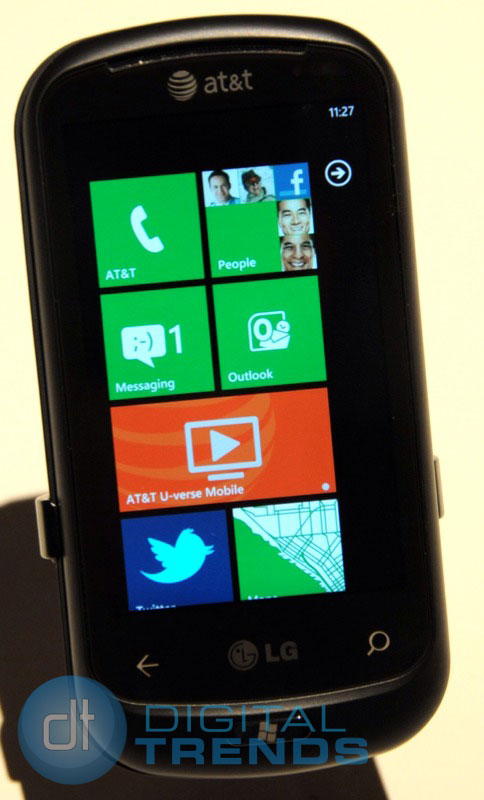
Rather than small and static icons, Windows Phone 7’s home page consists of active “tiles” that lead you to one of six main hubs. Real-time information is pushed to each tile, such as the number of new emails or voicemail messages waiting, social networking updates (such as someone’s Facebook status), photos, and more – so, at a glance, you can see what’s happening in your world. The touch-based user-interface is attractive and intuitive, as you swipe left, right, up and down to navigate through content.
 Consolidated contacts
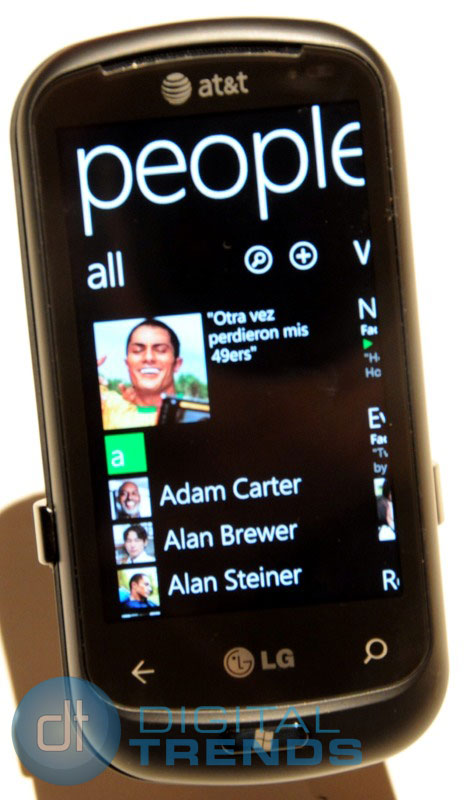
One of the half-dozen hubs is dubbed “People,” which delivers a consolidated view of each friend or colleague’s contact info (phone numbers, email addresses, and such), along with photos and social feeds – all on one page per person. This way, you need not close one app (e.g. Twitter) to open another (e.g. Contacts) to access information or media on a particular person. While others have tried this consolidated view in the past, such as some Android and Nokia smartphones, Windows Phone 7 handles it all in a more graceful way.
Strong ties with Windows
Because it’s based on Windows, users can expect familiar Microsoft Windows and Office programs, such as pocket versions of Outlook (for e-mail), Word (word processing), Excel (spreadsheets), PowerPoint (presentations), Internet Explorer (Web browsing, with upcoming Flash support), and others. If the previous Windows Mobile platform is any indication, the smartphone will also synch smoothly with a Windows PC. Windows Phone 7 devices also support Exchange accounts and all other major Web mail providers, including Windows Live Hotmail, Gmail and Yahoo! Mail.
Multiple carriers, manufacturers
Similar to Android’s approach, Microsoft is working with multiple hardware manufacturers, therefore consumers can find a form factor that best suits their needs and budget – and carrier of choice. Partners at launch include the likes of LG, Samsung, HTC and Dell, some with large touchscreens only, while others have slide-out QWERTY keyboards, too. Compared to, say, Apple, which only makes one kind of iPhone, and RIM is the only one that makes BlackBerry handsets. By opening it up to various hardware manufacturers, and their marketing budgets, Microsoft could gain market share quickly.
Xbox Live Integration
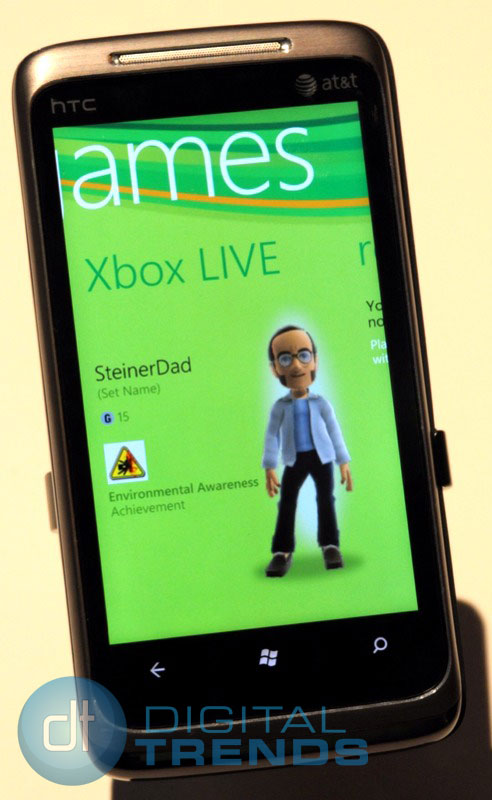
Another compelling feature of Windows Phone 7 is Xbox Live integration, offering the ability to play solo and multiplayer games (including many exclusives), synchronize scores, unlock new “achievements” and avatar outfits, and even post or accept challenges to other gamers. Gaming is big business, and with many millions of Xbox 360 owners in the U.S. and elsewhere, Microsoft is hoping to tap into this demographic – a tech-savvy group that’s likely to adopt smartphones and willing to spend money on games and other services.
Other cool features of Windows Phone 7 devices include a dedicated Bing search button on every device (which lets you look for online info by typing or saying a keyword) and support for Microsoft’s My Phone, a free service that automatically backs up your phone’s info (such as contacts, emails and text messages) onto a password-protected website. If you lose your phone, you can also track your phone’s whereabouts and erase your phone’s data by sending a command to restore the device to its original factory settings. Apple’s MobileMe, by comparison, costs $99 a year.
Another reason why Windows Phone 7 has a fighting chance: an estimated $400 million dollar marketing budget dedicated to launching the new platform.
Do the “pros” of Windows Phone 7 far outweigh the “cons”? Is Microsoft bringing smartphones to the next level or is it a case of too little, too late? The verdict is still out for the platform’s critical and commercial success, but one thing’s for certain: it’s going to be an interesting – and highly competitive – 2011 or the major smartphone players.



