
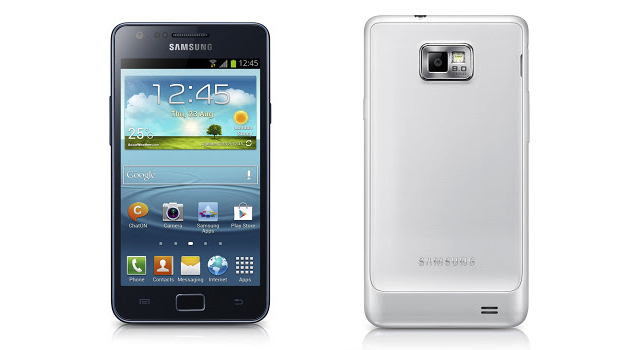
 No, you didn’t read the title wrong, Samsung really has announced an updated version of its flagship Android smartphone from 2011, this time called the Galaxy S2 Plus. So what has it done to deserve the Plus suffix? Let’s find out, starting with how it looks. The design itself hasn’t changed and the chassis is still just 8.5mm thick, but Samsung has brought it inline with the S3 by replacing the old textured casing with a smooth polycarbonate shell.
As you may have guessed by looking at the pictures, the Galaxy S2 Plus uses Android 4.1 Jelly Bean with Samsung’s Nature UX over the top. This coincides with a recent leak indicating the S2’s Jelly Bean update was almost ready for release, and sure enough features like Smart Stay, S Voice and Pop-Up Play are all present on the S2 Plus. The screen on which Android is displayed hasn’t changed, and is the same 4.3-inch, 480 x 800 pixel Super AMOLED Plus panel which won the phone so many fans the first time around.
The S2 Plus’s guts are also almost identical to the now classic S2, with a 1.2GHz dual-core processor and 1GB of RAM working hard to keep everything running smoothly, plus an 8-megapixel camera and LED flash can be found on the back of the device. Where the original had 16GB of storage space, the S2 Plus has to make do with 8GB, however it does have a microSD card slot to up this figure by a whopping 64GB.
Fleshing out the spec list are features such as dual-band Wi-Fi, a 2-megapixel video call camera, 1080p video recording, Bluetooth 3.0, GPS and a 1650mAh battery. Samsung will make two versions of the S2 Plus, one with NFC and one without, and they’ll both be available in white or dark blue color schemes, just like the Galaxy S3.
While we have all the technical details on the Galaxy S2 Plus, Samsung has neglected to provide any information on where and when the phone will go on sale. As the specification still holds up today, if it’s priced sensibly the aging phone could find itself with plenty of new fans, helping Samsung maintain its position at the top of the Android tree.



