The Android accessibility services team took the stage at Google’s I/O developer conference Wednesday to discuss a number of changes coming in Android O that aim to make the platform much more user-friendly for everyone.
Increasing productivity for accessibility services users was job one in preparing for Android O, according to Victor Tsaran, technical program manager on the Accessibility development team. To that end, the upcoming version of the mobile operating system delivers several critical improvements to TalkBack, an Android accessibility service that reads screen content to users who are visually impaired.
First, Android O introduces a separate volume stream for times when the system reads back to you. In other words, media like music and YouTube videos no longer has to play at the same volume that TalkBack does, so it’ll be easier to distinguish between them.
An even bigger addition is support for multilingual text-to-speech. Tsaran demonstrated the feature by having the system read an email out loud that contained phrases in several different languages. Android was intelligent enough to differentiate between them and adjust on the fly.
Android O will also allow fingerprint sensors on devices to support basic gestures so users can swipe between options. In tandem with TalkBack, this means a user who is unable to see the screen can swipe successively between menu items, hearing each one individually read back to them.
Finding and triggering accessibility services was another major focus for Android O. The update will bring a context-aware dedicated accessibility button at the bottom-right of the navigation bar, that will be able to trigger certain actions depending on what’s visible on the screen, and what services you have enabled.
For example, if you’re browsing the home screen, pressing the button will trigger magnification. If you’re using text-to-speech, it will bring up a remote control that allows you to start and stop screen reading, and determine the speed that the system reads to you.
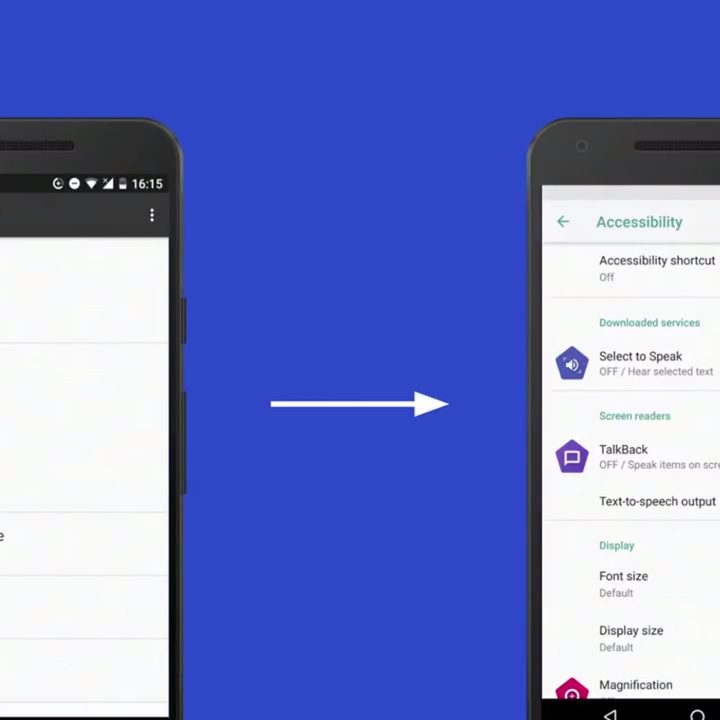
The focus on just making accessibility services easier to understand has made its way to the settings menu as well. Gone are the vague category descriptors, like “System” and “Services.” The menu now groups features based on the actions they perform, and also contains descriptions for what each service does. What’s more, a new shortcut has been added to turn accessibility services on and off on the fly, by pressing both volume buttons.
During the event, the development team stressed that Google arrived at many of these improvements by testing them, in iterative fashion, with real users. Likewise, the company is imploring third-party developers to perform their own accessibility research.
Last year, Google released an app called Accessibility Scanner that could examine developers’ apps and suggest changes to help enhance accessibility, like improving text contrast. Since that time, the company says developers have used the app to find over one million opportunities to improve their apps’ functionality for users with accessibility needs.