
Buying a phone is becoming harder and harder these days. There are so many different options on smartphones that it is hard to keep up with all the latest technology. With phones and tablets almost completely relying on touchscreen interfaces, the screens on these devices are easily the most important part of modern day devices. There are several different technologies behind these screens, and we aim to explain what some of these terms mean. If you’ve ever wondered what AMOLED, LCD, IPS, or TFT mean, you’re reading the right article.
These days you really only have two choices of screens when you are buying a smartphone or tablet: LCD or AMOLED. Many of you probably can’t tell the difference between the two screen types, but both technologies have inherent strengths and weaknesses. LCD has been around for a while, but AMOLED phones are gaining popularity thanks to Samsung and other manufacturers. There isn’t a clear winner at this point in time, so here’s a look at both.
Update: This article was originally published on June 18, 2012, and updated on Aug. 25, 2014, to reflect recent devices. DT writer Aaron Liu contributed to this article.
LCD
LCD, Liquid Crystal Display, has been a part of our lives for years now. Besides mobile devices, we see LCD screens being used with almost every computer monitor, and in the majority of TVs. While these screens are made of wondrous liquid crystals, they also require a couple panes of glass, and a light source. LCD screens produce some of the most realistic colors you can find on a screen, but might not offer as wide of a contrast ratio (darker darks and brighter brights) as an AMOLED screen.

Some common terms you will find associated with LCD displays are TFT and IPS. TFT stands for Thin Film Transistor, which makes the wiring of LCD screens more efficient by reducing the number of electrodes per pixel. One benefit of TFT displays is an improved image quality over standard LCD screens. Another popular LCD technology is In-Plane Switching, or IPS, which improves upon TFT by offering much wider viewing angles and color reproduction on LCD screens. IPS screens are able to achieve this by keeping all the liquid crystals parallel to the screen. IPS is generally preferable to standard TFT.
Notable Devices with LCD Screens: iPhone 5 and 5s, LG G3, Sony Xperia 2, Google Nexus 5.
AMOLED
AMOLED, Active Matrix Organic Light Emitting Diode, technology has grown in popularity in recent years, particularly among Samsung products. AMOLED screens consist of a thin layer of organic polymers that light up when zapped with an electric current. Due to this simple construction, AMOLED screens can be extremely thin and do not require a backlight. The benefit of losing a backlight is readily apparent: these screens are able to produce blacks so deep that the screen pixels can shut right off. Shutting off pixels can also save electricity and battery life in phones and tablets. Just keep your backgrounds close to black and you’ll save energy.

Sometimes when you read about AMOLED screens, you might hear people complaining about something called a “pentile” display. This is a feature of most color AMOLED screens. Instead of having just a single red, blue, and green sub pixel per actual pixel, pentile displays have a RGBG sub pixel layout which has two green sub pixels for each red and blue. The positive of this technology is that you are able to create a screen that is just as bright as normal screens with one third the amount of sub pixels. The negative of pentile screens is that they can appear grainy, or appear to be lower resolution due to the larger, more visible sub pixels. For a while, Samsung begun using a display type called Super AMOLED Plus, which does not use a pentile sub pixel layout and also improves viewability in direct sunlight — traditionally a weakness for AMOLED. Samsung equipped the Galaxy S II with a Super AMOLED plus screen, but then reverted back to Super AMOLED screens for the Galaxy S III, citing screen life as the reason for the switch.
Notable Devices with AMOLED screens: Samsung Galaxy S series, Nokia Lumia 900, HTC One S.
You be the judge
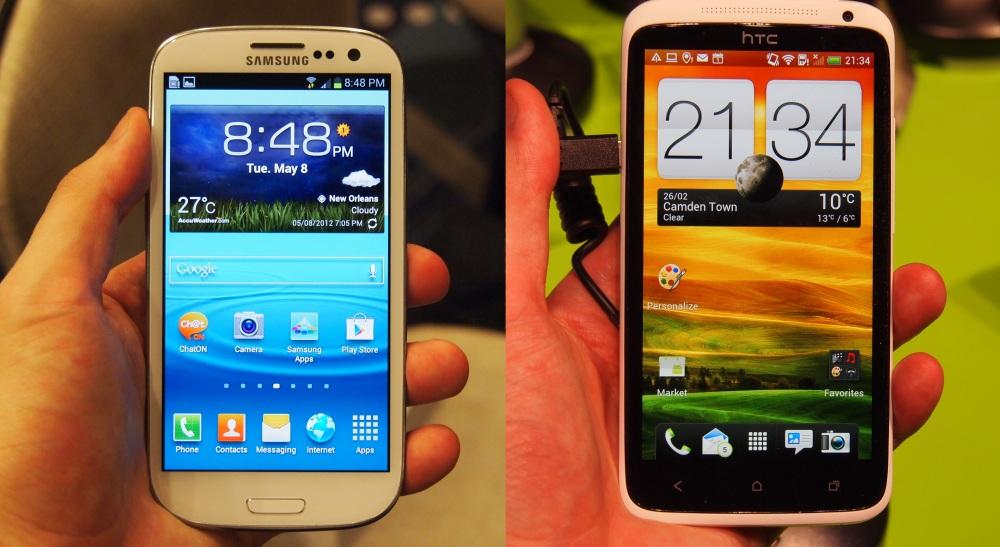
There are pros and cons for each type of screen, and both screen technologies can produce vivid, beautiful displays. The only way to know for sure if the screen on your future device will satisfy you is to try it out for yourself. You will be able to easily see if the screen viewing angles, contrast ratio, and color reproduction will fit your needs after using the phone for just a few minutes.
Related: LCD vs. Plasma TVs, LED vs. LCD TVs, and 1080p vs. 1080i.


