
With iOS 14.5, Apple will finally release a feature that was announced with iOS 14 but still hasn’t rolled out — the ability to prevent apps from tracking your activity across other apps and websites. The feature, called App Tracking Transparency, or ATT, takes a big swing at the likes of Facebook and Google, which make their money from collecting data about users, and then using that data to advertise to customers.
The end result of taking that swing, of course, is that user privacy is much more protected. You’ll have much more of a say in what data can be tracked across apps, and who can track it.
The way it works is relatively simple. When you download iOS 14.5, you may be prompted by certain apps to allow them to track your activity across apps and websites owned by other companies. You’ll then be able to either allow tracking or to ask the app not to track your activity. At its most basic form, that’s really all there is to App Tracking Transparency.
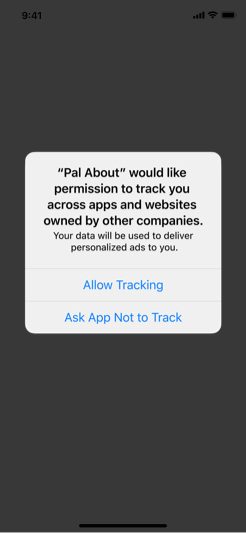
If you want to dig in, however, there is a bit more to it. For starters, you may not see the prompt immediately when you download iOS 14.5 — though that’s probably a good thing considering you won’t want to see hundreds of prompts for each app when you install the update. Instead, developers can choose when to serve up the prompt, and they can also choose not to ask you at all. Don’t worry though — apps aren’t allowed to track you before they ask for permission. And when they do ask for permission, they can offer a brief explanation for why you should allow them to track your activity.
If you want to see an overview of the apps that have been asked not to track your activity, you can do so by opening up the Settings app, scrolling down to Apps, then tapping Tracking.
For the uninitiated, each of your Apple devices has what’s called an IDFA, or an Identifier for Advertisers. This allows advertisers to track certain data without necessarily getting information that could be used to individually identify you as a person. If you tell apps not to track you in iOS 14.5, however, not only will they not get access to your device’s IDFA, but they’ll be told not to track you at all — including through metrics like your email address, phone number, and so on.
If you do hit the “Ask the app not to track me” button, certain information will be restricted, but companies could still technically track you. Apple’s policy, however, is that there will be consequences for apps that track you without your permission, such as the removal of the app from the App Store.
Apple has yet to release iOS 14.5, but the update is currently in beta, and it’s likely it will be released sometime in the next few weeks.


