
Apple is adding support this fall for storing driver’s licenses in the iOS wallet app as part of the iOS 15 update. Today, the company shared a list of the first eight U.S. states that would work with this feature.

When this feature rolls out, users will be able to access their identity documents and transit passes alongside their bank cards via the Apple Wallet app. Apple says Arizona and Georgia will be the first two states, with Connecticut, Iowa, Kentucky, Maryland, Oklahoma, and Utah joining them at some unspecified time afterward. The Transportation Security Administration (TSA) will be the first body that supports this initiative, allowing users to fly with just their iPhones as ID. There’s also word that iOS 15 will support the secure storage of vaccine cards, though until it rolls out, you have several other options.
“The addition of driver’s licenses and state IDs to Apple Wallet is an important step in our vision of replacing the physical wallet with a secure and easy-to-use mobile wallet,” said Jennifer Bailey, Apple’s vice president of Apple Pay and Apple Wallet. “We are excited that the TSA and so many states are already on board to help bring this to life for travelers across the country using only their iPhone and Apple Watch, and we are already in discussions with many more states as we’re working to offer this nationwide in the future.”
“This new and innovative mobile driver’s license and state ID initiative with Apple and states around the country will enable a more seamless airport security screening experience for travelers,” said David Pekoske, TSA administrator. “This initiative marks a major milestone by TSA to provide an additional level of convenience for the traveler by enabling more opportunities for touchless TSA airport security screening.”
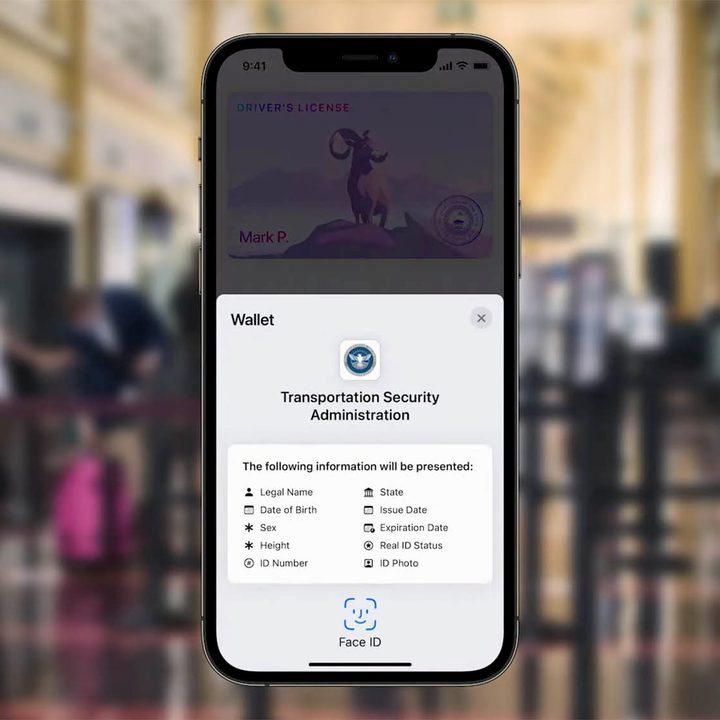
Digital licenses for the Apple Wallet have been worked on as a concept since 2016, but this is the first time users (albeit in these select states) would be able to access and make use of them. Adding a supported license to the Apple Wallet is as easy as adding a regular bank card or transit pass. You’ll also need to take a selfie at that point such that the state’s database can verify you before the ID is added to the Wallet app. It’s like waiting for a 2FA code when adding a bank card. Once enabled, you’ll be able to tap your iPhone or Apple Watch on identity readers to display your ID. Crucially and for privacy purposes, Apple says that users do not need to hand their devices over to agents, nor do they need to unlock them. The company also confirms that ID stored this way is encrypted and locked behind biometric authentication.
The precise dates for this to roll out aren’t yet available, but Apple says that participating states and the TSA will make an announcement. You’ll need to have iOS 15 on board of course, but that should be rolling out soon, and we already have a hands-on of its key features.


