  1. Home
  2. Phones
  3. News

Apple Music introduces a new way for you to create playlists with text prompts

Playlist Playground makes it easy to create mixes that match a mood or vibe.

Add as a preferred source on Google
Person touching phone with Apple Music app opened.
Bryan M. Wolfe / Digital Trends

Apple Music is following in Spotify’s footsteps with a new AI-powered playlist creation tool that lets users generate personalized playlists using text prompts. Apple has introduced the feature in the latest iOS 26 beta release, and it allows users to describe an activity, mood, or vibe to instantly build a custom playlist tailored to their request.

According to MacRumors, the Playlist Playground feature is live in the first iOS 26.4 beta and adds a text box to the bottom of the playlist creation page in Apple Music where users can enter their prompt. The app offers a couple of pre-set suggestions such as “morning coffee music,” “hip-hop party songs,” and “disco songs that defined the 1970s” to help users get started.
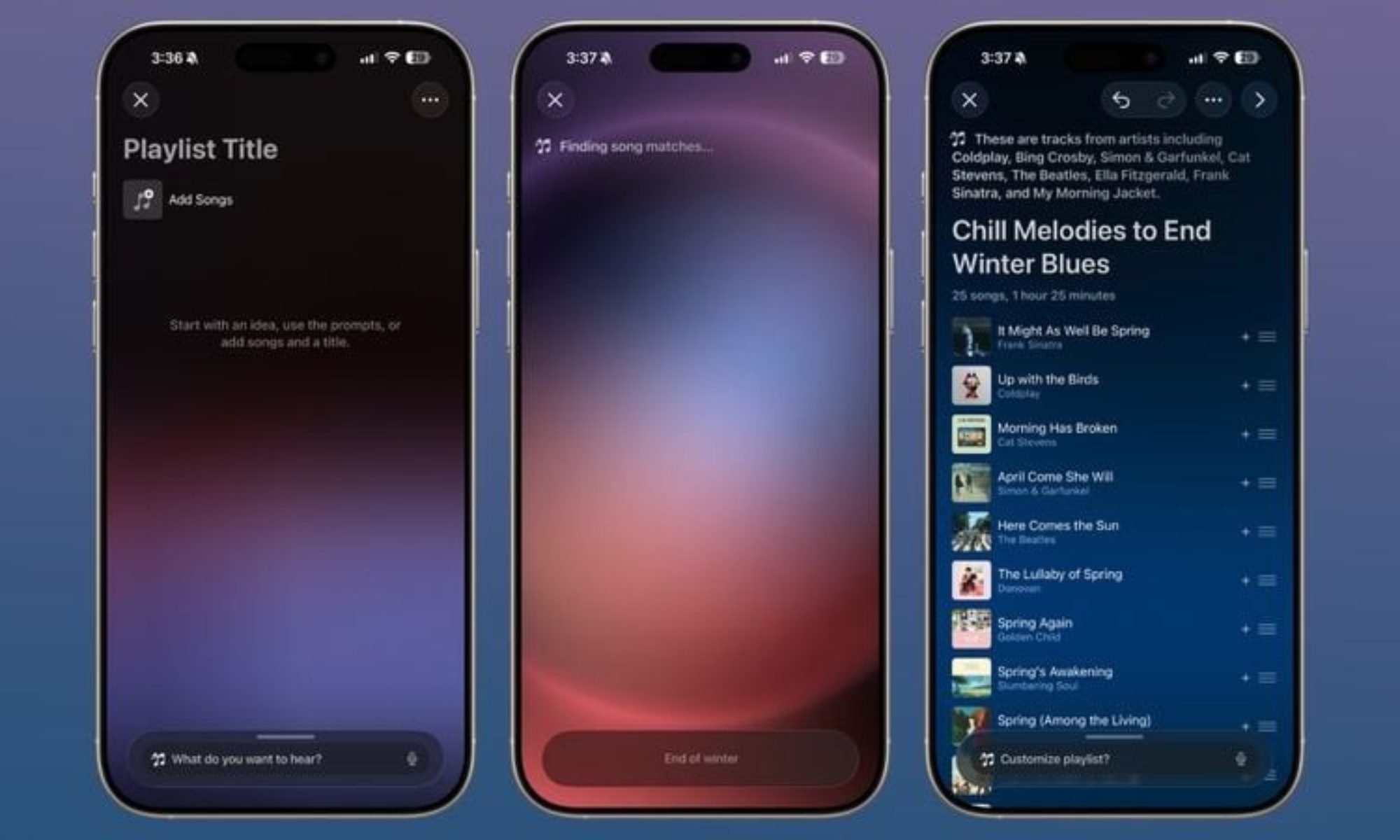
After selecting a suggestion or entering a custom prompt, Playlist Playground generates a 25-song playlist complete with a custom title. Users can further refine the mix by tapping the “Customize playlist” button at the bottom to add more prompts, change the title, or select a custom playlist cover.

Recommended Videos

It’s not immediately clear whether Playlist Playground takes a user’s playback history into account when generating a custom playlist. Spotify’s alternative does, allowing it to create mixes that more closely match the user’s taste. Apple is expected to share more details about how the feature works ahead of its stable release.

For now, Playlist Playground is limited to Apple Music users running the latest iOS beta build. The feature is expected to roll out more widely once iOS 26.4 hits the stable channel.

Pranob Mehrotra
Pranob is a seasoned tech journalist with over eight years of experience covering consumer technology. His work has been…
iOS 27’s Apple Pay fix won’t have you hunting for the right card before checkout
A small Apple Pay fix that's been a long time coming.
Apple Pay

Every time you check out with Apple Pay, tapping the card shown on the payment sheet to switch to a different one, they end up getting confused. In iOS 26, that tap does not switch your card. 

It opens an address-editing screen instead. The real card switcher is a different, easy-to-miss button near the bottom of the screen. If you’ve ever fumbled through Apple Pay at checkout, wondering what’s going on, Apple just fixed it with iOS 27. 

Read more
Apple has finally put the planned obsolescence rumors to bed
If you've been nursing an old iPhone, iOS 27 is the rare update that actually rewards you for it.
Electronics, Mobile Phone, Phone

Every time Apple released a new iOS update, people swore their iPhones suddenly felt slower. This rumor has followed Apple for years and while the company always denied it, the suspicion never really went away. With its latest iOS 27 update, I believe Apple has finally put this rumor to rest. 

I installed the beta on my iPhone Air, but the bigger story is what's happening on the older models. Reports from people running iOS 27 on even older iPhones say their phones feel faster, not slower.

Read more
Apple made Liquid Glass adjustable, which says plenty about Liquid Glass
The new slider is useful, welcome, and mildly hilarious after a year of Apple acting like transparent everything was the obvious future.
Text, Document, Business Card

Apple’s big glassy software future now comes with a way to make it less glassy. In iOS 27, users can adjust the translucency of the Liquid Glass effect, while macOS Golden Gate adds its own Liquid Glass controls under System Settings.

Liquid Glass is still alive across Apple’s platforms, still shimmering through menus and panels, still doing the elegant UI trick Apple clearly likes. The big visual bet has already earned a dimmer switch. After a year of treating translucency like the obvious next step, WWDC’s most revealing design update may be the one that lets people dial it back.

Read more