
We’re delighted that Sony has toned its angular design language down, slimming the bezels on the Xperia XZ2 and introducing a curved glass back that’s comfortable to hold. The redesign was long overdue, but while it’s a much better look, it’s not a durable design. Two sheets of glass with a metal frame in between is not going to react well when it meets the sidewalk or the keys in your pocket, even if it is tough Gorilla Glass 5.
If you want your shiny new Sony smartphone to stay that way, then you need to shop for the best Xperia XZ2 cases and covers.
Sony Style Cover Stand ($47)

This sleek folio cover from Sony is the perfect fit for your new Xperia XZ2. A minimal shell includes corner coverings to help guard against drop damage, the cover provides protection from every angle, and it also folds back to act as a landscape stand. There’s easy access for the fingerprint sensor, camera, buttons, and ports. You’ll also find that your Xperia XZ2’s display lights up automatically when you open the cover and off again when you close it. This case comes in gray, green, black, or pink.
Kugi TPU Gel Case ($6)

If you want to add a layer of protection without hiding those shiny curves, then this clear gel case might be a good bet. Made from flexible, TPU it’s an easy fit and features slim button covers, accurate cutouts, and a raised lip around the screen. It’s a simple, durable case that should deflect damage from bumps or minor falls, but we wouldn’t expect strong drop protection.
Roxfit Slim Standing Book Case ($23.50)

Fans of folio-style wallet cases who find Sony’s offering a tad too expensive might want to consider this instead. There’s a slim, minimal shell inside to hold the Xperia XZ2 securely and it’s wrapped in a polyurethane cover. A good range of perfectly placed cutouts offers unfettered access to the fingerprint sensor and camera on the back, buttons on the side, and the speaker on the front. The cover has a slot for one credit card or ID card and it can be folded back to act as a landscape stand. As a licensed “Made for Xperia” product, you can rest assured the fit and quality are good.
Olixar Flexishield Gel Case ($7.50)
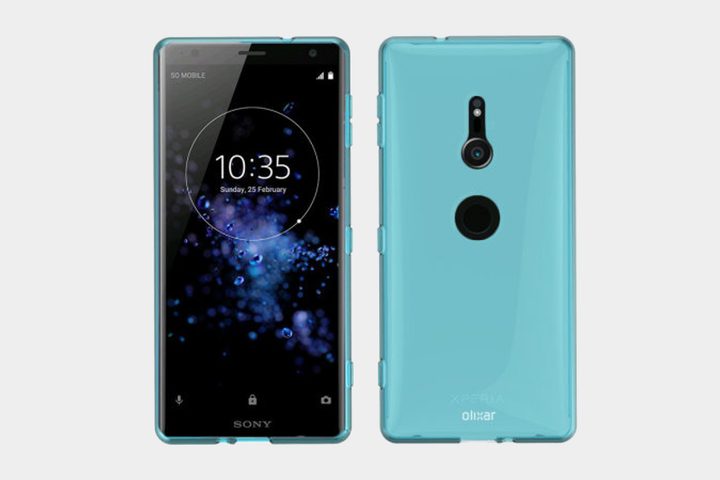
This is a really slim, basic gel case that should enhance grip and ward off scratches and minor bumps. There’s a slight lip around the screen, thin button covers, and accurate cutouts that won’t interfere with the camera, fingerprint sensor, or ports. If you need solid drop protection, then you should keep looking, but if you just want a basic protective skin, then this is a reasonably priced option. It comes in this slightly translucent blue, a more matte black, and a clear finish.
TopAce Carbon Fiber TPU Case ($7)

If your budget is limited, then a basic TPU case is usually a good option. This flexible case will enhance your grip and provide some drop protection. It boasts thin button covers, a protective lip around the screen, and openings for easy access to everything. The mock brushed metal finish features carbon fiber-style panels top and bottom to give it a stylish look that belies the modest price tag. It comes in black, blue, red, or gray (pictured).


