
Over the course of the past year, the lines that separate our digital lives from our nondigital ones have blurred more than ever. We spent an abnormal amount of time making sure our mic wasn’t on mute on Zoom calls, frantically scrolling social feeds to keep tabs on the coronavirus, and hosting virtual hangouts that were often more stressful than fun. It was a roller coaster of a year that we weren’t even remotely geared up for.
While a sense of normalcy will hopefully be restored to our lives over the next few months, there’s one pandemic trend that’s here to stay: Our increasing dependence on technology. We’ll likely remain glued to our screens and distracted by our devices until the pandemic has passed, simply because that’s our only option. But that doesn’t necessarily mean we should abandon the idea of digital well-being.
With that in mind, here are a few tips for improving your relationship with tech.
Ruthlessly block and unsubscribe from emails

Email spam feels so 2010, and yet our inboxes are constantly inundated by it. As we scramble to juggle multiple video calls, emails, and remote work every day, we can no longer afford the patience and the hours to deal with misleading emails.
There’s only one way out: Be ruthless. Most email platforms like Gmail offer simple options to quickly block and mark emails as spam. We generally don’t take advantage of these, though. Instead, we stick to the “Unsubscribe” button found at the bottom of emails or on the website’s built-in menu.
But it’s time for you to assertively shut off access to your inbox from recurring spam senders. When you do this, sites like Gmail don’t attempt to unsubscribe you from spam mailing lists. They instead take the role of bouncers and will quietly ban spammers from reaching you — no questions asked.
To do this on Gmail, click the three-dot menu at the top right corner and select Block.
Don’t upgrade unless it’s necessary
Tech companies do all kinds of things to convince us they’re trying to save the planet. But at the same time, they also use every trick in the book to convince us to toss our “old” gear in a scrap heap and buy their latest gadget.
Resist that nonsense. No matter how exciting all the next-gen upgrades (5G! foldable screens! ARM-based chips!) might sound, the reality is that none of them are great reasons to ditch your existing devices.
The facts are that 5G is still years away from actually being useful, phone camera upgrades are relatively incremental, and any laptop you bought in the past few years will likely remain relevant well into 2021. So it’s best to steer clear of retailers’ tech sections this year by either making the most out of the devices you already own or buying refurbished ones from 2020 — a move that will be friendly to both your pocket and the environment.
Take back control of your feeds
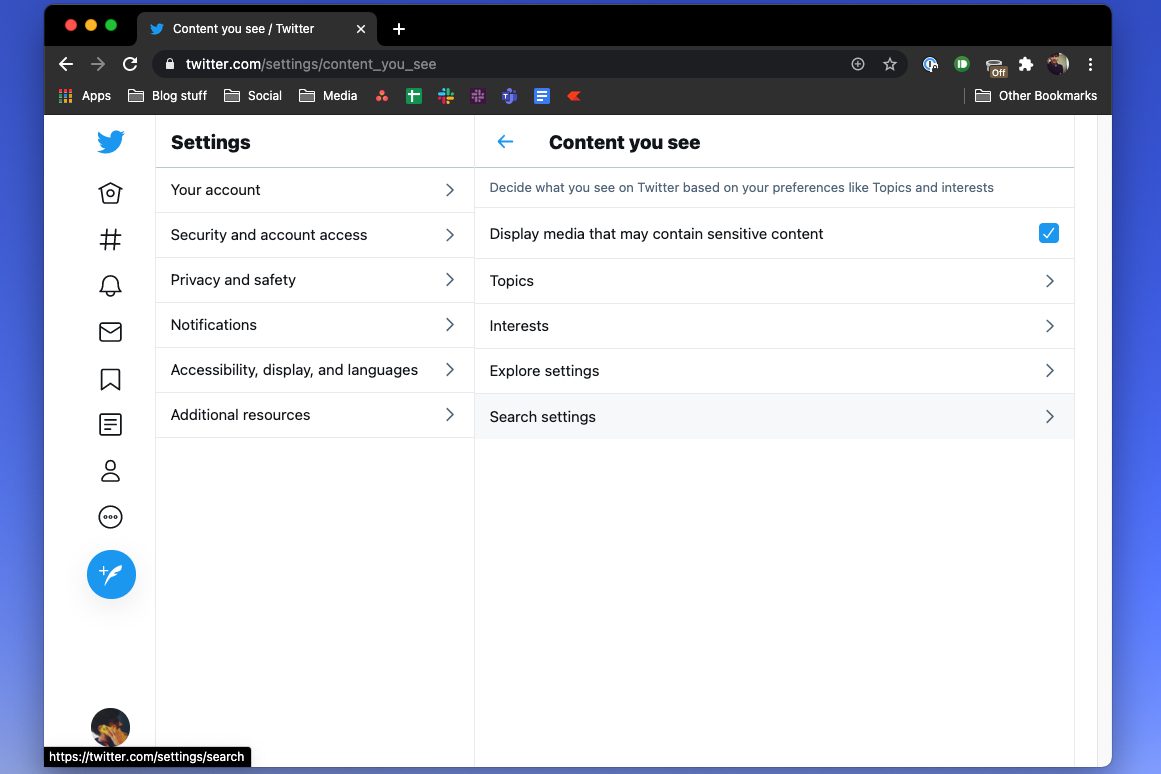
In 2020, social networks were largely our only windows to the world. But these platforms are not tuned to promote healthy social interactions. Their feeds are designed to surface the most incendiary, engaging, and provocative content. So if you plan to spend hours on them every day, you should consider tweaking these endless feeds to your liking.
Luckily, both Facebook and Twitter allow you to pick your topics and interests. On Twitter, you’ll find these options in Settings > Privacy and Safety > Content You See. For Facebook, visit Settings and Privacy > News Feed Preferences to customize what kind of posts you’d like to prioritize and boost to the top of your feed.
Get your subscriptions in order
Most of us have (and pay for) far too many subscription services. We have them for streaming movies and TV shows, getting grocery deliveries to our doorstep, managing our finances, and practically everything else that happens on a regular basis. While these subscriptions may have made surviving the pandemic a bit more bearable for you, they also automatically deduct money from your bank account every month.
Therefore, to ensure you’re not paying for a dormant subscription you no longer actively use, sign up for a service like Truebill that easily lets you track all of your online subscriptions and cancel the unwanted ones.
Secure your browsing
As the world’s web-browsing time skyrocketed during the pandemic, cybercrime reached an all-time high in 2020. The FBI received four times the number of cybercrime reports it generally does. And if estimates are any indications, these figures are not expected to go down anytime soon.
To avoid being the target of the next wide-scale cyberattack, you should do yourself a favor and configure all of those privacy measures you’ve been putting off.
There are many ways to browse more privately and, to be honest, you should set up all of them: Two-factor authentication for an extra layer of security in your accounts, password managers so that you can set more complicated codes, VPNs to anonymize your browsing lines, the Jumbo app to prevent Big Tech from tracking you, and more.


