  1. Home
  2. Phones
  3. Android
  4. Computing
  5. Mobile
  6. News

Google Backup & Sync app now available to help maintain your computer files

Google rolls out Backup and Sync app to make it easier to protect your files

Add as a preferred source on Google

Google wants to be better at backing up your computer’s files. While the company already offers a Drive folder that can be installed on your computer, Google has now officially launched a new way to back up and sync any folder that you point it toward on your computer. If you want, Google Backup & Sync can back up your desktop, entire documents folder, and more.

The new feature is now rolling out to users in the form of an app called Backup & Sync, and it replaces both the Google Photos desktop uploader and Google Drive for both MacOS and Windows. The app is aimed at regular consumers rather than business users — Google recommends business users stick with the already available Drive functionality that’s part of its G Suite.
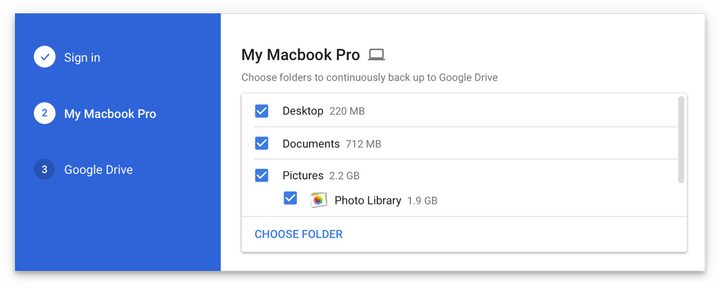
Image used with permission by copyright holder

the new Backup and Sync app backs up files and photos from your PC and stores them in Google Drive and Google Photos. You simply install the app, select Preferences, and then select the folders you want to backup. Click Choose folder to add other folders outside of the default choices.

Recommended Videos

You can also choose which files to sync back from Google Drive to your local computer and make available offline. Again, go to Preferences in the Backup and Sync app, click Google Drive, then Sync My Drive to this computer and specify whether to sync everything or just certain folders.

Finally, the Backup and Sync app can automatically upload files from a phone, camera, SD card, or other removable storage devices. Just go to Preferences, click USB devices & SD cards, click Plug in a camera or phone to backup files and click OK.

There are more options for you to check out once you’ve installed the app, which is available here for Google Drive and here for Google Photos. One thing, however, is for sure — syncing your entire computer will likely count pretty quickly toward your Google Drive storage limits, which sit in at 15GB for the free version — although you can buy more.

It’s nice to see Drive and Photos getting some upgrades. The Drive app has been around for some time now, and while it has gotten minor upgrades over the years, it has also become a little outdated. Another nice touch — and a necessary one — is that Google says your settings from the Google Drive app will remain untouched after the upgrade, so you shouldn’t have to worry about any of your files being lost or deleted during the switch. The integration with Google Photos is also a nice touch — and means that users should be able to more easily manage their photo libraries.

Updated: Added information on how the new Backup and Sync app works, as well as its availability.

Christian de Looper
Christian de Looper is a long-time freelance writer who has covered every facet of the consumer tech and electric vehicle…
Apple says Lockdown Mode thwarted spyware attacks with a clean slate
Apple’s strongest defense is actually holding up
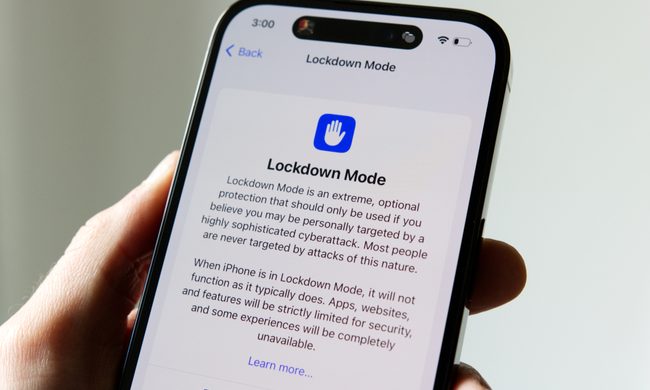
Lockdown Mode information page on an iPhone 14 Pro.

Apple says it has not seen a successful spyware attack on any iPhone with Lockdown Mode enabled, a claim it shared with TechCrunch.

Lockdown Mode arrived in 2022 as an opt-in feature for iPhone, iPad, and Mac. It was introduced as a stricter security mode for people at high risk of targeted attacks, such as journalists, activists, and government officials.

Read more
The Dynamic Island could shrink on the iPhone 18 series, and not just on the Pro models
One leaker, one claim, and a big question: is Apple genuinely ready to give every iPhone buyer the same design treatment as Pro owners this cycle?
Apple iPhone 17 Pro in Cosmic Orange leaning on a gray wall.

Apple’s Dynamic Island has been around long enough that most people have made their peace with it or forgotten it’s there. In fact, I’ve seen people associating the pill-shaped notch with newer iPhone models (released in the last 3 years). Now, a fresh leak suggests that the notch replacement is about to shrink, not just on the expensive models. 

What did the leaker actually say?

Read more
Apple Podcasts finally gets serious about video, adds multiple YouTube-inspired features
With offline downloads, Picture-in-Picture, and a dedicated video hub, iOS 26.4 turns Apple Podcasts into a platform creators can no longer afford to ignore.
Electronics, Phone, Mobile Phone

For years, the Apple Podcasts app supported video, at least it did technically, but nobody used it. Creators ignored it, while listeners forgot it. Meanwhile, other platforms like YouTube and Spotify quietly built empires on video podcasting. However, that changes with the iOS 26.4 update, or at least that is what Apple hopes for. 

Video podcasting exploded in popularity in recent years, with audiences gravitating toward platforms that treated the format well (as already mentioned above). Despite being an iPhone user, I personally consume podcasts on YouTube (I briefly paid for the Premium membership as well). 

Read more