

Last year, Google launched the official version Family Link — a free service for Android and iOS that lets parents manage the content of their kids’ devices. While kids can access Google services like Gmail, Maps, Chrome, and Photos, it ties their to their parents’ devices — providing them with notifications about virtually everything their kids do.
Since then, the company continues to add new features that both parents and kids can take advantage of. Here’s everything you need to know about Google’s Family Link app.
Family Link expands its availability, supports more devices and accounts
Google also announced that Family Link is expanding globally. Currently, the app is live in 30 countries around the world such as Canada, Brazil, Japan, and more. The app will soon be available in almost every country around the world.
Google is also providing parents with the ability to control more accounts. The company says that parents have been expressing they’d like to not only manage their younger children’s accounts but their teenagers’ accounts as well. Soon, parents will be able to manage existing Google accounts and devices with kids 13 and over — or the relevant age of consent in their region.
Earlier in the year, Google added the ability to log into a Chromebook with a Google account that’s managed with Family Link. This allowed parents to manage their kids’ website restrictions as well as account settings for the child’s profile on a device. Parents will soon be able to use the same features on a Chromebook for a teenager with an already existing Google account. The company is working on bringing parents the ability to manage the apps their children can use and set screen time limits on Chromebooks as well.
Using Family Link with Google Assistant
Starting next week, families will be able to do more with Google Assistant. Along with the ability to lock their child’s device with the Family Link app, parents can ask Google Assistant to do it for them, instead. Simply say, “Hey Google, lock Julian’s device” whenever a situation calls for putting electronics away — the Assistant will then ask you to confirm the specific device you want to lock.
You’ll also be able to use Google Assistant to find electronics for whenever they get left behind in a bedroom or between couch cushions. By saying, “Hey Google, find Julian’s device,” it will prompt the device to ring at full volume in order to help you locate it.
Those with Google accounts for children 13 and under (or also under the age of regional consent, not teenage accounts that are managed by the app) connected to Family Link, will also have the ability to ask the Assistant more fun questions. In return, the Assistant will reply with new, kid-friendly answers.
At a demo with Google, the Assistant was asked: “Hey Google, check for monsters,” at which point the Google Home Mini made sound effects that indicated it was physically scanning the room for monsters. Once it was done, the Assistant confirmed the room was free from any scary creatures. Other questions that can be asked are “Hey Google, I lost my tooth” or “Hey Google, what should I draw?”
Last year, Google added more than 50 games, stories, and activities for parents to use with their kids. With parental consent, children under 13 can have their own experience with Google Assistant that’s personalized to their account whenever they log in. With Voice Match, you can also train the Assistant to recognize which child or parent is speaking.
How to use Family Link with Android and iOS
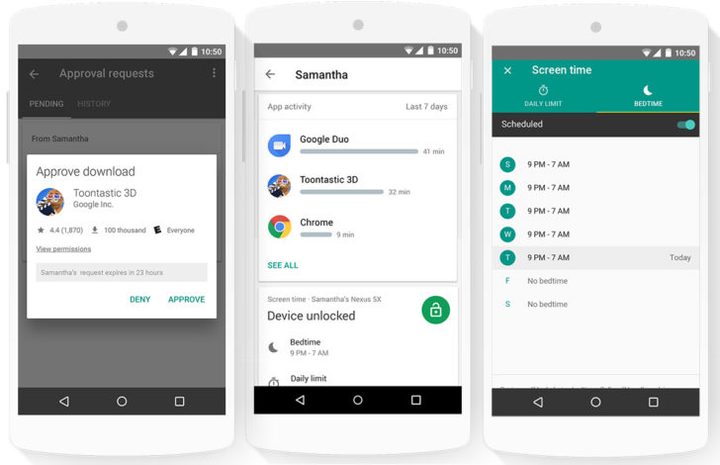
For those unfamiliar with Family Link, here’s how it works on Android devices: If kids try to download an app or visit a site, parents receive a notification that they can approve or deny. They get detailed analytics of what apps their kids are using, and even a rundown of which services they spend time with.
Once parents download the Family Link app to the child’s phone and their respective smartphones, they can allow or block access to any app on the child’s device, or limit the amount of time they can spend with a specific service. Ratings and information from the Entertainment Software Rating Board (ESRB) and Google’s own internal review board help to indicate the age-appropriateness of apps’ content (Maps is rated ‘G,’ for example).
Family Link includes broader device controls, too, like a feature that limits kids to a certain amount of screen time each day. Parents can set “blackout periods” during which kids won’t be able to access their devices (think dinner or bedtime), and a Lock Devices Now option instantly locks a child’s device.
YouTube is the exception to the rule. Family Link directs kids to YouTube Kids, Google’s child-friendly version of YouTube with built-in age controls and restrictions.
Family Link can control Android devices running Android 7.0 Nougat or higher, and select Marshmallow devices. Parents need to have a phone running Android 4.4 KitKat or higher, or iOS 9 and higher.
Family Link on iOS, isn’t as holistic. Because of the iPhone’s operating system-level security restrictions, Google doesn’t offer a Family Link client for kids’ devices — it wouldn’t be able to set time limits or remotely lock the device. Basically, parents can manage an Android device from an iOS device, but they can’t manage an iOS device from another device.
Family Link isn’t Google’s first attempt at kid-friendly controls. In Android 4.3 Jelly Bean, it introduced Restricted Profiles, which locked down potentially harmful features. But it was largely an all-or-nothing affair — kids were prevented from using Gmail, for instance, and couldn’t back up photos to Google’s cloud services.
Updated on September 18: Google added additional features to Family Link when using it with Chromebooks and Google Assistant; Family Link is also rolling out to almost every country around the world.


