
Since last August, it was reported that Google was planning to shift the photo tool out of Google+ and into its own standalone product, as it did with Hangouts. At the Google I/O conference on May 28, 2015, Google formally announced its new standalone service, Google Photos, which would give users unlimited uploads without requiring a Google+ subscription. The service is available as a new app for Android and iOS, and on the Web, starting today. You can download the Android version on Google Play now.
“We thought taking more photos would make it easy to relive them.”
Google Photos supports photo uploads up to 16 megapixels and videos up to 1080p, and higher-resolution content will be downsized from the original. In his keynote presentation, Anil Sabharwal, Google’s director of Photos, says the app “stores compressed versions at near identical visual quality.” This means Photos won’t support uncompressed RAW files, which is something Google+ does, but it will handle JPEG images from phones and basic point and shoots. If you want to store the original versions of your photos, including RAW, it will hit your Google account’s 15GB of free storage instead.
Sabharwal says free unlimited storage is one of three components that are the foundation of Google Photos. The first is “a home for all your photos and videos … a private and safe place to keep your lifetime of moments.” Google Photos automatically backs up all your images and videos from your phone, tablet, and computer, which are then accessible from any device.
With all those “moments” photographed through the years, it has become a difficult chore to organize and search for them. “We thought taking more photos would make it easy to relive them,” Sabharwal says. So, as part of the second component, Google worked on making it easy to organize the photos and “bring your moments to life.”
In his demonstration, Sabharwal showed how easy it was to browse through years of photo moments. Photos can be viewed across any day, month, or year, simply by pinching on the screen. Sabharwal noted that performance is so responsive that “every interaction feels fast, as if every photo is local.” Swiping the screen from the right brings up Collections, which is a timeline of moments.


To help users easily and quickly organize the content, Photos can automatically sort them by people, places, and things that are important, thanks to auto tagging, which uses machine learning. Photos could even facially recognize photos of Sabharwal’s niece, all the way back to when she was born. From a facial recognition standpoint, the ability to group images of the same person over time is really impressive. With this intelligent sorting, Photos also has an improved search function that lets you find past images by basic keywords, even if you can’t remember exact details. Everything is also kept private.
To bring moments to life, Photos lets you edit or make collages, stories, animations with soundtracks, etc. But to save you time in actually having to do it by yourself, a new feature, called the Assistant, can suggest and automatically create unique content from the photos and videos you’ve uploaded.
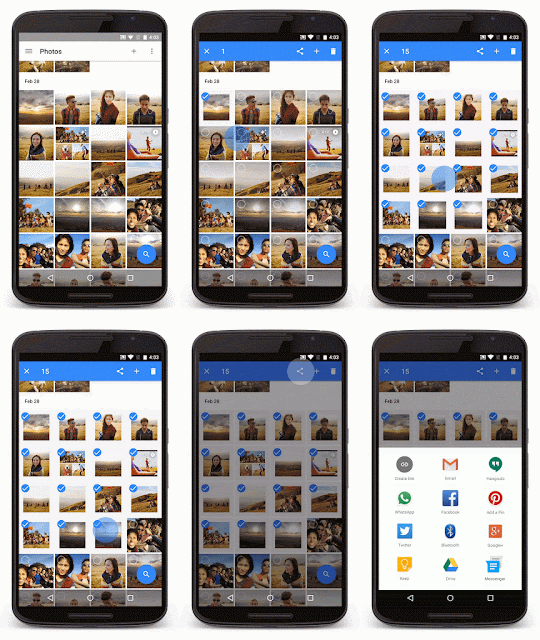
The third component is the ability to share. Photos support sharing to a variety of places, whether it’s Pinterest, Twitter, Facebook, Hangouts, Bluetooth to another device, or as a link you can email. One thing it simplifies is the sharing of multiple photos. Instead of tediously tapping on each photo to select it, users can drag their fingers across the photos they want to include.
Google’s move would pit Photos against Flickr, Dropbox, Apple iCloud, and other similar photo storage services. Unlimited photo uploads would overshadow Flickr’s free 1TB limit. But note that the unlimited storage only allows for 16-megapixel compressed JPEGs, while Flickr’s 1TB allows for RAW uploads. If you’re a pro or enthusiast photographer, Google Photos’ unlimited storage may not be so attractive. It’s obvious the target user here are casual photographers.
However, Photos would also bring along the cool editing and management tools that Google introduced. Considering that consumers are projected to capture more than 3TB of photos in 2016 (based on info Western Digital gave us) that unlimited storage, for this particular audience, is going to be enticing.


