1. Home
  2. Phones
  3. Mobile
  4. Photography
  5. Social Media
  6. Evergreens

No mo’ FOMO — Here’s how to delete your Snapchat account

Add as a preferred source on Google
Snapchat is one of the most popular social media network among young adults, having almost 200 million daily active users in the first quarter of 2018. While there has been recent layoffs and celebrity backlash, the multimedia messaging app — best known for its ephemeral “snaps” and wacky set of filters — remains a unique and fun way to share life’s biggest (and smallest) moments as they happen.
Recommended Videos
Once installed, the app allows you to send informal messages and photos to your friends and family, which will then disappear a few seconds after they open them. With Stories — a landmark feature Snapchat first rolled out in late 2013 — you can also post pictures or videos of your daily activities for anyone who follows you to see (but these will disappear after 24 hours). They recently introduced a tool to delete messages, in case you were have some regrets about what you sent.

While at times whimsical and entertaining, we recognize that Snapchat is not for everyone. Especially with the newest design rollout, separating friends from brands, we get that maybe it’s time to move on. If you found yourself perplexed by the inner workings of the mobile app, or have simply grown tired of the constant barrage of indulgent selfies and never-ending dog filters, deleting your account might be the best way to preserve your sanity. Deleting the Snapchat app from your iPhone or Android device could save you a lot of time (and battery power) in the long run.

Ready to step out of the yellow-hued limelight? Here’s how to delete your Snapchat account once and for all.

Time to pull the plug

Step 1:  Unfortunately, Snapchat doesn’t allow you to delete your account from directly within the mobile app, which can be a bit annoying when you consider that all of its functionality is embedded inside the app. Instead, you have to head over to Snapchat’s website using your browser of choice. Keep in mind, however, that this should work in just about any browser, including Safari, Chrome, or any other offering you have installed on your phone.
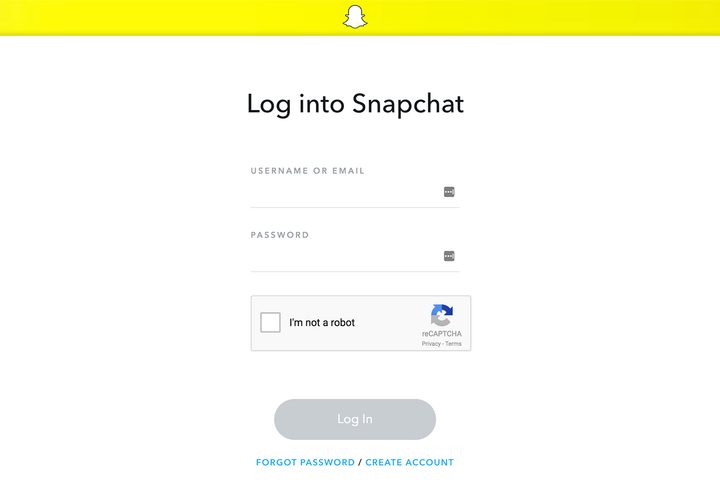
Image used with permission by copyright holder

Step 2: Once you have landed on the correct page, enter the appropriate credentials (username or email, and password), verify that you’re not a robot using the checkbox located in the captcha field, and click the purple Log in button to access your account information.
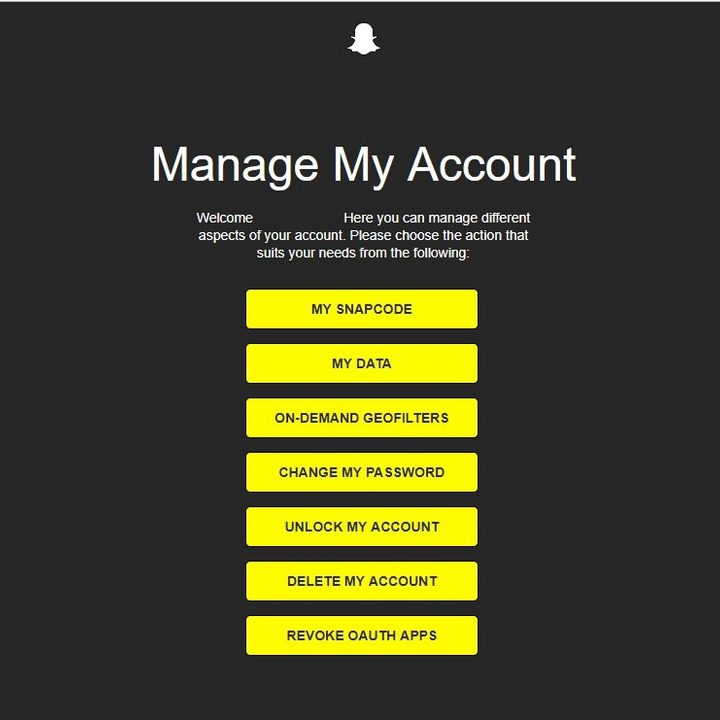
Image used with permission by copyright holder

Step 3: Next, locate and click the yellow Delete My Account button near the bottom of the resulting menu.
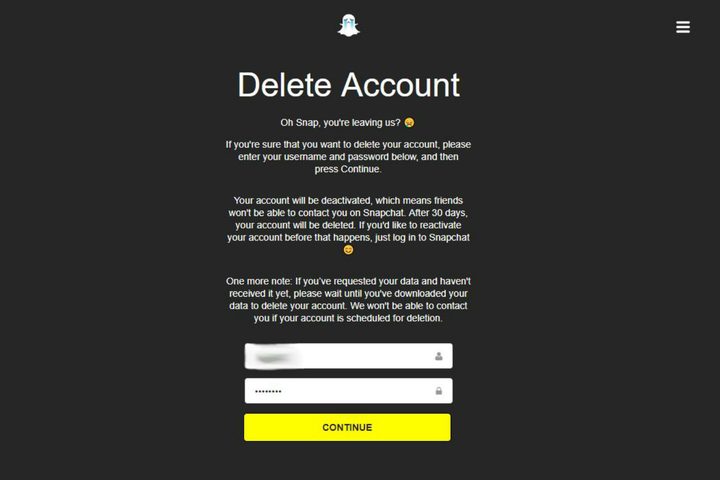
Image used with permission by copyright holder

Step 4: You will be directed to a screen where you have to re-enter your password one more time, then click “Continue.”
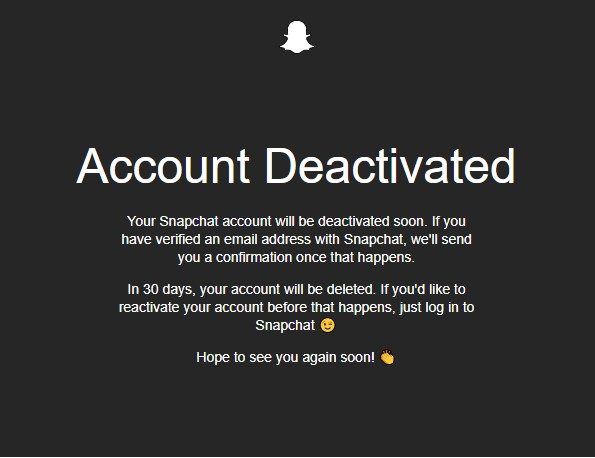
Image used with permission by copyright holder

Step 5: If you see the image above, then you’re done! Snapchat will immediately deactivate your account, but you will have to wait 30 days before your account is permanently deleted. This is somewhat of a safety feature, in case you change your mind and can’t live without dancing hot dogs, Snapchat’s ubiquitous face-swapping feature, or some other filter that’s become a part of your life (for better or worse). That said, if you choose to do so, you can easily reactive your account by logging in with your old information. However, be warned that you won’t be able to retrieve or change your password while your account is deactivated.

Social media can be a great way to connect with friends and build a personal network, but many of us may find ourselves lost in the sea of digital noise at some point or another. All it takes is one bad experience — or the desire to spend your time doing something more productive — to encourage us to step away from our smartphones. No matter what your reasons are for taking a break, or for deciding to forgo social networking completely, we’re here to help. After all, constantly sending snaps to everyone you know doesn’t define you.

Looking to unplug even further? Check out our guides for deleting your Tinder and Facebook or Instagram accounts.

Kailla Coomes
Former Staff Writer
Kailla is a staff writer from Portland, Ore. She studied Journalism at the University of Oregon and graduated in 2014. In her…
Apple says Lockdown Mode thwarted spyware attacks with a clean slate
Apple’s strongest defense is actually holding up
Lockdown Mode information page on an iPhone 14 Pro.

Apple says it has not seen a successful spyware attack on any iPhone with Lockdown Mode enabled, a claim it shared with TechCrunch.

Lockdown Mode arrived in 2022 as an opt-in feature for iPhone, iPad, and Mac. It was introduced as a stricter security mode for people at high risk of targeted attacks, such as journalists, activists, and government officials.

Read more
The Dynamic Island could shrink on the iPhone 18 series, and not just on the Pro models
One leaker, one claim, and a big question: is Apple genuinely ready to give every iPhone buyer the same design treatment as Pro owners this cycle?
Apple iPhone 17 Pro in Cosmic Orange leaning on a gray wall.

Apple’s Dynamic Island has been around long enough that most people have made their peace with it or forgotten it’s there. In fact, I’ve seen people associating the pill-shaped notch with newer iPhone models (released in the last 3 years). Now, a fresh leak suggests that the notch replacement is about to shrink, not just on the expensive models. 

What did the leaker actually say?

Read more
Apple Podcasts finally gets serious about video, adds multiple YouTube-inspired features
With offline downloads, Picture-in-Picture, and a dedicated video hub, iOS 26.4 turns Apple Podcasts into a platform creators can no longer afford to ignore.
Electronics, Phone, Mobile Phone

For years, the Apple Podcasts app supported video, at least it did technically, but nobody used it. Creators ignored it, while listeners forgot it. Meanwhile, other platforms like YouTube and Spotify quietly built empires on video podcasting. However, that changes with the iOS 26.4 update, or at least that is what Apple hopes for. 

Video podcasting exploded in popularity in recent years, with audiences gravitating toward platforms that treated the format well (as already mentioned above). Despite being an iPhone user, I personally consume podcasts on YouTube (I briefly paid for the Premium membership as well). 

Read more