  1. Home
  2. Phones
  3. Android
  4. Mobile
  5. Evergreens

How to turn on Now Playing and see music history on your Google Pixel

Add as a preferred source on Google

If you own a Pixel phone, discovering what music is playing near you is now easier than ever. Google includes an exclusive feature called Now Playing in its Pixel 2 and newer phones, so you’re not scouring the internet trying to figure out what that song was you just heard playing.

In short, the Now Playing feature automatically recognizes and shows you the title and artist of that mystery song on the lock screen. It also keeps track of those songs so you can access them later. However, you must manually enable this feature first. In this guide, we show you how to enable Now Playing, how to access the history, and tweak the notifications you get.

Recommended Videos

How to turn on Now Playing

Now Playing shows songs that are playing in your vicinity right on your lock screen. Again, this feature is only supported on the Google Pixel 2 or later — you won’t be able to follow these instructions on other phones or the original Pixel. Here’s how to turn it on:

Step 1: Swipe down from the top to open the Shade completely and then tap the cog icon. This opens the settings panel.

Step 2: Tap Sound and Vibration.

Step 3: Scroll down and tap Advanced to expand the settings.

Step 4: Tap Now Playing.

Step 5: Tap the toggle next to Show Songs on Lock Screen to turn this feature on.

When your phone is connected to Wi-Fi and charging, it will download a song database to recognize songs. Once your phone has downloaded the database, you’ll automatically get song info on the lock screen.

See your Now Playing history

Want to see a song that was playing yesterday? You can do that too. Here’s how:
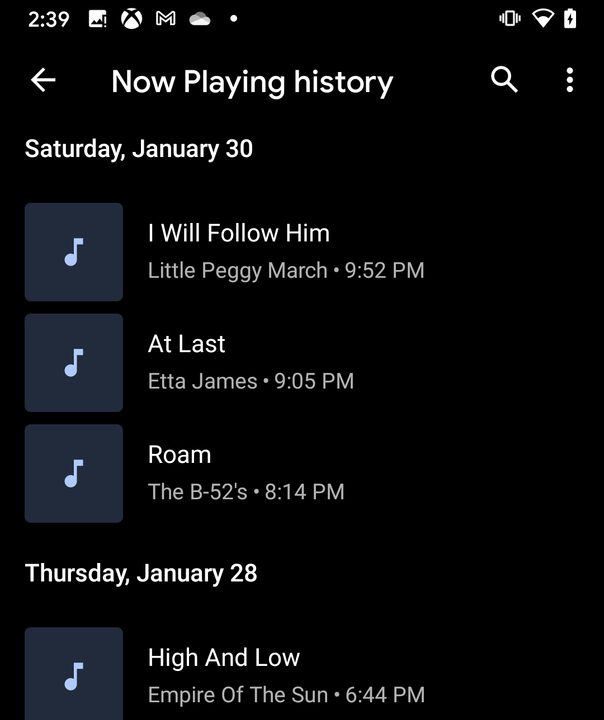
Now Playing History
Image used with permission by copyright holder

Step 1: Swipe down from the top to open the Shade completely and then tap the cog icon. This opens the settings panel.

Step 2: Tap Sound and Vibration.

Step 3: Scroll down and tap Advanced to expand the settings.

Step 4: Tap Now Playing.

Step 5: Tap Now Playing History.

You should now see a list of songs that have played near you. You can tap a song to listen to it or share it in your music app.

Manage Now Playing notifications

Don’t want notifications to show up at the top of your display when a song is playing? You can disable those notifications so that you’ll only see what’s playing on the lock screen. Here’s how:

Now Playing Notifications
Image used with permission by copyright holder

Step 1: Swipe down from the top to open the Shade completely and then tap the cog icon. This opens the settings panel.

Step 2: Tap Sound and Vibration.

Step 3: Scroll down and tap Advanced to expand the settings.

Step 4: Tap Now Playing.

Step 5: Tap Notifications.

Step 6: Tap on the toggle next to the notification you want to disable. There are three choices: All, Download, and Recognized Music.

Christian de Looper
Christian de Looper is a long-time freelance writer who has covered every facet of the consumer tech and electric vehicle…
WhatsApp Plus is here, and you can safely ignore this subscription
WhatsApp wants a monthly fee for what other apps include by default, and that's a problem Meta can't dress up with custom icons.
WhatsApp Plus screenshots.

WhatsApp has fiercely defended its status as a free, no-nonsense online messaging app for over a decade, but a new subscription tier is muddying the waters. 

Meta is rolling out WhatsApp Plus, a paid subscription model, to a limited number of iPhone users using the latest version of the App Store. 

Read more
Apple and Google just put a lock on your green-bubble texts, and it’s about time
The green bubble finally has something to brag about. Apple and Google's unlikely alliance brings real encryption to everyday cross-platform texting.
E2EE arrives on RCS for iPhone and Android phones.

For years, texting between an iPhone and an Android device felt less like a private conversation and more like shouting across a crowded street. Well, that changes on May 11, 2026, as Apple and Google jointly launched end-to-end encryption (E2EE) for RCS messaging. 

The long-awaited feature is rolling out first in beta with iOS 26.5 (also announced today) and the latest version of Google Messages. 

Read more
The Razr Ultra 2026 is everything a flip phone should be, but I’m not paying $1,500 for it
A flip phone was never supposed to cost this much. At $1,500, the Razr Ultra finds itself in an uncomfortable fight against everything else your money can buy.
Motorola Razr Ultra

I'll be blunt: $1,500 is a lot of money to spend on the Razr Ultra, a clamshell phone that folds in half. In fact, it's a lot of money to spend on any smartphone, especially when a Galaxy S26 Ultra or iPhone 17 Pro Max costs less and still leaves a few hundred dollars in your pocket, or throwing in a couple of hundred bucks can get you a full-fledged book-style foldable. 

For me, the Razr Ultra doesn't quite make a strong case at $1,500. In isolation, it's a genuinely impressive flip phone that gets all the basics right and delivers the premium experience you'd expect at this price. The Alcantara back, the 5,000-nit display, the silicon-carbon battery, and the dual cameras on the back make it sound like a complete package.

Read more