  1. Home
  2. Phones
  3. Mobile
  4. How tos

How to use the distance apart widget on iOS 16

Add as a preferred source on Google
The distance apart widget on iOS 16.
Joe Maring/Digital Trends

So, you want to know how far apart your best friend or significant other is from you without tracking their location. Or, if you're a parent, maybe you want to know how far your child is from you when they go wandering around their favorite store at the mall or, heaven forbid, get separated by a large crowd at Disney World. A viral TikTok video showcased distance-apart widget that lets you do just this — but you won't find it pre-installed with iOS 16. Like any widget, you have to download a special app that allows you to enable it on your home screen or lock screen. In this case, Widgetable.

Recommended Videos

Difficulty

Easy

Duration

5 minutes

What You Need

  • iOS 16

  • Widgetable app

  • iPhone 8 through 14 or second-generation iPhone SE

Widgetable is a widget app that allows you to edit social widgets to see your friends' status in real-time, such as their mood and distance relative to you — the latter of which is the topic of this guide. Let's jump into how you can enable the distance apart widget (or Friends Distance widget) so you can monitor your friends' distance as you get closer or further away from them.

The distance apart widget on iOS 16.
Joe Maring/Digital Trends

How to use the distance apart widget on iOS 16

It's likely you didn't know Widgetable existed until you heard about the distance apart widget. So, if you haven't done so already, go to the App Store and download the Widgetable app. Once that's done, follow the steps below.

Step 1: Open the Widgetable app.

Step 2: On the Lock Screen menu, scroll down to the Distance widget. It contains the caption Our Distance followed by the number of miles.

Step 3: Tap the Distance widget, and then tap the Friends tab on the right. Send your Widgetable code to your friend and ask that friend to do the same so that you can add each other to the friend list.

Step 4: Go back to the Distance widget's page, tap Select in the box under Select a friend, and pick any friend on the list. Once the bonding process is complete, save the widget.

Step 5: Go to your Settings app and scroll down to the Wallpaper tab, then tap Customize on the lock screen side.

Step 6: Tap the widget box on the lock screen, scroll down the Add Widgets page to Widgetable and tap it. Swipe to either the Circular Widget or Rectangular Widget, and tap the empty widget to go to the editing page. Select the Friends Distance widget, and install it on the lock screen.

If the distance apart widget from Widgetable still feels like an invasion of privacy, you don't have to add it to your iOS 16 lock screen — nor ask your friends to take part in it. It's just a fun app to use with a friend or partner who also wants to use it.

Cristina Alexander
Gaming/Mobile Writer
Cristina Alexander is a gaming and mobile writer at Digital Trends. She blends fair coverage of games industry topics that…
Apple says Lockdown Mode thwarted spyware attacks with a clean slate
Apple’s strongest defense is actually holding up
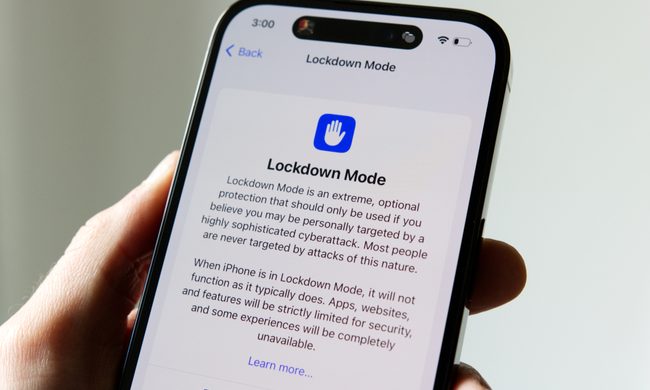
Lockdown Mode information page on an iPhone 14 Pro.

Apple says it has not seen a successful spyware attack on any iPhone with Lockdown Mode enabled, a claim it shared with TechCrunch.

Lockdown Mode arrived in 2022 as an opt-in feature for iPhone, iPad, and Mac. It was introduced as a stricter security mode for people at high risk of targeted attacks, such as journalists, activists, and government officials.

Read more
The Dynamic Island could shrink on the iPhone 18 series, and not just on the Pro models
One leaker, one claim, and a big question: is Apple genuinely ready to give every iPhone buyer the same design treatment as Pro owners this cycle?
Apple iPhone 17 Pro in Cosmic Orange leaning on a gray wall.

Apple’s Dynamic Island has been around long enough that most people have made their peace with it or forgotten it’s there. In fact, I’ve seen people associating the pill-shaped notch with newer iPhone models (released in the last 3 years). Now, a fresh leak suggests that the notch replacement is about to shrink, not just on the expensive models. 

What did the leaker actually say?

Read more
Apple Podcasts finally gets serious about video, adds multiple YouTube-inspired features
With offline downloads, Picture-in-Picture, and a dedicated video hub, iOS 26.4 turns Apple Podcasts into a platform creators can no longer afford to ignore.
Electronics, Phone, Mobile Phone

For years, the Apple Podcasts app supported video, at least it did technically, but nobody used it. Creators ignored it, while listeners forgot it. Meanwhile, other platforms like YouTube and Spotify quietly built empires on video podcasting. However, that changes with the iOS 26.4 update, or at least that is what Apple hopes for. 

Video podcasting exploded in popularity in recent years, with audiences gravitating toward platforms that treated the format well (as already mentioned above). Despite being an iPhone user, I personally consume podcasts on YouTube (I briefly paid for the Premium membership as well). 

Read more