I never really thought that I’d want to go down the route of owning a flip phone, ever since I swore off my Nokia in the early 2000s (you know, the one with the weird felt covering and tiny notification window).
Fast forward two decades, and I’m considering rejoining the race, thanks to the Samsung Galaxy Z Flip 7. Coming in at $1,100, it’s not cheap, but it’s definitely something different compared to the world of black rectangles, and it it feels like Samsung’s Flip family has finally come of age.
Let’s not forget that Samsung has started to get overtaken in the foldable phone world. The new Motorola Razr Plus is a similar design to this phone, with the full-front cover window, so Samsung needed to improve the style and performance of it’s smaller foldable device to keep up.
A new world

First thing: I need to be honest, I’ve not had much hands-on experience of the folding flip phones since they appeared on the scene a few years ago.
I’ve watched their appearance on the tech scene and taken note of how they look, what they do and how they’re received, of course, but I’ve never been the one to review them.
As it turns out, I’m glad that the Z Flip 7 is my first experience. The new front cover window, which stretches out to 4.1-inches across the front half of the phone, feels right.
To compare it to the cramped, weirdly-designed window on the Z Flip 6, with its 3.4-inch screen… well, that would have annoyed me.
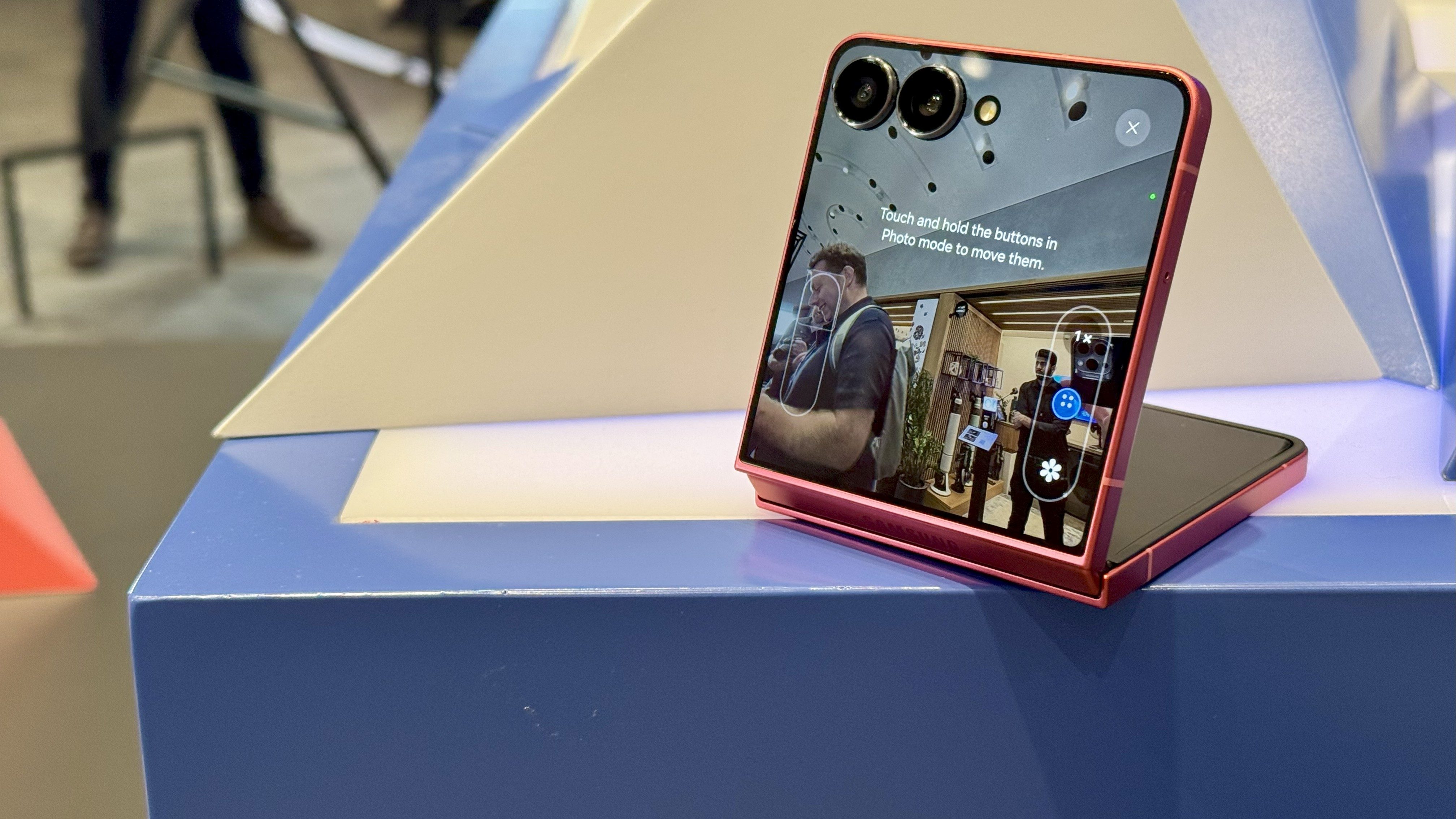
While the Z Flip 7 is still a little thicker in the pocket, when folded down, it still doesn’t feel weighty and it slips much further down inside the trouser leg, which is a plus.
The front display, with the two cameras able to be used in selfie mode when combined with the cover window, is great for both video and photography capture, providing a ‘proper’ viewing experience to check your framing if you’re ever trying to shoot your own footage.
The camera quality, using the 12MP ultra-wide or the 50MP wide-angle lens, looked great, especially on the smaller screen.
Samsung made a big deal about being able to use one finger to zoom in and out, like we were used to on old JVC camcorders, but this wasn’t the simplest action to use, with a few taps needed – I’d have to like to see that be a little more intuitive.

I hugely enjoyed the novelty of propping up the phone to use as a screen to take a selfie, and when viewed from the other side, a small touchpad with mouse control for the ‘top’ screen popped up.
I’m not sure what this is for, other than being able to select items on the screen and have the mouse function in place of a finger… it felt fiddly and, well, pointless, so I’m looking forward to trying to figure out what that’s for.
The one thing that I was a bit worried about when trying a foldable flip phone for the first time was the length – it’s a loooonger phone than you might be used to when it’s fully extended.
But in under a minute I was used to it, and I didn’t mind the fact that watching YouTube or other 16:9 content didn’t quite extend to the ends of the device.
It also gives more real estate for scrolling, which is nice, and makes it easier to read articles on the go – especially combined with the fluid 120Hz display, which means content slides across the screen with ease.

The screen size has been increased from a 6.7-inch display to a 6.9-inch one, with a 21:9 aspect ratio, which isn’t that uncommon in smartphones these days, and the overall shape just fits the device well.
The brightness of the screen, both front and back, is something that really helps – both in terms of being able to see what’s on there from far away but also helping minimise the visibility of the crease down the middle of the phone.
It’s far from a problem, and a long way from the heavy divot in the middle of foldable devices from years gone by.

It is still there, and the big question will be if it’s more noticeable or visible after a few months’ use, which will hopefully be less of a problem given the crease hasn’t started out as deep as with other foldable phones on the market.
The phone didn’t feel fully straight at some times though, with the hinge feeling like it was flexing a touch inward on occasion.
I couldn’t tell in my limited hands on time with the phone whether this was just the way I was holding it, or if there was something I was missing, but it did make me feel a little more tentative using it.
The Galaxy Z Flip 7 does have the new Flex Hinge, which means the design can be thinner but with a strong opening and closing mechanism, something Samsung has been tested to last for 200,000 flips open and shut.
It certainly feels robust enough in the hand, and that’s partly to do with the fact Samsung has made the circuitry waterproof, rather than needing to seal the phone around the bezel, which allows it to be a little thinner.
The phone packs Gemini Live onboard as well, so you can chat with Google’s AI chatbot, but I didn’t have enough time to dig into that properly.
In my limited tests, where I pressed the side button and asked it questions about what I was seeing on screen, it was working more as an ‘AI intercom’ to chat with Gemini, when I wanted to ask it more contextual questions about what I was seeing on the screen.

The One UI 8 onboard felt more complete and comprehensive than on any Samsung phone I’ve used (and finally supports DeX on the smaller foldable phone from Samsung), and the Now Briefing bar on the front of the phone sounds like it’ll be useful to show you things like health, boarding information or updates on your latest Uber ride.
Again, these don’t feel like earth-shattering changes, more Samsung finally catching this range up with the likes of other high-end flagships, like Apple has been using on the newer iPhones with the Dynamic Island.
It’s arguably more important here, given the Z Flip is the kind of phone that’s going to be used more when shut, so these notifications become more pivotal.
The Samsung Galaxy Z Flip 7 comes in three colors: the coral red, black and a rather attractive blue (called ‘Blue Shadow’, whatever that means).
The colored options in particular do look good in the hand, and I’d be hard-pressed to choose between the two.
The Samsung Galaxy Z Flip 7, much like the Galaxy Z Fold 7, is a huge step forward for the South Korean brand – its devices have been stagnating in the foldable world, but these feel like a real effort to try and catch up.
The Flip 7 is compact with a lot of power under the hood – if the battery life promises hold up (Samsung believes it’s improved battery life with the 4300mAh power unit inside, able to last 31 hours in video playback) then this could be a serious contender for those that want high end power in a compact design, without having the same flat candy bar design as we see on most other phones.