  1. Home
  2. Phones
  3. Apple
  4. Mobile
  5. Evergreens

How to sync multiple Google Calendars with your iOS device

Add as a preferred source on Google

So you have several different Google Calendars, but have only managed to sync the primary one with your iPhone and iPad. Not to worry. Though it’s not the most intuitive system, by following these instructions, you’ll be up and running in no time. Knowing when you’re supposed to go to lunch with your boss has never been easier.

Syncing Google calendars with your iOS device

Step 1: First, lets make sure your Calendar is properly synced. The process for doing so is identical on the iPhone and iPad, assuming you’re using the same version of iOS.

Recommended Videos

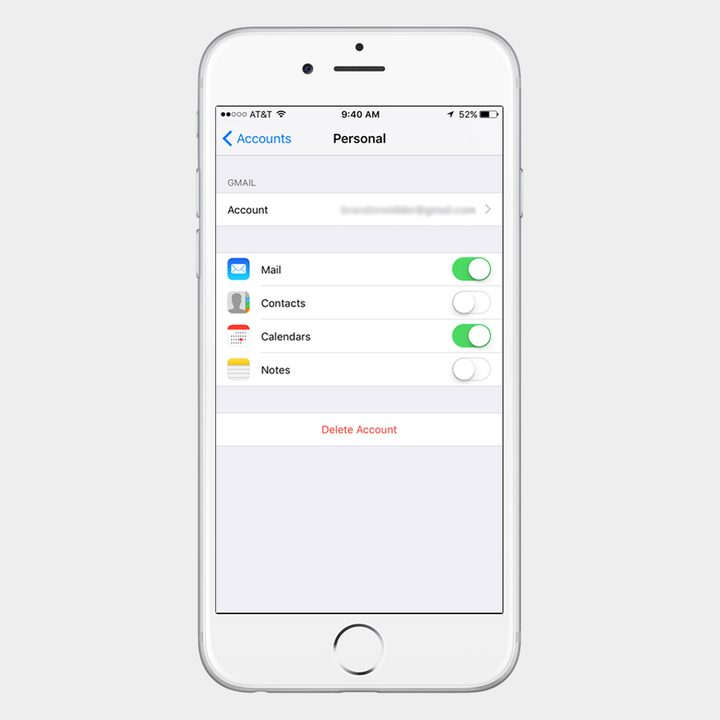
Step 2: Go to Settings > Calendars and select AccountsAdd Account. If you’ve already added your Gmail account, then instead of tapping Add Account, choose Gmail account from the resulting list.
calendar-switch-blur
Image used with permission by copyright holder

Step 3: Toggle the slider directly right of Calendars to sync your Google calendars with your iOS device. If you’re setting up a new account, enter your Google credentials and a description of the calendar, and ensure that the Calendars option is toggled on. Syncing will begin when you open the Calendar app on your iPhone or iPad.

Choosing which calendars to sync with your iOS device

Step 1: To do this, you first need to visit the sync settings in Google Calendar.

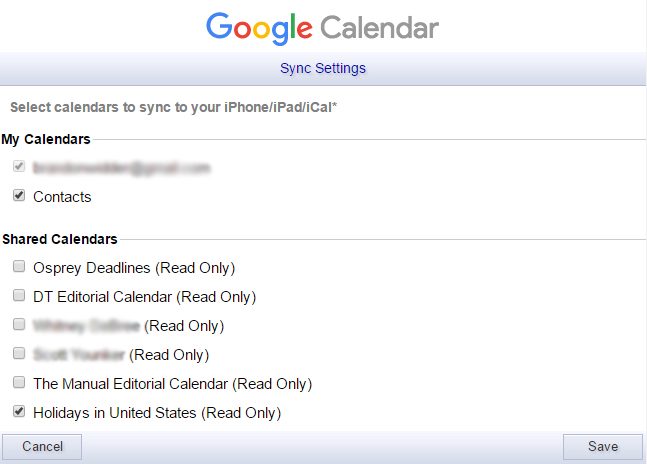
Step 2: If you’re signed into your Google account, you should see a list of all your calendars, with a check box next each to them. Tick the boxes beside the calendars you want to sync with your iOS device. Shared Calendars need to be selected individually, and they’re unchecked by default. This means you must repeat these last few steps when a new calendar is shared to ensure it syncs with your iOS device.
calendar-tutorial
Image used with permission by copyright holder

Step 3: When you’re done selecting calendars, click the Save button in the bottom-right corner. Afterward, open the Calendar app on your iOS device and wait for it to sync. That’s it! All your calendars should be ready and waiting for you.

Andy Boxall
Andy has written about mobile technology for almost a decade. From 2G to 5G and smartphone to smartwatch, Andy knows tech.
Apple Podcasts finally gets serious about video, adds multiple YouTube-inspired features
With offline downloads, Picture-in-Picture, and a dedicated video hub, iOS 26.4 turns Apple Podcasts into a platform creators can no longer afford to ignore.
Electronics, Phone, Mobile Phone

For years, the Apple Podcasts app supported video, at least it did technically, but nobody used it. Creators ignored it, while listeners forgot it. Meanwhile, other platforms like YouTube and Spotify quietly built empires on video podcasting. However, that changes with the iOS 26.4 update, or at least that is what Apple hopes for. 

Video podcasting exploded in popularity in recent years, with audiences gravitating toward platforms that treated the format well (as already mentioned above). Despite being an iPhone user, I personally consume podcasts on YouTube (I briefly paid for the Premium membership as well). 

Read more
Instagram could soon let you watch Reels while offline with automatic downloads
A new leak suggests Instagram is working on automatic downloads for Reels, which could let you continue your binge even without an internet connection.
Instagram and YouTube

Instagram could soon let users continue their Reels binge even when they're offline. A new leak suggests the app is working on automatic downloads for short-form videos, a move that would bring it closer to YouTube, which already allows offline viewing of Shorts.

What is Instagram working on?

Read more
Android 17 will let apps get the best out of your phone’s camera chops
A new vendor-defined extension system could bring advanced camera features like Super Resolution to your favorite third-party apps.
Android 17 logo.

Android 17 is shaping up to be quite an important update, especially if you care about camera quality across apps. Google is introducing a new way for phone makers to extend their custom camera features system-wide, which could finally close the gap between stock camera apps and third-party ones.

How is Android changing camera access for apps?

Read more