

The competition in the e-ink reader segment has matured a lot in the past couple of years. Amazon’s Kindle — once deemed the default pick — is now facing an onslaught of better-equipped products in more form factors than Amazon has ever attempted.
This year marked a big overhaul in the Kindle portfolio, with Amazon diversifying its Scribe reader with three distinct options at separate price points. You get a stylus, a colorful chassis, and a choice between color and monochrome panels. The statement is pretty clear. Amazon wants to offer something for everyone.
That strategy sounds good on paper, but doesn’t really translate to a rewarding experience. Onyx, aka Boox, has mastered the art of offering more for less. The brand has consistently delivered some beloved products, such as the palm-friendly Boox Palma and the Color Go. The latest from the brand is Note Air 5C, which is targeted at the Kindle Scribe and delivers a stunning value for less.
Basics done right

The latest from Boox is essentially a stylus-toting digital notebook that comes with a fantastic dual-purpose folio case, a clever stylus, and a keyboard accessory to go with it. Up front is a 10.3-inch Kaleido 3 ePaper screen with an anti-glare layer on top and the ability to produce 4,096 colors.
Sounds like the Kindle Scribe Colorsoft so far, right? Well, that’s where the similarities end and the gulf widens. This one is essentially an Android tablet with an octa-core processor ticking at its heart. Unlike Amazon’s slate, this one also offers a microSD card slot for storage expansion and features 6GB of RAM.

There are plenty of AI-powered tricks sprinkled within the sketching and jotting pages. For example, Smart Scribe turns uneven shapes into even outlines, you get scribble-to-erase perk, and a lasso recognition tool that does OCR to convert hand-written notes into machine text.
There’s a built-in AI assistant tool, tagging alongside the AI-read facility. The latter opens in split-view mode, like the AI sidebar in ChatGPT Atlas, for quick background research or contextual tasks such as summarizing a chapter, an overview of the book, or information about the author.

The AI assistant comes in handy with more generic queries. For example, just highlight a portion of the text, tap on the AI assistant option in the context box, and fire away your in-the-moment questions.
On a similar note, the AI-powered handwriting recognition system makes it dramatically easier to export handwritten notes as a properly formatted document. Of course, you can always download any other AI app, such as Gemini, ChatGPT, or Copilot to get more work done.

The real star of the show is the stylus. It’s sleek, really well-built, and offers a lag-free sketching and note-taking experience. It looks like a real luxury pen with a clever trick. The cap at the top is magnetic, and it can be easily pulled off to reveal three extra nibs.
The BOOX Pen3 Stylus, as the brand calls it, can handle tilt sensitivity and can identify 4,096 levels of pressure. Paired with the matte layer on the display that offers just the right amount of surface friction for controlled stylus movement, you get one of the most refined note-taking experiences on a digital notebook.

The pressure detection isn’t quite in the same league as those you get with Wacom or the Apple Pencil Pro, but the new pen styles in the Note app still deliver a satisfying experience. I tried Arabic calligraphy, and it didn’t turn out to be a terrible experience. For quick notes and document annotation, this is fantastic.
Where it truly shines…
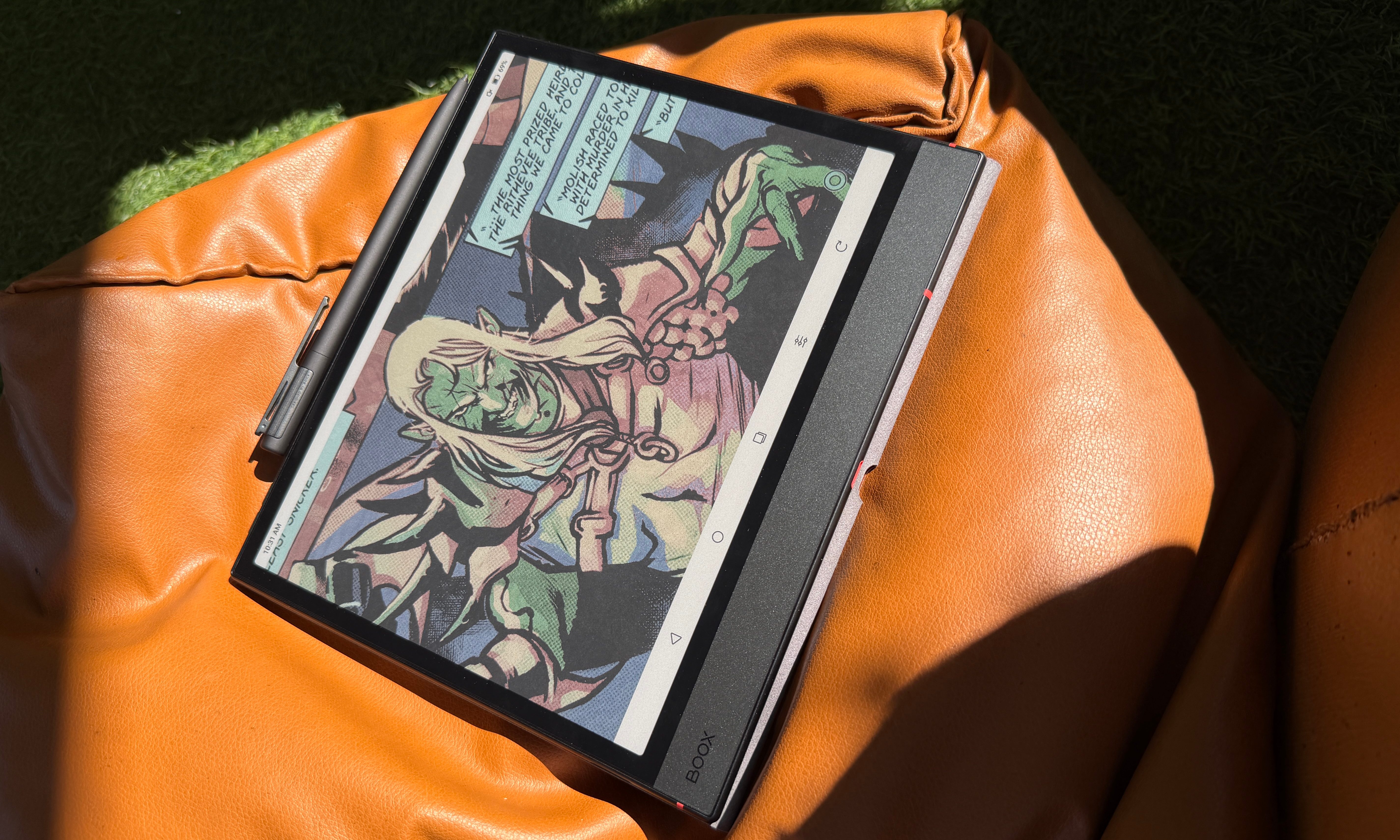
You’re buying an e-ink slate for reading, right? Well, if you prefer plenty of flexibility with every aspect of your experience, Boox offers the most granular set of controls. Let’s start at the most basic levels. You can entirely turn off the front light and turn it into a sunlit or ambient-lit tablet. This mode is far more lenient on the battery uptake, and if you’re reading by a lamp or under the sky, it works fine. Have a look at the reading view under daylight with the front light turned off.

Notably, it works just as fine with color content, such as photobooks and comics. And this is where the real fun begins. There’s a dedicated EinkWise hub that lives at the bottom of the screen, right next to the navigation buttons. By the way, you can ditch them entirely and go with Android’s swipe-based navigation.
In the hub, all the visual content defaults to the Recommended settings for screen refresh and color quality. For comics and visual content, the Regal setting works best, while the color mode should be set to Optimal. But if you don’t mind a bit of slow page refresh (alongside a bit of shimmer transition), go with the Vivid setting.

I would, however, suggest playing with the custom settings, where you can play with contrast, vividness, and color brightness levels. For reading manga, books, or articles, the Speed refresh mode works best. Boox has upgraded the refresh rate pace, and there is minimal jitters when you are swiping vertically or switching pages.
Simply put, the visual transitions are the best I’ve ever seen on a Boox device. And while reading, you get access to a whole bunch of tools, such as Circle to Mark, Underline to Mark, Scribble to Erase, Auto-Perfect shapes, and more. The Dark Mode, in particular, is exquisitely beautiful. You can adjust the font styling, or create your own customizable theme profile for each book, launch into split view when reading in landscape mode, and annotate to your heart’s content.

There’s a NavBall that offers more tools for one-tap controls, such as drag to select for OCR. While reading image-heavy books, I preferred the soft front light preset and kept the color temperature on the lower side. For nighttime reading, you can slide it to the max and get an eye-friendly warm hue.
I didn’t notice any color shift, and the saturation levels are also fine. The only caveat is that you need to make adjustments to find the right balance of color fidelity and page refresh for each book or magazine. I’d take this flexibility over a hit-or-miss one-size-fits-all approach.
The knockout punch

Almost every e-reader out there is held back by the software. One can argue that these devices must keep things minimal, but that argument falls apart the moment you start to look outside the ecosystem. The Kindle Scribe Colorsoft is no exception.
The Boox Note Air 5C stays far ahead of the curve, thanks to full support for Android 15. The built-in Library, Notes, and reader apps already offer more controls than you would find on any rival product. But if you want to explore your options, or want to stick with a favorite reader or note-taking app, you can head over to the Play Store (or install an APK) and get the app(s) you want.

From document converters and file managers to cloud drives and productivity apps, you can have it all. The onboard speakers do a decent job for podcast listening and YouTube learning sessions. I could check my emails, calendars, and messages on Teams, and more, without going through any technical hoops whatsoever.
Overall, the Boox Note Air 5C not only offers one of the best color e-ink outputs on a digital slate, but also an exhaustive set of tools for the most rewarding note-taking and reading experience out there. And did I mention that the power button on the Boox Note Air 5C also doubles as a fingerprint scanner? Yeah, that too.

Here’s the best part. The Boox Note Air 5C does all that at $499. The Kindle Scribe Colorsoft, on the other hand, will set you back by $629 a pop. In a nutshell, the Boox Note Air 5C does its intended job really well, but then adds a few perks at the hardware and software level that push it well ahead of its rivals.


