

iPadOS has often attracted criticism as merely a stretched-out version of the iPhone’s software, with a handful of Pro-grade apps and games thrown into the mix. With iPadOS 26, Apple is finally shedding that reputation.
In fact, the overhaul is so deep that iPadOS 26 now feels closer to the Mac than iPhone software. Now, this is purely a personal opinion, but the new Liquid Glass design language looks much better on the iPad than it does on the iPhone.
Beyond the design, iPadOS 26 borrows heavily from macOS Tahoe, and even eclipses the desktop software with a few special niceties of its own. In fact, the entry-level iPad is the one that has received the most notable functional upgrade.
A whole new multi-tasking system
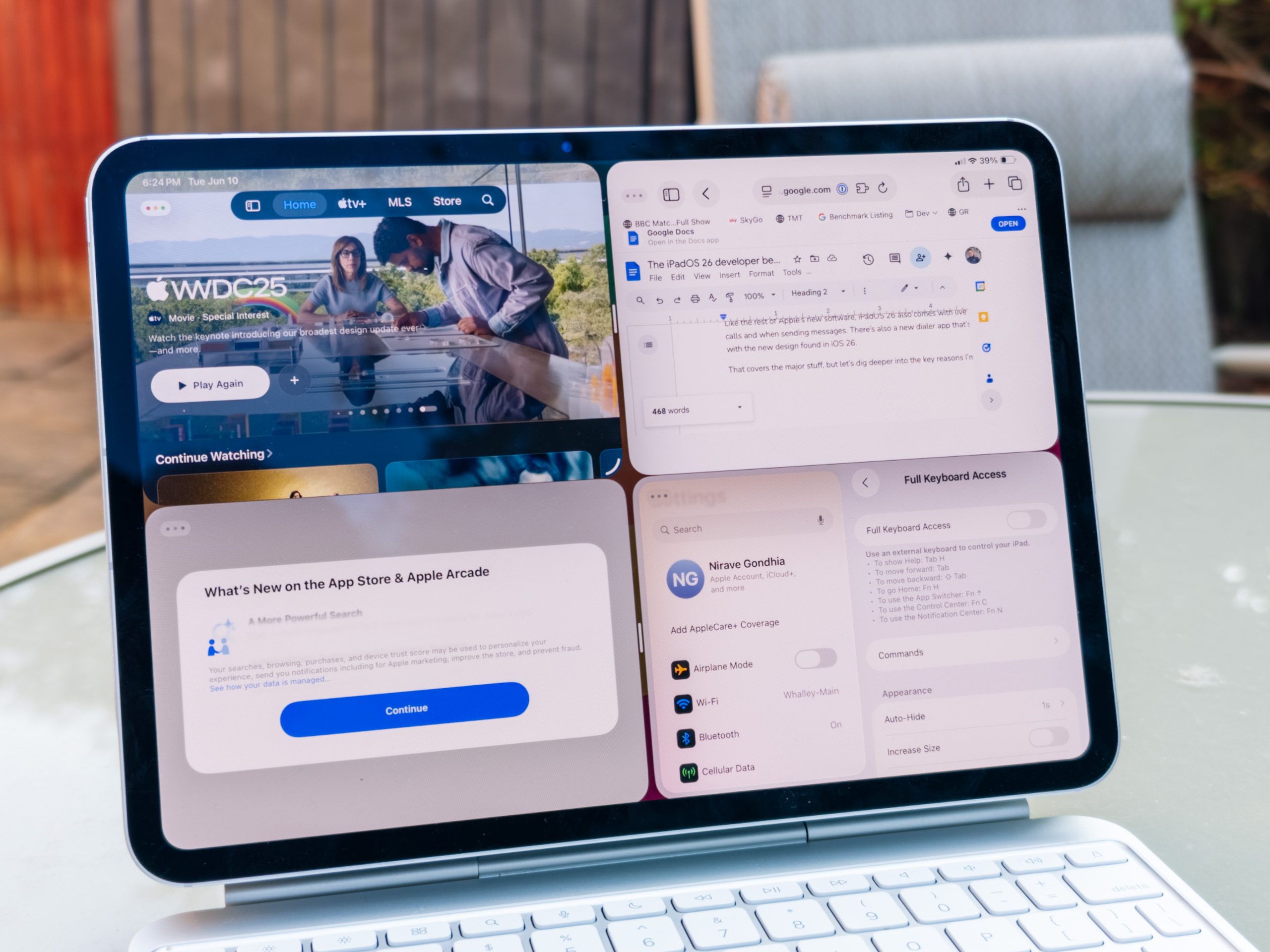
When Apple introduced the Stage Manager system for app multitasking, it was limited to the more powerful Air and Pro series iPads. With the arrival of iPadOS 26, Apple has extended that facility even to the base $349 iPad. I absolutely love it.
In addition to Stage Manager, Apple has introduced a whole new Windowed app system for running multiple apps at the same time. There is more flexibility with the resizing of app windows, and with a simple upward swipe, you can open all the clustered apps in an Expose view.
From there, you can pick any app and bring it to the foreground, or add a new app instance into the mix. Interestingly, this feature is available across the entire iPad lineup, even the baseline model. When spanned across an external display, it truly comes to life.
The mighty menu bar

The most striking element of iPadOS 26, beyond the new redesign and multitasking upgrades, is the increasing familiarity with macOS. The best example? A dedicated menu bar at the top, just like macOS.
Instead of cramming all the settings and tools behind clustered drop-downs or slide-out folders, apps can now spread them all across the top. The approach is identical to macOS, and gives developers an opportunity to offer a familiar experience across their desktop and tablet-optimized apps.
From a user’s perspective, it’s much easier to find and interact with the relevant tools they are looking for. This approach also leaves more screen real estate to flesh out the core user interface.
Oh, and did I mention that the dreaded round cursor is finally gone and we now have a familiar arrowhead? Yeah, that too. Also, if you’re working across different screens, you can simply move your finger (or mouse) quickly to enlarge the cursor size and find it. Neat!
Improved app tiling, at last

One of my biggest complaints about iPadOS has been the half-baked app resizing and tiling system. Actually, Apple’s approach to windowing felt rigid, even after Stage Manager came into the picture. Those issues have been addressed in iPadOS 26.
Just like its macOS compatriot, the latest iteration of iPadOS brings the familiar three-button layout for closing, maximising, and minimizing app windows. Integrated within the green maximize key are the core tiling controls, with eight resizing and positioning presets at your disposal.
Moreover, you no longer have to struggle with resizing each app window. By default, you can now naturally fit four evenly sized app windows on the iPad’s screen. Additionally, with a flick gesture, you can split the screen and tile an app window near the left or right edge in one single move.
Preview comes to Appe’s slate

Another trick that has been ported over from macOS to the iPad this year is the Preview app. I am somewhat confused why it took so long, since the touch-sensitive and stylus-friendly nature of the iPad makes it a better choice for handling documents than the Mac.
Nevertheless, it’s here, and it works just fine. You can open, edit, and annotate to your heart’s content. Whether it’s PDF files or images, the Preview app covers it all.
On a related note, you can now put any folder of your choice in the dock. Talking about folders, you can now color-code them and even put an emoji on their face for easy identification.
Phone app on the iPad

It’s somewhat surprising that, despite offering cellular iPads for years, Apple didn’t put the phone app on the iPad. Well, the wait is finally over. The Phone has finally landed on the iPad, with all the upgrades in tow that have landed on iPhones.
Call screening, hold assist, and live translation are some of the new Phone app features that are now available on the iPad, as well. Additionally, the calls you record within the Phone app on iPad can be directly imported as an audio clip in the Notes app.
For anyone who works off the iPad as their primary computing workhorse, or even as a stopgap machine, the Phone app is a deeply underrated convenience. You can now conveniently put your iPhone away and focus on the work, without having to worry about missing an important call or message.


