
Is the iPad truly a laptop replacement? Well, it depends, and it depends on more than just the iPad itself. While the iPad Air and iPad Pro both offer excellent performance, on their own, they’re basically just big, beautiful displays. If you truly want to use your iPad as a laptop replacement, you’ll need some accessories. That’s where Apple’s Magic Keyboard comes in.
But the Magic Keyboard isn’t cheap. Quite the opposite — for the smaller model, which supports the iPad Air and 11-inch iPad Pro, you’ll shell out an eye-watering $300, while if you want the larger 12.9-inch model, you’ll have to step up that price to $350. That’s right, for the same price as an entry-level iPad, you can buy…a keyboard.
It’s worth it.
Everything you could want in an iPad keyboard
There’s very little to not like about the Magic Keyboard, except for the price. It’s versatile, feels great, and makes it easy to transition between different usage modes.
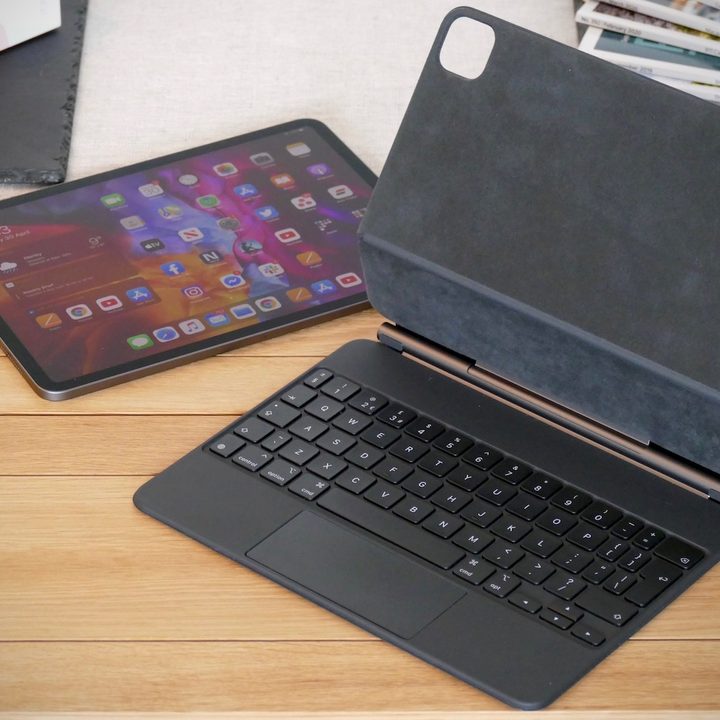
Let’s start with the actual keys and trackpad. They’re awesome. Apple seems to have learned a lot about building great keyboards over the past few years, since the days of the ultra-thin, no-travel MacBook Air keyboard. These days, MacBook keys have a good amount of travel, and feel natural during typing — and that experience is clear with the iPad Magic Keyboard. Apple has taken a different path with the trackpad. I don’t remember a period where MacBook trackpads were low-quality — they’ve always been incredible, and the Magic Keyboard’s trackpad is no exception to that rule.
But there are other details beyond just the physical keys and trackpad that make the Magic Keyboard a great option. Apple’s use of magnets in its recent products has changed how many devices are used. With the Magic Keyboard, all you have to do to attach your iPad is place it in the right spot. Then, when you want to use it as a keyboard again, just take it off. Simple. The only downside to this is that when you’re using the device in tablet mode, it’s case-less — however you’ll get used to using the Magic Keyboard as a case when the iPad isn’t being used.
Apple has even thought of a great charging solution. The Magic Keyboard has a USB-C port built right into it, which you can use to charge your iPad without having to use up the iPad’s built-in port. It’s a charging-only port, so you can’t use it with accessories, but it still works great for that.
The Magic Keyboard even works great when you’re typing on your lap, thanks to the fact that it has a rigid foot.

Perhaps the only real downside to the Magic Keyboard is the fact that it is pretty heavy. The 11-inch model comes in at a hefty 1.3 pounds, which is heavier than the iPad itself. Together, the two devices are heavier than a MacBook Air, although it is smaller. If you combine the 12.9-inch iPad and the keyboard, it’s even heavier. But in such a small footprint, the weight is easy to forget about.
Budgeting tips
To be clear, I would never advocate that those strapped for cash buy Apple’s Magic Keyboard. It is overpriced, and no matter what the quality of the accessory, if you don’t have money to spare, there are plenty of high-quality alternatives that can help you get your work done without you having to resort to using the iPad’s on-screen keyboard.
For example, you could get the Brydge Pro+ keyboard for the iPad, which comes with a track pad. Or, you could go for the Logitech Folio Touch, which boasts excellent protection. Or, if you want to stay first-party, get the Apple Smart Keyboard Folio, which doesn’t have a trackpad, but still feels pretty nice.
If you do have the money, however, the Magic Keyboard is the way to go.


