

When Apple announced the Apple Watch Ultra last September, I was excited about it. It wasn’t something that I needed at the time, but I loved that it’s pretty much the first big change for the Apple Watch product as a whole since the Apple Watch Series 5. The design of the Ultra is completely different from the Apple Watch Series 8, and — of course — it has the Action button.
Oh, the Action button. Aside from the Digital Crown and side button, the Apple Watch Ultra has a unique Action button, accented in a bright orange, that lets you quickly launch an action — such as starting a workout, opening the Workouts app, using the Apple Watch Ultra as a flashlight, launching a shortcut, and more. People love the Action button, plenty of them have given it praise, and I thought it was one of the cooler features of the Apple Watch Ultra.
I had an opportunity to upgrade to the Apple Watch Ultra from my old Apple Watch Series 5, which was on its last legs, so I finally did it. I’m excited to have an Apple Watch that can last the entire day and then some, but I was also eager to check out the hype over the Action button.
While it’s fairly useful, I’m a little let down by the lack of customization with it, at least out of the box. Let me explain.
The Action button is very limited
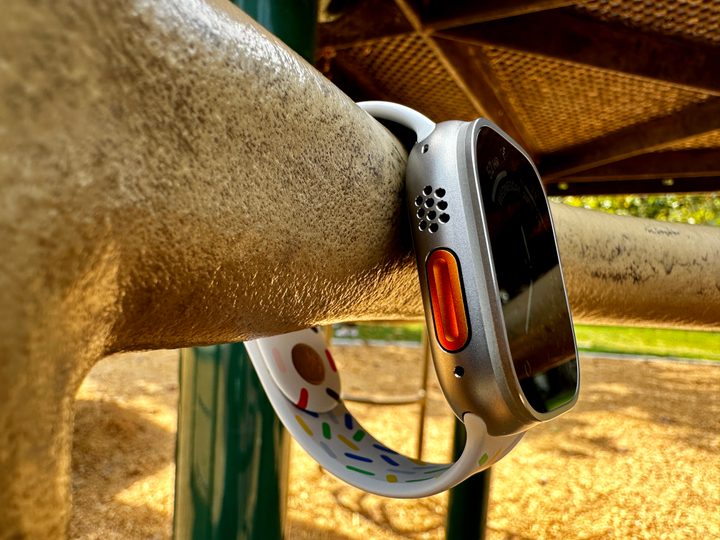
The moment I strapped the Apple Watch Ultra to my wrist, I was eager to start playing with the Action button. I already knew beforehand that the default action was set to open the Workouts app, but I wanted to see what else there was.
As I went into the Watch app and then selected the Action button section to pick a different action shortcut, disappointment set into my face. The only options are Workout, Stopwatch, Waypoint, Backtrack, Dive, Flashlight, Shortcut, or None. Each option has its own set of actions that you can set for the first press.
For example, the Workouts app has it where you can just open the app, or you can set it to a specific workout you do often when you do the first press. If you pick Stopwatch, the first press starts it, another press will mark a lap, and if you press both the Action and side buttons together, it will pause the stopwatch.
The other option for the Action button is to press and hold to activate the siren, which plays a loud, continuous sound from the Apple Watch Ultra that can be heard up to 600 feet away. This feature is to be used when you need to signal for help in (likely) remote environments.

I understand that the Action button on a wearable that’s primarily aimed at health and fitness makes sense to access features like this, but I guess I was expecting more. I thought there would at least be options to set actions for one press, double press, or even triple press.
I mean, what if I want to be able to map multiple actions to the button? For example, one press to open up Workouts and a double press to start a specific workout? And then a triple press to drop a waypoint. It looks like that’s impossible, at least right now. I basically can only choose one, and I’m stuck with it — unless I reconfigure it each time, and that’s a hassle.
And then there’s the Siri Shortcut option. That’s where you can really customize the Action button to do pretty much whatever you want, but that also requires learning the Shortcuts app. For a lot of people, that’s a big extra step, and learning Shortcuts can be rather tedious and time-consuming.
I think I came into the Apple Watch Ultra expecting too much. I thought I could set the Action button to pretty much anything, and while that’s technically true, it’s also not at the same time. I don’t want to have to learn to create Shortcuts to do something specific; I wanted more stock options from Apple. It would have also been nice to be able to pick multiple actions and differentiate between them by the number of presses.
I expect more with the iPhone 15 Pro

We’re just a few months away from the iPhone 15 announcement in the fall, and rumors suggest that the iPhone 15 Pro is replacing the classic mute switch with a mute/action button instead. I was excited about this feature, and I (mostly) still am. But I hope that Apple will give us more options with it than what you get on the Apple Watch Ultra.
I think the limited functionality of the Apple Watch Ultra Action button is because it’s wearable, and there really is only so much you can do on your wrist. As such, I still have hope for what we could possibly do with the iPhone 15 Pro Action button.
Aside from simply turning the mute on or off, I would love to be able to double-click the button to bring up the camera app, like you can on almost every Android phone. It would also be nice to just activate Low Power Mode with a button press or even activate Shazam to identify a song. Or turn on the flashlight when I need to make a trip to the bathroom in the middle of the night. The options are endless!
If we are getting an Action button on the iPhone 15 Pro like the rumors have been suggesting, I’d like to see it not be hindered as much. Apple has the ability to do something really cool with a new button on this year’s iPhone, and I hope it’s used to its fullest potential.


