1. Home
  2. Wearables
  3. Mobile
  4. Evergreens

Digital Trends may earn a commission when you buy through links on our site. Why trust us?

How to change your Apple Watch band

Add as a preferred source on Google
 

An Apple Watch makes a statement. It shows you are on top of the latest technology. It also shows off your fashion sense, but you can add even more style with changeable watch bands.

Recommended Videos

Changing your watch band is a snap, and we’ll walk you through the process. We even offer tips if you’re struggling during the process. However, it’s up to you to choose whatever band speaks to your sense of style.

Prep the surface

Apple Watch Band set up
Jackie Dove/Digital Trends

Before you start working on your watch, prepare a soft microfiber cover on a sturdy table, as shown above.  This prevents you from accidentally scratching the pretty watch face.

Release the old band

Apple Watch band connector
Jackie Dove/Digital Trends

Step 1: Flip the watch over to see two thin, elongated oval release buttons — one at the top and one at the bottom. Be sure to hold the watch firmly in your hand before moving on, or place it face down on the soft cloth surface.

Removing Apple Watch straps
Step 2: Hold down either release button and shift the band to the right or left until it slides off the watch body, as shown above.

Step 3: Rinse and repeat for the other watchband.

If you’re having trouble removing the band, keep pressing down on the button and try again. Some bands are easy to remove while others can be extremely stubborn, especially if there’s a collection of gunk.

In the end, your Apple Watch should resemble the limbless model pictured below.

Apple watch band separated
Jackie Dove/Digital Trends

Add the new band

If you look at the new band, you will see a small bit of plastic in the center. When you insert the band, this piece moves into a small lock on either side of the watch body, securing the band.

That said, slide the replacement band into place until you hear a click, signifying a proper locked seating. However, read on for the actual step-by-step instructions.

Apple Watch band attachment
Jackie Dove/Digital Trends

Step 1: First, you need to learn how to position the new band. Some bands have a loop or other feature that can be flipped upside down or put on backward if not attached appropriately. If you’re installing a loop band, ensure that both sides are in alignment with your watch. 

Step 2: Slip your new watch band into the corresponding notch. You’ll know it’s connected when it makes a clicking sound. Try to carefully twist the band from side to side to ensure it’s attached fully, but be careful not to press the release button while checking. Your band shouldn’t shift at all. 

Step 3: Repeat the same steps for the other side. 

Double-checking your new band’s firm connection is one of the most important steps before putting on your Apple Watch. If you don’t make sure the band is secure, your watch could slip off and potentially break or become lost. Even after checking the band and placing it on your wrist, give it a little wiggle to make sure it’s attached.

New Apple Watch band replacement
Jackie Dove/Digital Trends

If accessories are an essential part of your outfit, have no fear. Apple provides a gorgeous collection of bands in a mix of bright or subdued colors, patterns, designs, and textures. You can coordinate your Apple Watch to match your outfit, a special occasion, or the season with several watch and strap combinations. Keep in mind, the way you adjust them can vary, so be sure to carefully read over the mechanics behind each design to find what works for you.

Jackie Dove
Former Contributor
Jackie is an obsessive, insomniac tech writer and editor in northern California. A wildlife advocate, cat fan, and photo app…
Apple wants you to verify your identity before you get Education discount on products
Apple moving the US Education Store off the honor system also seems about making a globally consistent verification infrastructure that could eventually support more aggressive Education Store expansion.
Computer, Electronics, Laptop

Getting an Apple Education discount in the United States used to be as simple as claiming you’re a student or a teacher; it didn’t need a formal verification. That era is officially over. 

Starting May 8, 2026, Apple now requires formal identity verification for all Education Store purchases in the US, ending the informal honor system that was in place for years (via MacRumors). 

Read more
You can finally avail an education discount on the Apple Watch
It's Apple broadening its ecosystem play into a segment that previously had no wearable entry point, and that could meaningfully accelerate Apple Watch adoption among younger first-time buyers.
Side view of Apple Watch Series 11.

Apple’s Education Store has always been a reliable shortcut to cheaper Macs and iPads for students and teachers. However, for years, Apple Watch wasn’t allowed into the story, making people wait for third-party sales or discounts to get their hands on the smartwatch. 

That’s changing, with effect from May 8, 2026. Apple has quietly added the Apple Watch to its Education Store for the first time. The Watch Series 11, SE 3, and the Ultra 3 are now available at discounted education pricing across 21 markets, including the US, UK, India, Canada, and Australia. 

Read more
Whoop’s response to Fitbit Air and Google Health is real doctors, not just an AI chatbot.
In the race to own your health data, Google chose an AI, and Whoop chose a doctor. That single decision may define which fitness tracker serious health users reach for in 2026 and beyond.
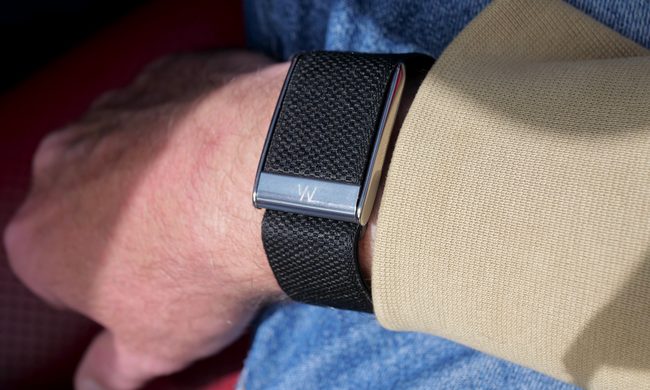
A person wearing the Whoop 5.0.

Recently, Google launched the Fitbit Air as a direct rival to the Whoop screenless fitness band, rebranded the Fitbit app to Google Health, and released a Gemini-powered AI coach. Exactly one day later, Whoop has responded with on-demand video consultations with licensed clinicians for US users. 

The contrast is hard to ignore. While Google is betting on AI as your general health advisor, Whoop is doubling down on real, licensed doctors, and making the case that they can serve its fitness-focused users considerably better (via CNBC).

Read more