1. Home
  2. Web
  3. Computing
  4. Mobile
  5. News

Google Calendar for desktop gets a long-awaited material design face-lift

Add as a preferred source on Google

Google Calendar is a seriously awesome tool, but the desktop version of the app has felt a little outdated over the past few years. Well, folks, that’s finally changing — Google is pushing out an updated version of Google Calendar on desktop that makes heavy use of Google’s material design language.

We first knew that a Calendar redesign was in the works earlier this year when Google showed off a 2017 product roadmap, so it’s not a surprise — but it’s still nice to see the redesign.
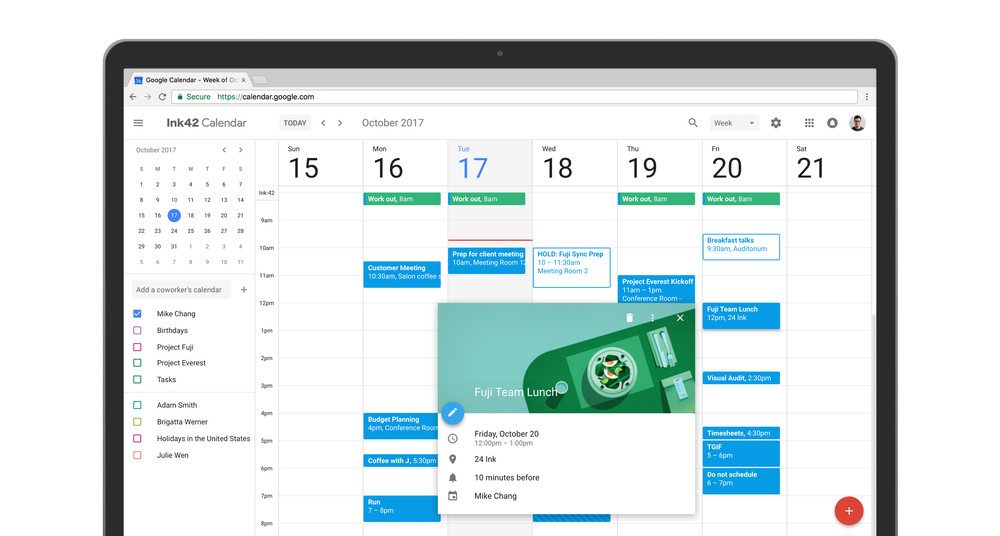
Image used with permission by copyright holder

There are a few key changes that Google has made to the desktop version of Calendar. For starters, the website now smartly adjusts depending on the size of your computer screen, which is pretty helpful for those that like a windowed approach to their desktop. Like the previous version of Calendar, you’ll get a view of the month on the top left, under which is a list of the different calendars you have access to. On the top right you’ll find settings and a search bar, as well as a drop-down menu to change the view. The rest of the screen shows your events.

Recommended Videos

The changes aren’t just aesthetic either — you can also now do things like add links to relevant documents and spreadsheets, so if you’re creating meetings with other people within a company, you can add documents that might be helpful.

Like the previous version of Calendar, you can view your events by day, week, month, year, or four days at a time. The “Day” view allows you to view different calendar side by side, too, which could be very helpful for those that manage multiple calendars at a time.

The redesign is certainly well overdue — the apps for Calendar have featured Google’s material design for some time now, so it’s nice to see Google bringing the desktop version in line with the mobile version.

The update to Google Calendar is rolling out to G Suite users now, and G Suite admins can enable the new calendar by hitting the “Use New Calendar” link in the top right-hand corner of the interface, or you can hit this link.

Christian de Looper
Christian de Looper is a long-time freelance writer who has covered every facet of the consumer tech and electric vehicle…
How to find archived emails in Gmail and return them to your inbox
Archived emails in Gmail are easier to find than you think—once you know where Google hides them
Gmail icon on a screen.

If you’re looking to clean up your Gmail inbox, but you don’t want to delete anything permanently, then choosing the archive option is your best bet. Whenever you archive an email, it is removed from your inbox folder while still remaining accessible. Here’s how to access any emails you have archived previously, as well as how to move such messages back to your regular inbox for fast access.

Read more
Is there a Walmart Plus free trial? Get a month of free delivery
A Walmart sign on the outside of a store.

For regular Walmart shoppers, signing up for Walmart Plus is a no-brainer. It's basically Walmart's version of Amazon Prime, with subscribers unlocking free shipping on most orders, early access to discounts and new product drops (like Nintendo Switch 2 restocks), the best grocery delivery, and more. If you're always taking advantage of Walmart's bargains for the best smart home devices or the best tech products in general, but you're still not sure if you'll be able to maximize the benefits of Walmart Plus, we highly recommend claiming the free trial to the service, and we've got everything you need to know about it right here.

START YOUR FREE TRIAL

Read more
Best Buy’s Cyber Monday has insane discounts of up to 72% off
Digital Trends Best Black Friday Best Buy Deals

With Black Friday officially over and Cyber Monday starting, there are a lot of great Best Buy deals going on that you can take advantage of. That means getting Cyber Monday smartwatch deals, Cyber Monday gaming laptop deals, Cyber Monday TV deals, and more. You might also want to check out our general roundup of all the greatest Cyber Monday deals going on right now, along with all the great deals from Best Buy below.
Our Top Pick: Arlo Pro 5S 2K 3 Camera Indoor/Outdoor Wireless Bundle — $200 $500 60% off

Arlo is considered one of the best home security camera makers, so this deal on three of their indoor/outdoor cams is a fantastic way to get started on your home security journey. In our mashup of the Arlo Pro 5S vs Ring Stick Up Cam — two of the most premium security cams available — the Arlo Pro 5S was considered best for those wanting the "most vivid images possible."

Read more