  1. Home
  2. Web
  3. Computing
  4. Evergreens

How to make a YouTube channel

Want to become the latest YouTube sensation? You'll need to make a channel first

Add as a preferred source on Google

As the premier video sharing website in the world, YouTube attracts everyone from the biggest online content creators to those just looking to share a few clips of themselves with friends and family. Whether you’re trying to become the next Pewdiepie or manage a personal video storage locker, everyone starts from the same place. You need to know how to make a YouTube channel.

Recommended Videos

Fortunately, Google has made the process easier and easier over the years, so you can follow just a few quick steps and you’ll be up and running in no time at all.

When you’re all set up, if you want to learn how to stream games on your channel, here’s our guide to get you started.

Creating a YouTube account

You can’t have a YouTube channel without a YouTube account. If you already have one, then you can simply sign in and move on to the next section, but for those who don’t, follow these simple steps

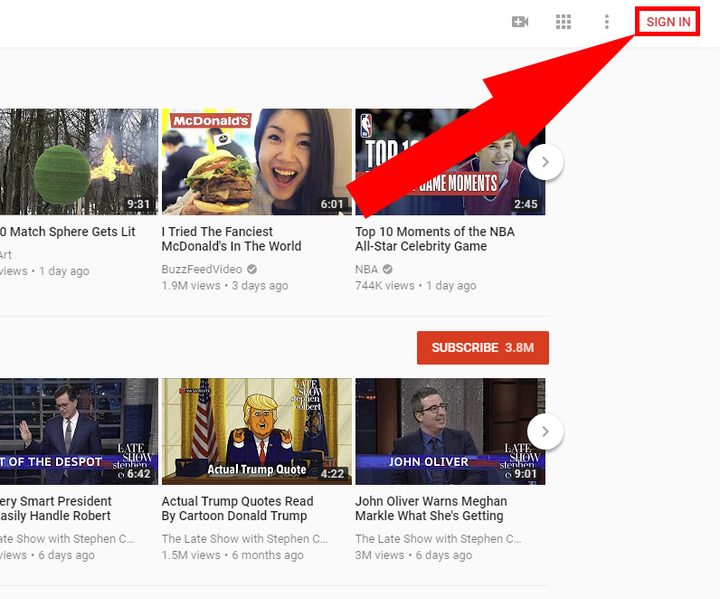
Step 1: Go to YouTube’s homepage and click the “Sign in” button in the top right-hand corner.
JonMartindale/DigitalTrends

Step 2: If you have an existing Google account, congratulations, you also have a YouTube account! Login to it and skip to the next section. Otherwise, click “More options” and then “Create account.”

JonMartindale/DigitalTrends

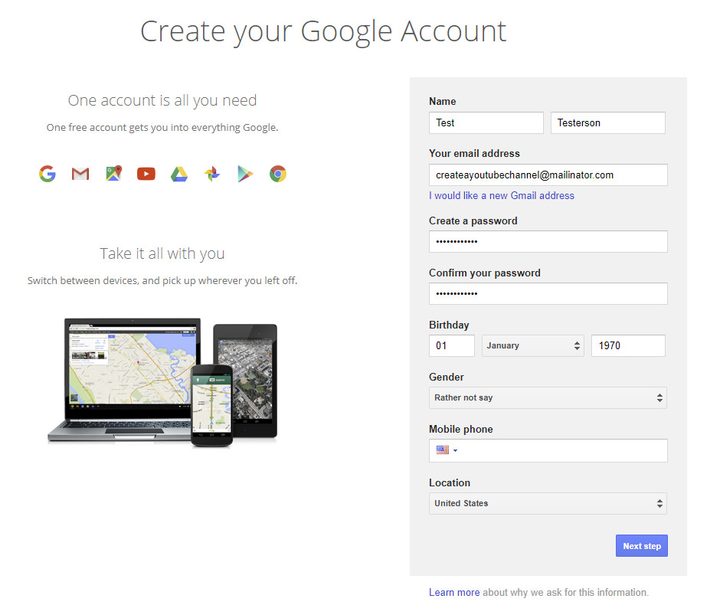
Step 3: Fill in the relevant information on the account set up page and click the “Next Step” button.
JonMartindale/DigitalTrends

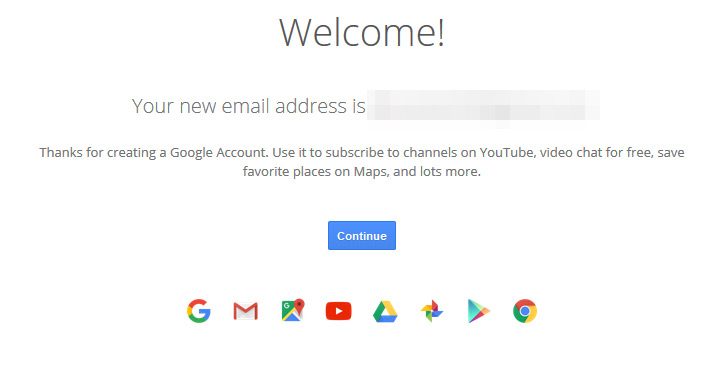
Step 4: If Google asks you to, verify your account using your mobile. Once complete, you should be sent to the welcome screen.
JonMartindale/DigitalTrends

Step 5: Go back to YouTube’s homepage. You should be automatically logged in, but if not, click the “Sign in” button in the top right-hand corner again and fill in your relevant login information.

Related content

Creating a YouTube channel

YouTube is pretty keen to give everyone a YouTube channel, even if they only plan to post comments with it. That means that if you try to do anything on YouTube, you’ll be prompted to make one. The easiest method to do so though is with the steps below.

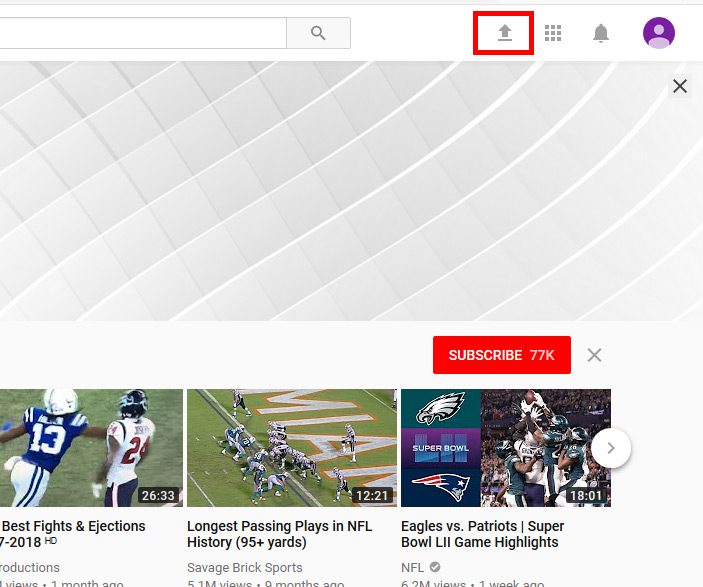
Step 1: Click the upload button (the up arrow with a line under it) in the top right-hand corner.
JonMartindale/DigitalTrends

Step 2: You’ll be shown a prompt asking you to confirm your name and display picture. You can keep those the same as your Google account, but if you’d rather stay anonymous on your YouTube channel, you can input any information you want.

Step 3: It’s a good idea to read through the YouTube terms of service while you’re here, so you know what you’re signing up for. Once done, click the “Create Channel” button.
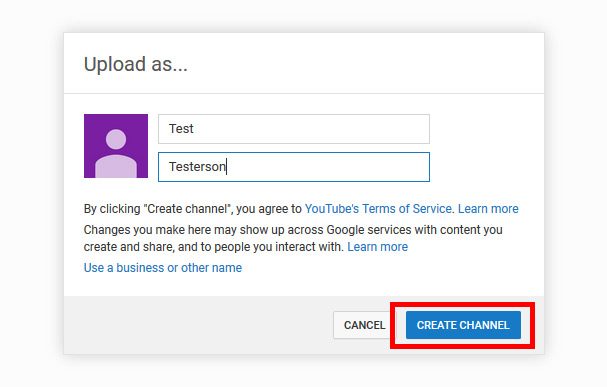
JonMartindale/DigitalTrends

That’s it! You now have a functioning YouTube channel. You can now post videos and work your way towards internet stardom — or just show off your cat. Hey, sometimes they’re the same thing.

Jon Martindale
Jon Martindale covers how to guides, best-of lists, and explainers to help everyone understand the hottest new hardware and…
How to find archived emails in Gmail and return them to your inbox
Archived emails in Gmail are easier to find than you think—once you know where Google hides them
Gmail icon on a screen.

If you’re looking to clean up your Gmail inbox, but you don’t want to delete anything permanently, then choosing the archive option is your best bet. Whenever you archive an email, it is removed from your inbox folder while still remaining accessible. Here’s how to access any emails you have archived previously, as well as how to move such messages back to your regular inbox for fast access.

Read more
Is there a Walmart Plus free trial? Get a month of free delivery
A Walmart sign on the outside of a store.

For regular Walmart shoppers, signing up for Walmart Plus is a no-brainer. It's basically Walmart's version of Amazon Prime, with subscribers unlocking free shipping on most orders, early access to discounts and new product drops (like Nintendo Switch 2 restocks), the best grocery delivery, and more. If you're always taking advantage of Walmart's bargains for the best smart home devices or the best tech products in general, but you're still not sure if you'll be able to maximize the benefits of Walmart Plus, we highly recommend claiming the free trial to the service, and we've got everything you need to know about it right here.

START YOUR FREE TRIAL

Read more
Best Buy’s Cyber Monday has insane discounts of up to 72% off
Digital Trends Best Black Friday Best Buy Deals

With Black Friday officially over and Cyber Monday starting, there are a lot of great Best Buy deals going on that you can take advantage of. That means getting Cyber Monday smartwatch deals, Cyber Monday gaming laptop deals, Cyber Monday TV deals, and more. You might also want to check out our general roundup of all the greatest Cyber Monday deals going on right now, along with all the great deals from Best Buy below.
Our Top Pick: Arlo Pro 5S 2K 3 Camera Indoor/Outdoor Wireless Bundle — $200 $500 60% off

Arlo is considered one of the best home security camera makers, so this deal on three of their indoor/outdoor cams is a fantastic way to get started on your home security journey. In our mashup of the Arlo Pro 5S vs Ring Stick Up Cam — two of the most premium security cams available — the Arlo Pro 5S was considered best for those wanting the "most vivid images possible."

Read more