Many of us have quite the love-hate relationship with our Facebook News Feed, and for good reason. The platform has certainly transformed over the years. Facebook once felt more like a small, invitation-only party, and now that even our grandparents are privy to the “like,” the social network has a completely different vibe.
On a daily basis, we’re inundated with pictures of babies we’ll never meet and photos of marriages that we were never invited to. Last and certainly not least, we are given regular glimpses inside the minds of humans who — for some reason or another — believe Facebook is their personal political soapbox. Now that the election season is in its final month (as of this posting), most of us would surely welcome any ability to remove any mention of politics from our Facebook feed. Fortunately, there are measures you can take. Here’s how to do so on your desktop.
Block political posts using the Social Fixer
It’s not particularity surprising that’s there’s a tool out there with the sole purpose of tailoring your Facebook News Feed on your desktop — after all, there’s only so much the human psyche can endure. The extension in question is called Social Fixer, and you can download it for Chrome, Safari, FireFox, and other browsers here.
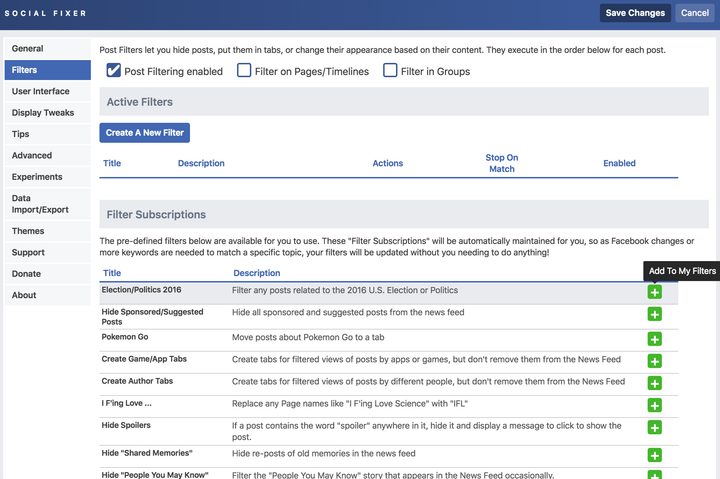
Once downloaded, open Facebook and log in as you normally would. A wrench will appear in the top-right corner of your Facebook page. Next, click on Filters. Now, beneath the Filters Subscriptions section, there should be several filters you can apply to your News Feed. The first option listed is the one you’re looking for. Click on the addition sign next to Election/Politics 2016 and the filter will be added. Refresh your browser and your feed should be rid of all things political.
Unfollow or unfriend specific individuals
The trail of life takes many turns, and, unfortunately, many of the humans we meet along the way stay with us in the form of digital acquaintances. Fortunately, ridding your News Feed of frienemies, keyboard politicos, gadflies, and maybe even members of your immediate family is very easy.
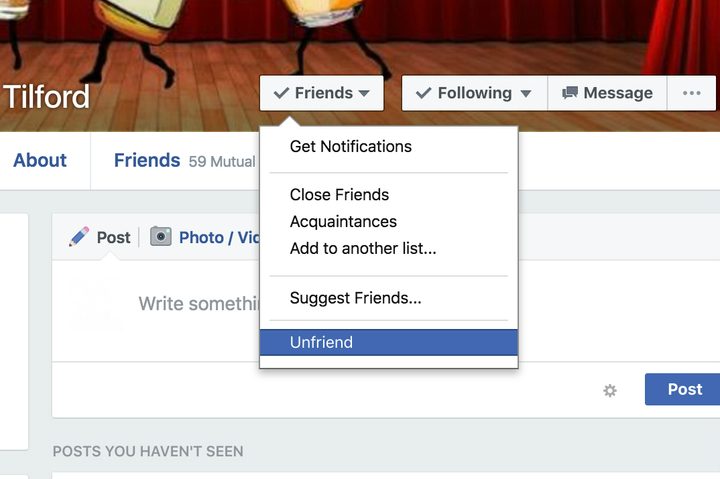
First and foremost, “unfollowing” is not the same as “unfriending.” Most importantly, they will not know that you have chosen to unfollow them. Simply go to the person’s Facebook page and at the bottom of their cover photo is the option to “unfollow” the individual. If it says “following,” just click the button and select “unfollow.” Once selected, this person’s posts will no longer show up in your Facebook News Feed.
If this person just seems like someone you’d rather no longer be friends with, you even have the option to unfriend them. The button for doing so is also located at the bottom of their cover photo. Click the “friends” button, scroll down, and select “unfriend.” Voila! The deed is done.
Think of it as a spring cleaning of sorts. A social cleanse. You’ll feel oh-so liberated after doing so and your News Feed will surely reflect these welcome subtractions.
No workaround for Facebook’s mobile app (yet)
Currently, there are no extensions or applications to block political posts within Facebook’s mobile app. To remove political posts from your Facebook app News Feed, your best and only bet at the moment is to either unfriend or unfollow these individuals. You can do this by simply selecting the downward arrow on any post in your News Feed.