1. Home
  2. Phones
  3. Mobile
  4. Photography
  5. News

What is variable aperture? A feature as old as film finally comes to smartphones

Add as a preferred source on Google
galaxy s9 Plus hands-on review back full
Julian Chokkattu/Digital Trends
MWC 2026
Read our complete coverage of Mobile World Congress

Samsung calls the camera on the new Galaxy S9 and Galaxy S9 Plus “the revolutionary camera that adapts like a human eye” because of a new feature called dual aperture, a form of variable aperture. But what exactly is a variable aperture, and why is it revolutionary?

Recommended Videos

The variable aperture is “revolutionary” in that the feature has never been included on a smartphone camera before — but it’s actually an option that has been around since early film photography when variable aperture was added to a camera lens around the mid-1850s.

Variable aperture simply means that the Samsung Galaxy S9 and S9 Plus can actually change the aperture of the lens. Aperture is a term that refers to how large the opening in the lens is — a wide-open aperture will let in more light, while a narrower aperture will let in less light. In dark scenes, a wide aperture will create a brighter image. Because of how small the lens is, smartphones use a fixed aperture — you can’t adjust the aperture like you could in a DSLR or mirrorless camera.

What the Samsung Galaxy S9 and S9 Plus do that previous smartphones did not is allow users to change the aperture. The feature isn’t quite the same as the aperture adjustments on a film lens or a DSLR. While a dedicated camera offers a range of different aperture settings, the S9 offers just two settings: an f/1.5 and an f/2.4, the f/1.5 being the brightest or widest of the two. In comparison, the earlier Samsung S8 uses a fixed f/1.7 aperture.

While the smartphone can’t go from f/1.8 to f/22 and a few dozen settings in between like a DSLR lens might, the dual aperture lens allows the smartphone to switch between the two, with the widest used for a low light mode and the narrower option for the regular camera mode. (Along with automatically switching between the two based on how bright the scene is, the two apertures can also be switched inside a manual mode).

The dual aperture is available from the same lens thanks to a moving piece called an iris that adjusts the size of the lens opening, which means you don’t have to get the pricier S9 Plus and the dual lenses to get the variable aperture. On the S9 Plus, the feature is only available from the wider rear-facing lens, not the second lens with zoom. The feature may not be revolutionary for photography, but fitting moving aperture blades inside a tiny smartphone is no small technical feat.

So why not just use a brighter f/1.5 that’s wider than the camera on the older version? Aperture changes the amount of light that’s let into the photograph, but it also changes how soft or out-of-focus the background is. The effect is less drastic on smartphones because of their smaller sensor sizes, which is why dual camera smartphones use a fake computed bokeh, but the f/2.4 aperture in general will shoot sharper images than the low light mode f/1.5.

Along with the variable aperture, the S9 Plus also has a bokeh mode created from the dual-lens view that will adjust the shape of the out-of-focus lights. Like the variable aperture, this is a trick done before by changing the shape of the aperture using a special lens cap on a DSLR, though in Samsung’s case, the effect is from computational photography, not actually changing the shape of the aperture opening. The bokeh filters on the S9 Plus rear camera will change the out of focus lights in the background from circles to starbursts, snowflakes, butterflies, or a handful of other shapes.

Variable aperture has been around since photography’s early days — but for a tiny smartphone lens, the feature is a first.

Hillary K. Grigonis
Hillary never planned on becoming a photographer—and then she was handed a camera at her first writing job and she's been…
I let this Galaxy S26 feature handle my battery, and it actually works
Galaxy S26 on a table

I have never been particularly good at managing my phone’s battery health. I know all the advice by now — avoid charging past 80 percent, do not let the battery drain completely, try not to leave the phone plugged in overnight. I know these habits the same way I know I should probably drink more water or sleep earlier. In theory, they make perfect sense. In practice, I rarely stick to them consistently.

So when I started using the Galaxy S26 and realized that Device Care’s optimization features were quietly handling a lot of this for me, my first reaction was skepticism. Phones have offered “smart” protection tools for years now, and most of them tend to disappear into the background after you switch them on once. Half the time, I forget those settings even exist. This felt different, though. Not because it was flashy or constantly reminding me it was there, but because I could actually feel it adapting to how I used my phone, rather than forcing me to change my habits around it.

Read more
I thought I needed an iPhone Pro until I paid attention to how I actually use it
iPhone 17 Pro

For a while, I had convinced myself that my next iPhone had to be a Pro. Not because I had genuinely thought about what I needed from a phone, but because the marketing slowly wore me down. The triple cameras, the titanium build, the ProMotion display, the idea that it could handle absolutely anything — it all created this lingering feeling that choosing the regular iPhone would somehow mean compromising. Like I would be missing out on the “real” experience. Then I stopped looking at spec sheets and started looking at my actual usage. And honestly, the entire argument for buying a Pro quietly fell apart.

Apple really knows how to make you doubt the regular iPhone

Read more
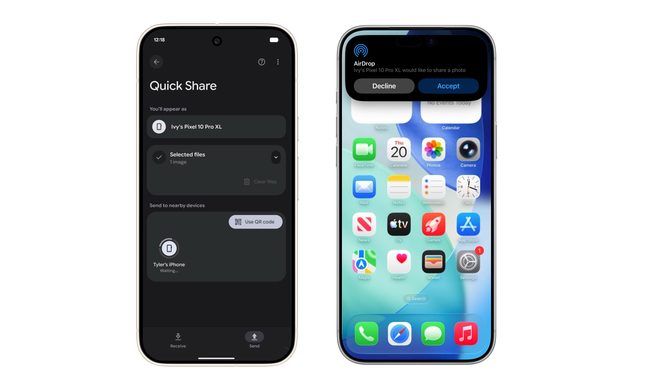
I used to dread moving files between devices — now I barely think about it
Android Quick Share with iPhone AirDrop

The kind of work I do involves constant file sharing, and with iPhones, Android phones, and a MacBook all part of my daily rotation, moving files between them used to be far more exhausting than it should have been. Something as simple as getting a photo or video from an Android phone onto my MacBook often turned into a mini process of its own. Most of the time, I had to upload files to Google Drive, wait for them to sync properly, and then download them again on the other device. It sounds manageable when you describe it once, but when you repeat that cycle several times a day, it starts feeling like a tax you pay with your time and patience.

This was mostly the result of ecosystems spending years building walls around themselves. Apple’s walls were obviously the tallest, but Android had its own barriers too. For the longest time, it felt like nobody was particularly interested in making these devices cooperate gracefully. But somewhere along the way, that started changing. And honestly, the difference it has made to my everyday workflow is much bigger than I expected.

Read more