  1. Home
  2. Phones
  3. Android
  4. Mobile
  5. News

Samsung Galaxy J2 Core: Everything you need to know

Here's a first look at the upcoming Samsung Galaxy J2 Core

Add as a preferred source on Google
Image used with permission by copyright holder

After months of rumors, Samsung finally confirmed it is releasing an Android Go handset. The Samsung Galaxy J2 Core is the first from the South Korean company to take advantage of Android’s lightweight OS.

Here’s everything we know about the Samsung Galaxy J2 Core.

Recommended Videos

Design

The Samsung Galaxy J2 Core looks every bit the budget smartphone. It has a 5-inch display with chunky bezels all around.

The back of the phone appears to be constructed of polycarbonate with a single lens camera module. There’s no fingerprint sensor, but that makes perfect sense since the phone will likely come in at under 7,000 rupees (~$100).

Specs
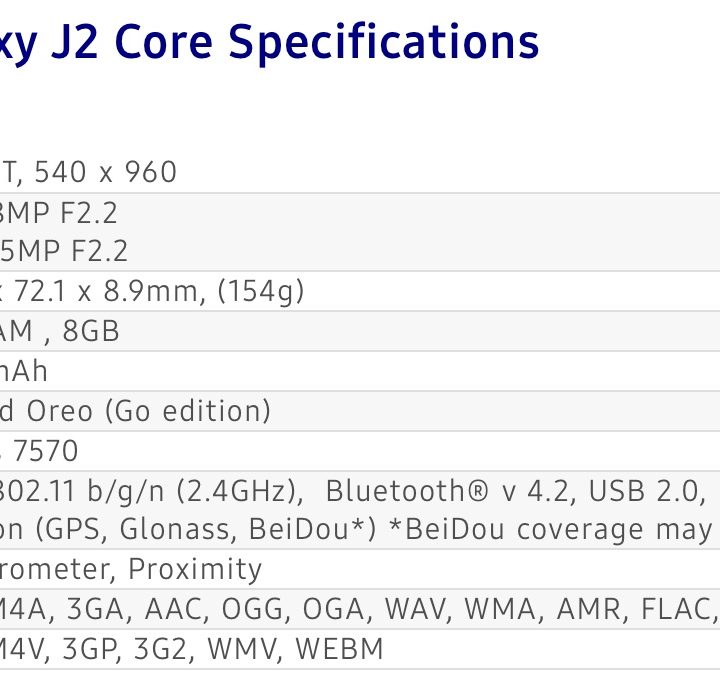
Image used with permission by copyright holder

The J2 Core ships with a quad-core Exynos 7570 processor and 1GB of RAM — these meager specs putting the device well within the usual range for an Android Go smartphone. The handset also features a paltry 16GB of onboard storage, but the phone does have a MicroSD slot for external storage.

Display
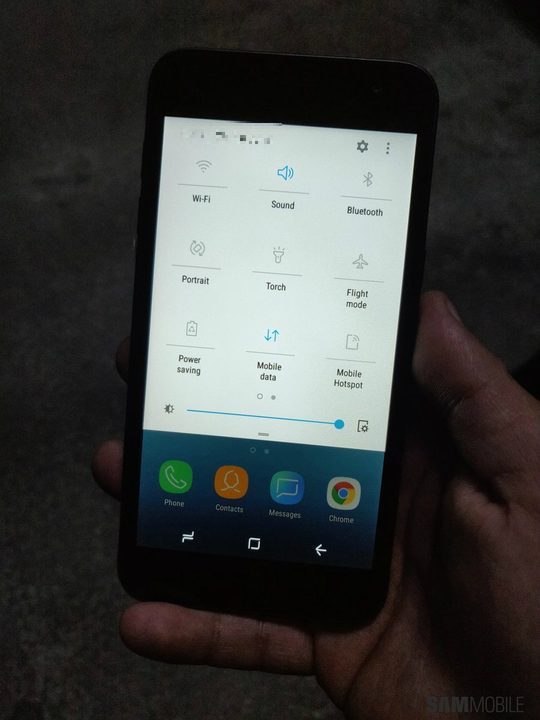
Image used with permission by copyright holder

You’ll find a 5-inch LCD display on the Samsung Galaxy J2 Core. The display resolution comes in at 540 x 960. While the resolution may not match what you’ll find on other budget phones, the J2 Core will likely come in with a very low price tag.

Battery and charging

There’s a 2,600mAh battery on the Samsung Galaxy J2 Core. That should be plenty for an normal day’s use on a phone with a 5-inch display. Samsung also says it has optimized applications to extend battery life on the phone.

Camera

Image used with permission by copyright holder

So what will the camera be like on Samsung’s latest budget phone? Well the rear-racing camera comes in at 8 megapixels and has an f/2.2 aperture. The selfie cam comes in at 5 megapixels with an F/2.2 aperture as well.

Software

Image used with permission by copyright holder

What makes the Samsung Galaxy J2 Core truly interesting is its software. Samsung decided to go with the Android Go version of Oreo for its latest budget phone.

Android Go is Google’s attempt to break into rapidly developing markets dominated by low-spec budget devices. As such, Android Go is a bare-bones version Android that makes much lower demands on system resources — to fit lower-end hardware — and special versions of Google’s G Suite apps, specially optimized to fit and run on entry-level devices.

Now that doesn’t mean that Samsung hasn’t made tweaks to Android. While we’ve yet to see the phone in action, leaked images show the phone running with a Samsung Experience skin. We also know that Samsung has added a beauty filter to the camera as well as an Ultra Data Saving feature,  that provides tips for more efficient data use.

Release and availability

Image used with permission by copyright holder

The Samsung Galaxy is now available in Malaysia and India. Samsung says it will announce additional markets for the phone in the near future, but there’s no word if it will ever make it to the U.S.

Pricing has yet to be announced, but we expect to be priced around $100 since it is meant primarily for emerging markets.

Updated August 24: All copy updated with announcement of Samsung Galaxy J2 Core.

Steven Winkelman
Former Staff Writer, Mobile
Steven writes about technology, social practice, and books. At Digital Trends, he focuses primarily on mobile and wearables…
iOS 27’s Liquid Glass slider looks simple, but it’s more useful than I expected
Text, Document, Business Card

Let's be honest: few iOS design changes have sparked as much debate as Liquid Glass. When Apple first introduced it with iOS 26, the internet immediately split into two camps. Some people loved the fresh, translucent look, while others couldn't stand it and felt it made parts of the interface harder to read. I happened to be firmly in the first camp. At the time, I was using an iPhone 14 Pro Max, and installing the update was one of the first things I did. I loved how the new design made iOS feel more modern and dynamic. The transparency effects gave the interface a sense of depth, making the entire experience feel fresh again.

That said, it's easy to understand why not everyone felt the same way. After months of feedback, screenshots, hot takes, and endless debates online, Apple eventually responded by giving users more control. Instead of forcing everyone into the same look, it introduced options that let people choose between a clearer glass effect and a more tinted appearance. With iOS 27, Apple is putting the Liquid Glass debate completely in your hands. A new slider lets you customize the effect exactly the way you want it, whether you prefer a crystal-clear look or something easier on the eyes. Here's what it does and how to make the most of it on your iPhone.

Read more
Apple users are being targeted by a familiar tech support scam
Apple users face a new wave of fake iPhone and iCloud security warnings
iPhone user

AI has made online scams harder to spot by making deepfakes, voice cloning, and fake messages more realistic. Even so, the old tech support scam is still catching victims. For years, fraudsters often posed as Microsoft support workers. Now, reports suggest many are shifting their attention to Apple users.

Consumers are reporting a rise in fake “Apple High Alert” messages that claim an iPhone, iCloud account, or Apple ID has been compromised. These messages are designed to make people panic and react quickly before they can stop to check whether the warning is real.

Read more
iOS 27 puts a much better dictation experience on your iPhone, and you must enable it
A better dictation system is already on your iPhone. Apple just didn't switch it on.
Electronics, Phone, Mobile Phone

If you have an iPhone 17 Pro, iPhone 17 Pro Max, or iPhone Air running iOS 27 beta, you have a meaningfully better dictation system on your device right now. 

However, Apple did not turn it on by default, and most users have no idea it is there.

Read more