  1. Home
  2. Phones
  3. News

iOS 27 puts a much better dictation experience on your iPhone, and you must enable it

A better dictation system is already on your iPhone. Apple just didn't switch it on.

Add as a preferred source on Google
Electronics, Phone, Mobile Phone
Nadeem Sarwar / Digital Trends

If you have an iPhone 17 Pro, iPhone 17 Pro Max, or iPhone Air running iOS 27 beta, you have a meaningfully better dictation system on your device right now. 

However, Apple did not turn it on by default, and most users have no idea it is there.

So what exactly is Advanced Dictation Preview?

iOS 27 ships with two separate dictation systems. 

Recommended Videos

The one you get depends on your hardware. Even though every iPhone gets some improvements (compared to the standard edition), owners of the iPhone 17 Pro, 17 Pro Max, and iPhone Air have access to something different. It’s called Advanced Dictation Preview. 

The advanced version runs on Apple’s AFM Core Advanced model, the same one powering the new expressive Siri voices, and works entirely on-device (without an active internet connection). 

In fact, it handles punctuation and capitalization automatically as you speak, so you no longer have to speak the “comma” or “period” out loud. 

Why doesn’t every iPhone get it?

The Advanced Dictation feature delivers a major boost in accuracy. The catch, however, is that it is switched off by default. That’s because the feature is still in beta, and Apple is gathering opt-in feedback to fine-tune it.

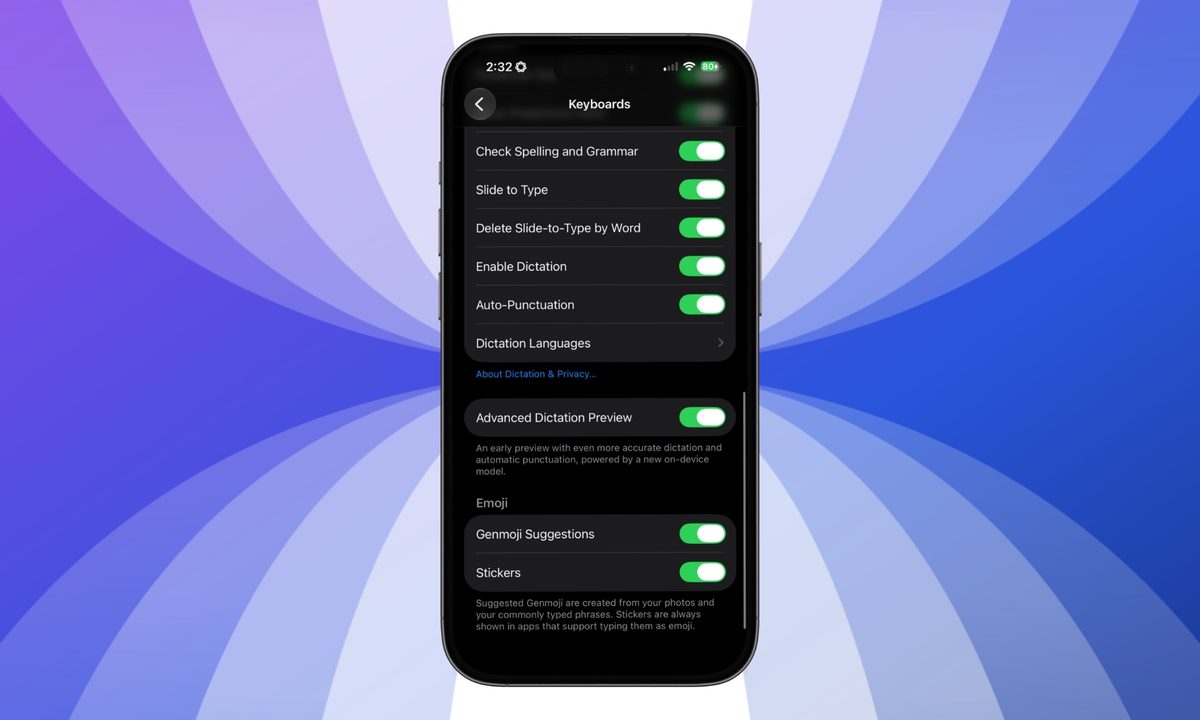
For now, if you have access to iOS 27 beta and you use voice dictation frequently, you can go to Settings > General > Keyboards, and scroll down to find Advanced Dictation Preview (via Tech Between the Lines). 

The reason why every iPhone getting iOS 27 doesn’t get the feature is RAM. AFM Core Advanced needs at least 12GB of RAM to run locally, and the standard iPhone 17 ships with 8GB of RAM. Even the iPhone 16 Pro, despite being a recent device, also has 8GB of RAM, which is why it is excluded. 

Moreover, this is a fixed hardware cutoff and not a staged rollout. If your iPhone makes the cut, head to Settings and flip the toggle to get an improved dictation experience.

Shikhar Mehrotra
For more than five years, Shikhar has consistently simplified developments in the field of consumer tech and presented them…
I’ve tried nearly every iOS 27 feature, and these 3 are why I’m still excited about the update
Electronics, Mobile Phone, Phone

It's been a little over a week since Apple's WWDC keynote, and the iOS 27 beta is already out in the wild. While Apple spent plenty of time talking about its Gemini-powered Siri, the thing I was most excited about was getting the update onto my iPhone 16e and seeing what it was actually like to live with.

I've been using the beta every day since then, and one thing has become pretty clear: not every new feature lived up to the hype for me. Some felt more interesting during the announcement than they do in everyday use, while others simply haven't found a place in my routine. But a few features have been the complete opposite. They're the ones I've found myself returning to again and again without even thinking about it. After spending more than a week with iOS 27, these are the three features that have stood out the most — and the biggest reason I'm still excited about this update.

Read more
Did you know that your iPhone bursts on-screen fireworks when you call a person on their birthday?
Not every iOS 27 gem made it into the keynote. This one's worth finding.
Electronics, Phone, Mobile Phone

Apple buried dozens of small features in iOS 27, ones that didn’t get any mentions at WWDC 2026, but this one might be the most delightful discovery so far. 

If you call someone on their birthday with iOS 27 installed on your iPhone, it quietly displays a fireworks animation on the call screen. I tested this feature by setting my sister's birthday to today, June 20, 2026, in a beta build of iOS 27, and it worked just fine.

Read more
Your old iPhone may have a security flaw Apple can’t fix
Security researchers find a new BootROM exploit affecting iPhones with A12 and A13 chips
iPhone 11 Pro in hand

iPhones are widely seen as some of the most secure smartphones for everyday users. Still, Apple devices are not immune to serious security flaws, as recent threats like Coruna and DarkSword have shown. Now, security researchers at Paradigm Shift have detailed a different kind of exploit called usbliter8, which affects some older iPhones and targets a deep part of Apple’s startup process known as the BootROM.

The BootROM is the basic startup code that runs before iOS loads. It helps the iPhone begin the boot process and verify what should run next. Because it is built into the chip itself, it is much harder to fix than a normal iOS bug. Apple can usually patch software flaws through an update, but it cannot rewrite BootROM code on devices that have already shipped.

Read more