
Further reading
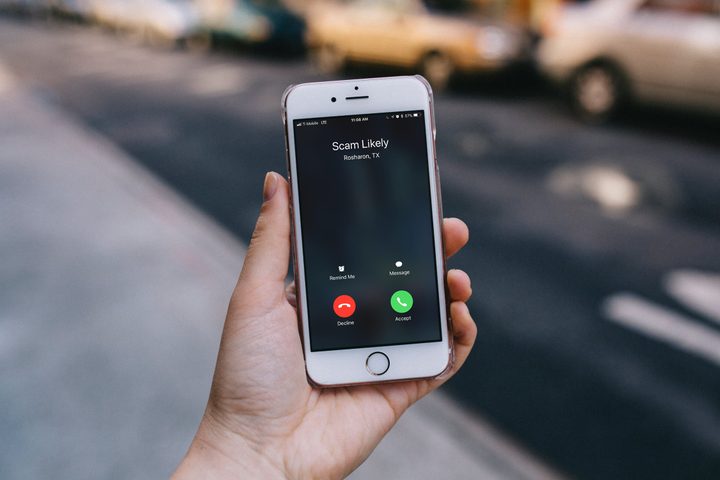
If you’re a T-Mobile or MetroPCS customer, you may have noticed that some of your incoming calls are now being marked “Scam Likely.” While that may seem like a bold marketing choice for a firm to tag their calls, it’s actually your carrier’s way of helping you more easily identify scam calls. If you’ve ever answered any of these marked calls, you’d realize the alerts are usually pretty spot on. Here’s what you need to know about how the feature operates, and how to enable it if you haven’t done so already.
How it works
T-Mobile first started rolling out its free protection services — as well as a paid solution — back in 2017, namely as a way to help its customers prevent and avoid robocalls and other types of spam. These features were later extended to MetroPCS users (a T-Mobile-owned company) and are now accessible to customers of both carriers, regardless of the type of phone they’re using.
The first service is called Scam ID, which identifies potential scam calls by cross-referencing the number with a database of potentially fraudulent ones. This tag is applied on the carrier side of things, meaning you don’t have to worry about downloading any special software to your phone, and will work regardless of the type of phone you have, assuming it has Caller ID.
The calls will still come through on your device, but you can decide whether to accept the call based on the actual phone number or deny it. While this anti-scam feature works most of the time, it is still possible that a legitimate call will get tagged with the “Scam Likely” marker, so having the option to still receive calls with this tag, especially if you are expecting one from a number not saved in your address book, is a good thing to have.
The second service is called Scam Block, which takes Scam ID one step further and prevents all calls with the “Scam Likely” tag from ever reaching your phone. Both features are free and don’t require any additional software to use — you just have to be a T-Mobile or MetroPCS customer.
Enabling Scam ID and Scam Block
Scam ID should be enabled automatically, but if for some reason it’s not, you can enable it by dialing #664# on your T-Mobile device. Scam Block has to be manually activated. To do so, dial #662# on your device. Keep in mind that you can dial #632# at any time to turn it off again.
If for some reason you really don’t want to have Scam ID enabled, you’ll have to contact customer support or visit a retail store to get it turned off. Considering it doesn’t do anything other than alert you to possibly fraudulent calls, however, there’s not much reason to disable it.
Similar services via other providers

T-Mobile also offers a paid service called Name ID, which identifies a caller’s name and location, and allows you to block personal numbers (even if they are not in your address book). It can even identify the types of organizations calling you. While Name ID is included in the T-Mobile One Plus and One Plus International plans at no extra cost, it will cost you an additional $4 a month on any other plan.
Other wireless carriers offer similar services, but T-Mobile’s is the only one that doesn’t require an app to use. AT&T customers can enable scam protection for free by downloading the Call Protect app for Android or iOS. AT&T customers also have the option to download the AT&T Mobile Security app on their Android or iOS device, if they want to use the company’s malware protection service.
Sprint and Verizon also offer similar services, but they require a premium fee. Sprint customers can sign up for Premium Caller ID services through the Premium Caller ID app, for example, which will run you $3 a month. Verizon users have the option to pay for call protection using the Caller Name ID app, but, unfortunately, this is the most expensive service of the bunch, and will require you to spend $3 a month per line in order to avoid receiving calls from potentially fraudulent numbers.
Still, it’s a small price to pay for some added peace of mind.


