After a long-awaited arrival, Cyberpunk 2077 is finally here. Explore Night City as you work your way through the ranks of the criminal underground in search of fame, glory, and riches. Cyberpunk 2077 is a seemingly endless array of side jobs, missions, and events that will keep players occupied for hours on end. There’s almost too much to wrap your mind around in the early game. Follow these 10 essential tips to get your Cyberpunk career off the ground.
See more
- How to increase your Street Cred in Cyberpunk 2077
- How to make money fast in Cyberpunk 2077
- How to build a gaming PC for Cyberpunk 2077
Don’t get hung up on character creation

Cyberpunk 2077 has an incredibly in-depth and immersive character creation screen. While players are forced to take on the persona of a character called “V,” they are free to build V in any way they see fit. While there aren’t hyper-specific sliders that players can manipulate to make finite adjustments to V’s features, there are enough cosmetic options (i.e., nose type, eyebrows, hairstyles) to give V decent variety.
While it’s fun to dive deep into character creation, it’s important not to get hung up on it. Remember, Cyberpunk 2077 is primarily a first-person game. On top of that, V will most likely be wearing different gear that covers up your face. The only times you’ll really see V’s face is when you’re interacting with mirrors or reflective surfaces.
Adjust your settings
You should not expect Cyberpunk’s gunplay to be as fluid as games like Call of Duty and Battlefield, where it’s the primary focus. Thankfully, players can make tiny adjustments to their sensitivity sliders to give them their ideal shooting experience. However, there are a few things to keep in mind:
- Zoom sensitivity is ADS sensitivity in general.
- Don’t drop your dead zone too low. This can cause issues with stick drift and can leave V spinning in circles.
- The response curve is not like Call of Duty. Playing on super-high sensitivities may do more harm than good.
Cyberpunk’s gunplay takes some getting used to. Fine-tune your settings until you find a happy medium.
Outside of gunplay, there are a few other settings you may be interested in changing. Cyberpunk has been plagued with all sorts of bugs and glitches. While future patches will hopefully solve these, there’s a clear discrepancy between last-gen performance and next-gen performance. If playing on PlayStation 4 or Xbox One, it will help to turn off some of the visual enhancements, such as depth of field and field grain. While the game may not look as smooth, it can help with crashing.
Don’t skip the tutorials

As mentioned above, Cyberpunk’s gunplay takes some getting used to. However, players will need to understand hacking, stealth, and hand-to-hand combat to survive Cyberpunk’s opening mission. Jackie will give V a chip to plant that will open a combat training simulation. Here, V will learn basic game mechanics, such as taking cover, shooting, and hacking.
After completing the first two, V can leave the simulation. This is not recommended. There are still two more modules that V can complete. Here, the simulation will begin combing different things you’ve learned in more specific scenarios. You’ll have to hack, sneak, and fight all at the same time. You can either spend the time to complete the tutorial or learn the same lessons the hard way.
Scan everything
V’s cybernetic eye scan is reminiscent of Arnold Schwarzenegger’s in the Terminator franchise. It’s important that you scan everything at any given moment. It’s senseless to run-and-gun into a room full of enemies when V has the ability to hack the tech around them. Scanning will also uncover consumables and collectibles that V can pick up. You’ll be able to learn about different NPC’s affiliations and determine whether they’re hostile or not. However, it’s safe to assume that everybody in Night City is hostile in one way or another.
You can also quick-scan the environment by tapping the Scan button. This will send out a scan pulse and mark POIs or useable items. Use the quick-scan to mark valuable items that V can go back and grab when dealing with any threats in the area.
Master the breach protocol

As mentioned above, scanning the environment is how V will hack tech in Cyberpunk 2077. Hacking is the key to survival, and breach protocols are the key to hacking. It’s loosely explained during the hacking tutorial, and you’ll most likely learn how to solve breach protocols through trial and error properly. Hopefully, the following examples will clear some things up.
Think of breach protocols like simple sudoku. You must enter codes that differ between rows and columns. When beginning a breach, you’ll either start on a row or column. From here, you must select the first input in the sequence while making sure that the next input is in the next row or column. It’s best to map out which moves you’re going to make before pressing any inputs. There’s no going back, and the cool-down to retry is long.
Remember, you’re always able to complete all given codes in a sequence. Don’t just focus on the best one. Below is the answer key for the above image. To get both Icepick and Mass Vulnerability in this sequence, you would begin with:
- Row 1 column 2 — 1c (first input for Ice Pick)
- Row 4 column 2 — 55 (second input for Ice Pick and first input for Mass Vulnerability)
- Row 4 column 3 — 1c (second input for Mass Vulnerability)
- Row 5 column 4 — 1c (final input for Mass Vulnerability)
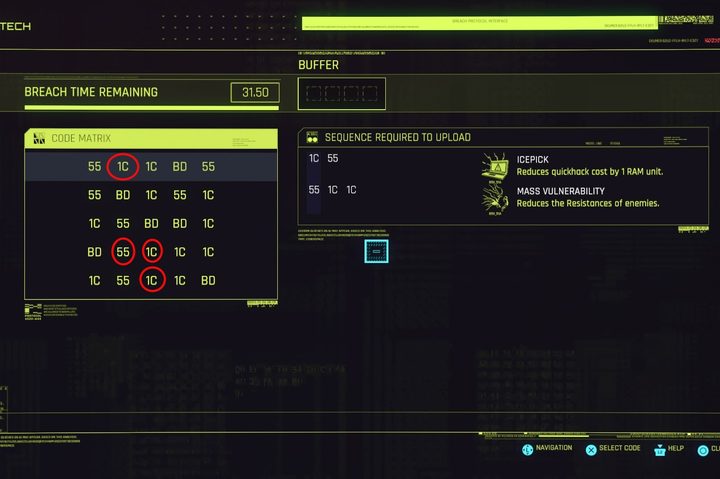
In this example, the sequence began in row 1, so the second input must be in column 2, and so on. Remember, these sequences will not always move left to right. They could very well go right to left. As previously stated, it’s best to pull back and look at the entire puzzle before making any moves.
Pick up everything
V has a massive inventory. While you are still limited by a max carry weight in Cyberpunk 2077, you won’t be finding yourself over-encumbered too often. (At least not as frequently as in games like Fallout and Elder Scrolls.) There are plenty of opportunities to sell your junk all around Night City. Once in the interface, you’ll be prompted to “sell all junk.” This is a great way to earn extra Eddies and unload all the useless stuff you’ve been picking up.
Cyberpunk is a fast-paced game, and it’s hard to differentiate between what’s junk and what’s useful sometimes. You never know when you’ll find a loose piece of cyberware on the floor next to various pieces of trash. Hopefully, your Ripperdoc sanitizes it before implanting.
Grind through Act I

Spoiler alert! Act I ends when Johnny Silverhand (Keanu Reeves) is introduced. It’s here that you will find yourself immersed in everything Night City has to offer. No longer are you tied to the prologue and are free to focus on side jobs, gigs, and events.
From here, you’ll be bombarded with phone calls and text messages, giving you all sorts of new opportunities to explore. There won’t be many elongated cut scenes and conversations to get through, either. Focusing on these side gigs is a great way to earn XP and flows into the next essential tip: Leveling up Street Cred.
Focus on Street Cred
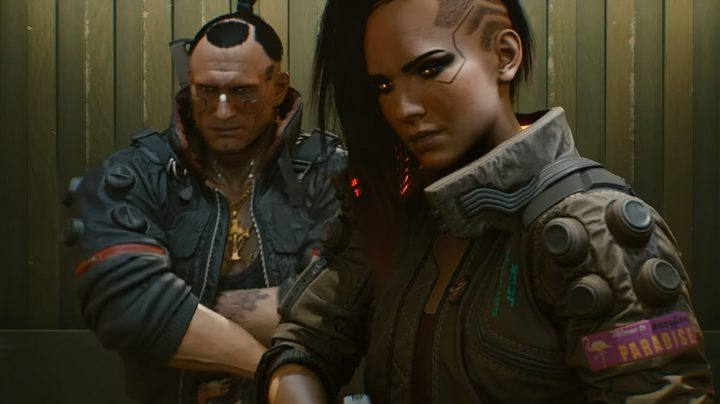
There are two different schools of leveling when it comes to Cyberpunk 2077. There’s base XP tailored toward leveling up your base stats and unlocking perks. Then there’s Street Cred, which is directly tied to the gear V can use and equip. You’ve probably noticed that certain items are unavailable because V’s Street Cred is too low. The ability to use these items is far better than the passive buffs V will get from perks.
Bioware is the most important element in Cyberpunk and is directly correlated with your Street Cred. V will unlock a handful of useful items at Street Cred level 10 (think of it as an early soft cap).
Level up Street Cred by completing side jobs, gigs, and events all around Night City. The easiest ones to do are usually tailored to the NCPD and involve clearing a small area of enemies and collecting evidence. These side objectives are always super fast and are a great way to grind both XP and Street Cred.
Find a reliable car

Nobody is questioning the sheer size of Night City. It’s massive. V will need a reliable ride to venture from objective to objective. Thankfully, you get a decent ride at the beginning of the game. Calling your car works just like calling your horse in Assassin’s Creed: Valhalla. Press Right on the D-pad (PlayStation), and it will appear close by. Unfortunately, this won’t last very long after Act I, when one of Delamain’s remote cars crashes into and totals V’s car.
It’s pretty easy to hijack civilian cars in Cyberpunk, and there’s minimal risk in doing so. Unlike Grand Theft Auto, when hijacking a car would occasionally sic the cops right on you, Cyberpunk lets you freely steal any car at virtually any time. While this makes riding around Night City easier, it’s still best to find a set of wheels you’re accustomed to.
After completing Act I, you’ll also be prompted to buy a new car from some of the Fixers (job givers) you’ve met since the beginning. However, you can always hijack a car you like and store it in one of your safe houses.
Upgrade cyberware

As mentioned above, cyberware upgrades are the most important ones you can make in Cyberpunk 2077. You can visit a Ripper-Doc at any time to install upgrades that you’ve either found through exploration, or you can purchase upgrades from the Ripper-Docs themselves. Remember, cyberware upgrades are unlocked by leveling up Street Cred.
In the beginning, players should focus on upgrading their Integumentary System and Operation System (OS). Having an upgraded OS will boost V’s hacking capabilities, imperative for survival in the game’s early stages. It will boost V’s overall RAM storage as well as quick-hack capabilities.
The Integumentary System will boost V’s overall armor when combat is necessary. You should have an easy time finding armor and healing items around the world. Upgrading your Integumatory System is a good way to ensure survivability.
One Cyberware upgrade you’ve probably heard about is the Mantis Blades. You can unlock the Mantis Blades after leveling your street Cred up to level 20. They cost just over 15,000 Eurodollars, but that should be chump change by Street Cred level 20. Remember, this is a starting out guide, but it’s always good to set goals.