AirDrop has long been the easiest way for Apple users to share files, photos, and other data between their own devices, and with friends and family. Along with other features like iMessage, AirDrop has been hailed as one of the biggest advantages of sticking within the Apple ecosystem.
But others are at least trying to catch up. After years of Apple standing alone, Google finally launched what looked to be an answer to AirDrop, in the form of Android Nearby Share. The name isn’t as catchy, but the idea is the same: You can use it to share files and photos with your own nearby devices, or those of your friends and family.
Turns out, however, Google still has some catching up to do — and there may be nothing it can do about it.
The tech and the interface
The actual tech behind Android Nearby Share is a little different from AirDrop, but the concept is the same. It uses Bluetooth, Wi-Fi, or NFC to transfer files between devices, and it determines which method is best on the fly. AirDrop, on the other hand, sticks to using Wi-Fi and Bluetooth, establishing a connection with the other device through Bluetooth, and then sharing files over a walled-off and private Wi-Fi network.
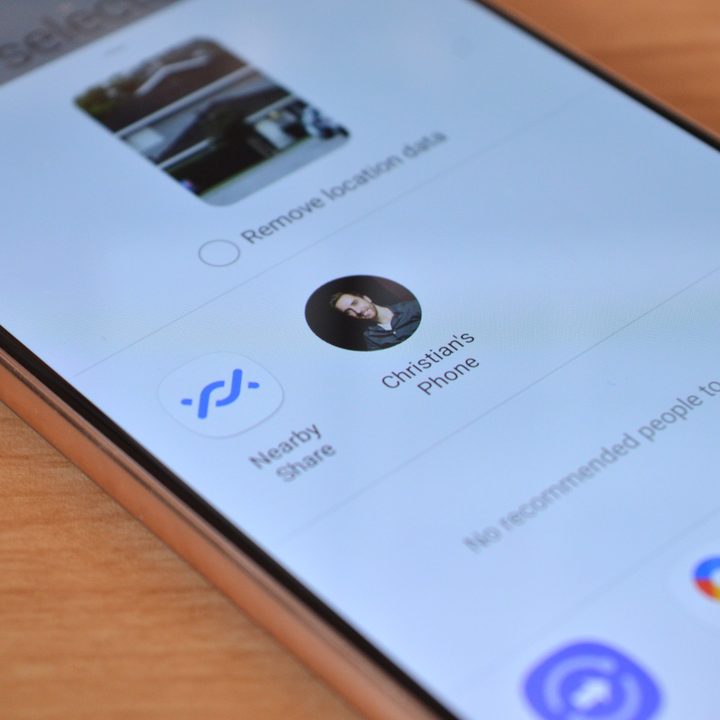
To use both systems, you need to have Wi-Fi and Bluetooth enabled, but don’t need an active data connection. Assuming all the settings are turned on, which they are by default, they both work pretty easily.
With both AirDrop and Nearby Share, once you hit the share button on a file or photo, potential targets should pop right up. Tap on their profile image, and off flies the file, hopefully without interruption. Transfer times are low, and ease-of-use is high.
It’s the ecosystem, maaaaan
But while both AirDrop and Nearby Share are similarly easy to use, and about as effective as each other for a simple phone-to-phone transfer, there’s still one way in which AirDrop is better — and it makes it much better. That’s the ecosystem.
The way I use AirDrop most is transferring files between my own devices — and for me, that includes a Mac. AirDrop is hands-down the fastest and simplest way to move piles of photos or large video files to my computer. No waiting for an internet upload and download; it’s at my computer in a few seconds.
There’s still one way in which AirDrop is better — and it makes it much better. That’s the ecosystem.
That’s just not something that Android Nearby Share can facilitate in the same way. Sure, you can send files between your Android phone and Android tablet, or to a Chromebook. But let’s be honest, there are far more people with Android phones using iPads and Windows or Mac computers — and you simply can’t use Nearby Share on them. That severely limits Nearby Share’s usability for many people.
AirDrop is at once limiting and freeing. Not only can you quickly and easily share files with all of your own Apple devices, but you can also do so to and from all of your friends’ Apple devices. Phones, tablets, laptops, and desktops. In my household, this comes in handy a lot — I can share files directly to my girlfriend’s Mac, her iPad, or her iPhone, and she can do the same to me. And it’s not just “files” — you can send boarding passes in Apple Wallet, contact details, and more, and the devices all know how to automatically handle the content types.
The catch is, of course, the “Apple devices” part. You can get seamless phone-tablet-computer transfers, but they all have to come from Apple. Still, at least this is an option.

Of course, this is a much wider issue than just file transfer tech. Unfortunately, Apple is really the only company that offers a complete device ecosystem. You could, and maybe you already do, own and use only Apple devices, but that isn’t the majority of people. Sure, you may be using a Chrome OS computer — but why would you need to transfer files from your phone to it, when it has limited local storage and few apps to process the files? The big hangup here is Windows; Microsoft has made advancements in integrating Android phones with Windows of late, but not Nearby Share.
It’s hard to imagine how Google could make a better experience with Android Nearby Share. It’s a solid feature — and actually, it’s a necessary one that should’ve been here a long time ago. It handles the basics, but without the weight of a full ecosystem of products behind it, it can’t compete. With no way to integrate with Apple devices, no Windows support, and a very small market share with Android tablets, Nearby Share’s prospects for competing with AirDrop are slim.